Climax Technology
Outdoor Siren
BX-32ZW
Siren
HW: 255 FW: 1.04
ZM5101
6.61.00
0x018E (398)
0x0002 (2)
0x000B (11)
ZC10-17015385
2017-01-09 22:43:13.515547
N/A
Enhanced 232 Slave
Listening Sleeping Slave
Yes
BX-32ZW is a battery-operated wireless outdoor siren generating a loud 107 decible siren sound and strobe lights to provide visible and audible alerts for possible intruders, emergencies, and safety incidents.
BX-32ZW is a battery-operated wireless outdoor siren generating a loud 107 decible siren sound and strobe lights to provide visible and audible alerts for possible intruders, emergencies, and safety incidents. The multi-functional outdoor bell box can work with the Control Panel to emit entry, exit delay, and low battery beeps. The BX-32ZW generates unique alarm sounds for fire and burglary to inform users of the type of danger at hand. It’s tamper-deterrent feature protects against unauthorized removal and sabotage. The BX-32ZW is compatible with other manufacturers’ Z-Wave alarm systems.
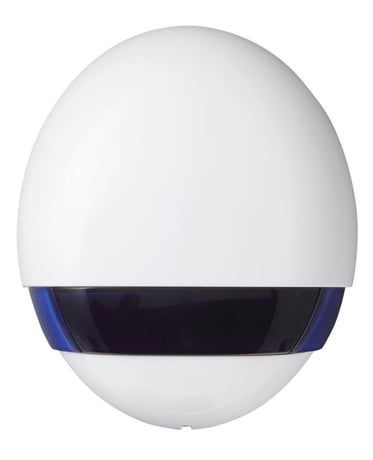
Product Picture
This product can be included and operated in any Z-Wave network with other Z-Wave certified devices from other manufactures and/or other applications. All non-battery operated nodes within the network will act as repeaters regardless of vendor to increase reliability of the network. - Insert the two 1.5V D-Cell alkaline batteries into the battery compartment connecting the correct polarity as shown on the battery compartment lid. - The Bellbox will emit a 2-tone beep. Put the Z-Wave gateway or control panel into Inclusion mode (please refer to the Z-Wave gateway or control panel manual). - Within 1.5 seconds, press the Function Button 3 times. - Refer to the operation manual of the Z-Wave Gateway or Control Panel to complete the adding process. - If the sensor has already been added (included) into another Z-Wave Gateway/Control Panel, or if the sensor is unable to be added into the current Z-Wave Gateway/Control Panel, please exclude it first (see Removing Device) before attempting to include it into the current Z-Wave Gateway/Control Panel.
The Bellbox must be removed from existing Z-Wave network before being included into another. There are two methods available to exclude a device. Exclusion Mode - Put the Z-Wave gateway or control panel into Exclusion mode (please refer to the Z-Wave gateway or control panel manual). - Within 1.5 seconds, press the Function Button 3 times and the Bellbox will be removed from the Z-Wave network.
Factory Reset (Only use factory reset when network Control Panel/Gateway is missing or inoperable). - Press and hold the Function button of the Bellbox for 10 seconds to factory reset with all LED flashes once. <NOTE> Factory resetting the Bellbox will restore it to factory default settings (excluded from the Z-Wave network). The Z-Wave gateway or control panel will still keep its Z-Wave settings. Please refer to the gateway or control panel manual on how to remove the Bellbox’s Z-Wave settings.
| Type | Value(s) |
|---|