Westinghouse
Westinghouse RTS-Z-AU
8002.0
Door Lock - Keypad
HW: 1 FW: 1.00:08.01
ZM5202
6.51.06
0x0217 (535)
0x0800 (2048)
0x0002 (2)
ZC10-17015406
2017-01-17 21:15:53.8941
N/A
Enhanced 232 Slave
Listening Sleeping Slave
Yes
Z-Wave enabled deadlatch door lock with 1000 user's fingerprint or PIN, access logging and scheduled access.
The RTS-Z-AU is perfect for security-sensitive business and government environments. Set access control rights for each individual user to each individual lock and upload these access rights in seconds. You can register users as fingerprint only, PIN-code only or both on any lock or group of locks you define. The combination of large user capacity, audit trails, built-in scheduling system and weather-proof design makes this system unequaled in value compared to other products currently available.
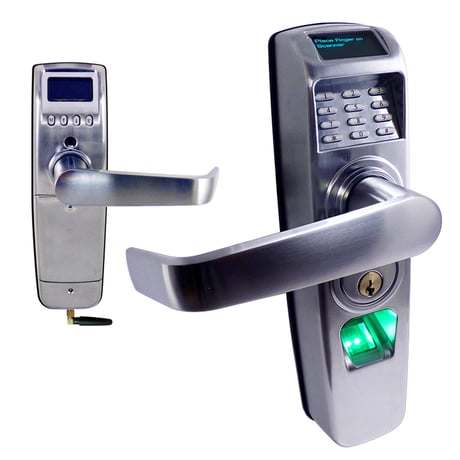
Product Picture
To include our device into a controller. 1. Perform 'Include' on the controller. 2. From the lock's main menu item ""7.Z-Wave"", select the ""Z-WaveInclusion"" option by using the arrow keys to scroll to it and then pressing 'M' to select it. After a few seconds, you should see "" Success"" on the lock.
To exclude our device into a controller. 1. Perform 'Exclude' on the controller. 2. From the lock's main menu item ""7.Z-Wave"", select the ""Z-WaveExclusion"" option by using the arrow keys to scroll to it and then pressing 'M' to select it. After a few seconds, you should see "" Success"" on the lock.
When accessing the lock simply press the # button to scan a fingerprint or enter your pincode directly then press the * button twice. To access the Main Menu press the M button on the inside unit. Any Z-Wave communication will wake the unit and then execute any command from a paired controller.
If your controller fails or is replaced or if you need to perform a Factory reset on the device so that an inclusion may be performed again or with a new controller. Factory reset can be done on the device by selecting 'Hard Reset' from the Main Menu on device's display and pressing the M button. When prompted to reset is complete the display with return to the Main Menu. Note: When a Hard Reset is completed, the Z-Wave node id is initialized to 0 and the device can't be controlled by Z-Wave. In order to control the device again, the controller needs to include the device on Z-Wave network.Please use this procedure only when the network primary controller is missing or otherwise inoperable.
• 1,000 user capacity • Multi-modal access via PIN code, fingerprint, and mechanical key • 4th generation advanced CMOS optical finger- print sensor • Easy to read OLED screens • Z-Wave Plus 5202 chipset with integrated Z-Wave controller • Mesh network extends range of other devices • Operate stand alone or integrate server side • Capture, review, and transmit audit trail history • IP56 tested ensures resistance to humidity, dust, and rain • Rugged Zamak 5 cast enclosure with Satin Chrome finish • MS1 is an optional management software tool that allows you to administer an unlimited number of locks • FCC, CE, UL, ANSI, RoHS Certifications • ISO 9001 Compliant • ISO/TS 16949 - ISO 14001 • 83% Made in America • 2 year warranty from date of purchase
| Type | Value(s) |
|---|