Coolcam
Siren Alarm
NAS-AB01Z
Siren
HW: 48 FW: 2.90
ZM5202
6.51.09
0x0258 (600)
0x0003 (3)
0x1088 (4232)
ZC10-17025443
2017-02-24 04:02:41.217601
N/A
Routing Slave
Listening Sleeping Slave
Yes
Siren Alarm is a battery-operated Siren that can add audible notifications to any Z-Wave Home Automation system. It can be mounted or placed on any wall or surface, making it easy to incorporate into any system.
Loud alarm sound (up to 105dB) with flashing LED's when triggered.Mounts anywhere- it's wireless and 100% battery powered with 1-year battery life (2 CR123A Batteries Included). 1.Make sounds and lighting when alarm is triggered 2.Compatible with 300 series and 500 series. 3.Range:Up to 50m outdoor :Up to 30m indoor 4.Standby current :87uA 5. Continuous work :1400 times
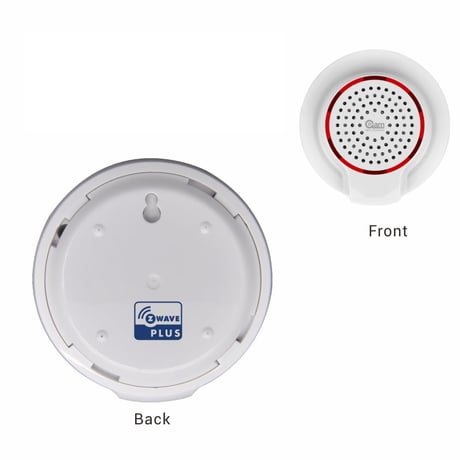
Product Picture


1 - Configure Alarm Music Volume
This parameter defines the output volume when siren plays door bell music. Door Bell music volume is divided into 3 stages, Low (Parameter is set to ‘1’), Middle (Parameter is set to ‘2’), High (Parameter is set to ‘3’). Default value is ‘3’.Size: 1 byte
Default: 3
Minimum: 0
Maximum: 0
Possible values
| From | To | Desription |
|---|---|---|
| 1 | 3 | unsigned |
2 - Configure Alarm Music Duration Time
This Parameter defines the alarm music duration time when siren receive an alarm sensor notification report or an alarm command from controller. The duration time is divided into 5 stages: Siren is not on (Parameter is set to ‘0’), 30 second (Parameter is set to ‘1’), 1 minute (Parameter is set to ‘2’), 5 minute (Parameter is set to ‘3’) and Siren is always on until battery is dead (Parameter is set to ‘0xFF’). Default value is ‘2’. The value for this parameter is unsigned value. Values above 127 may need to be entered as hexadecimal values or signed negative values; please consult the owner's manual of your controller for entering unsigned values.Size: 1 byte
Default: 2
Minimum: 0
Maximum: 0
Possible values
| From | To | Desription |
|---|---|---|
| 255 | 0 | unsigned |
| 0 | 3 | unsigned |
3 - Configuring Door Bell Music Duration Time
This parameter defines the door bell music duration time when siren receives a door/window sensor notification report or an alarm command (BASIC_SET = 0x02) from controller. The door bell music will be played always if this parameter is set to ‘0xFF’. The door bell music will not be played if this parameter is set to ‘0’. Other values are the door bell music playing duration time. Unit: Time. The value for this parameter is unsigned value. Values above 127 may need to be entered as hexadecimal values or signed negative values; please consult the owner's manual of your controller for entering unsigned values.Size: 1 byte
Default: 1
Minimum: 0
Maximum: 0
Possible values
| From | To | Desription |
|---|---|---|
| 0 | 255 | unsigned |
4 - Configure Door Bell Music Volume
This parameter defines the output volume when siren plays alarm music. Door Bell music volume is divided into 3 stages, Low (Parameter is set to ‘1’), Middle (Parameter is set to ‘2’), High(Parameter is set to ‘3’). Default value is ‘1’.Size: 1 byte
Default: 1
Minimum: 0
Maximum: 0
Possible values
| From | To | Desription |
|---|---|---|
| 1 | 3 | unsigned |
5 - Configure Alarm Music Index
This parameter defines the alarm music index for siren play different music when alarm occurs. There are 10 different music for user selection.Size: 1 byte
Default: 10
Minimum: 0
Maximum: 0
Possible values
| From | To | Desription |
|---|---|---|
| 1 | 10 | unsigned |
6 - Configure Door Bell Music Index
This parameter defines the door bell music index for siren play different music when alarm occurs. There are 10 different music for user selection.Size: 1 byte
Default: 9
Minimum: 0
Maximum: 0
Possible values
| From | To | Desription |
|---|---|---|
| 1 | 10 | unsigned |
7 - Configure Default Siren On Mode
This parameter defines the default music index, volume and the duration time forsiren on. This parameter can be selected between ALARM MUSIC and DOOR BELL MUSIC. The settings for ALARM MUSIC MODE defines by Param #1, #2 and #5. The settings for DOOR BELL MUSIC MODE defines by Param #3, #4 and #6. If parameter is set to ‘1’, siren will select ALARM MUSIC MODE to play music; If parameter is set to ‘2’, siren will select DOOR BELL MUSIC MODE to play music;Size: 1 byte
Default: 1
Minimum: 0
Maximum: 0
Possible values
| From | To | Desription |
|---|---|---|
| 1 | 2 | unsigned |
8 - Configure Alarm Led Enable
This parameter defines the default led enable status when siren is on for ALARM MUSIC MODE. If parameter is set to ‘0’, led will be disable. If parameter is set t0 ‘1’, led will be enable. When siren is on, the led will blink.Size: 1 byte
Default: 1
Minimum: 0
Maximum: 0
Possible values
| From | To | Desription |
|---|---|---|
| 0 | 1 | unsigned |
9 - Configure Door Bell Led Enable
This parameter defines the default led enable status when siren is on for DOOR BELL MUSIC MODE. If parameter is set to ‘0’, led will be disable. If parameter is set t0 ‘1’, led will be enable. When siren is on, the led will blink.Size: 1 byte
Default: 0
Minimum: 0
Maximum: 0
Possible values
| From | To | Desription |
|---|---|---|
| 0 | 1 | unsigned |
In the front casing, there is button that is used to carry out include, exclude or reset factory default settings on PCB Board. When power is first supplied, the LED will flash on and off alternately at one second intervals within 5 seconds if the detector has not been added a Z‐Wave network. Please get familiar with the terms below before starting the operations. This product can be included and operated in any Z‐Wave network with other Z‐Wave certified devices from other manufacturers and/or other applications. All non‐battery operated nodes within the network will act as repeaters regardless of vendor to increase reliability of the network.
1. Remove the siren cover. 2. Make sure the siren is powered. 3. Set Z‐Wave controller or Z‐Wave gateway into inclusion mode (Refer to the controller or gateway operating manual) 4. Press the button three times within 1.5 second, the device will enter inclusion mode. And the LED will flash on and off alternately five times. Note: If siren has not been added to Z‐wave network, the siren will enter inclusion mode automatically when it is powered on. You should let the controller enter into inclusion first before power on the siren in order to run this function.
You can press the button once to wake up the device and send wakeup notification to controller. If press successfully, the LED will blink one time
Reset procedure will delete all information on the Z‐Wave network and Z‐Wave controller or Z‐Wave Gateway, and restore the siren to factory default settings. 1. Remove the device cover. 2. Make sure the siren is powered. 3. Press and hold the button for 10 seconds, led will blink once. 4. Release the button. Note: to use the reset procedure only when the primary controller is missing or inoperable.
| Type | Value(s) |
|---|