Zooz
Zooz Z-Wave Plus Smart Chime
ZSE33
Siren
HW: 48 FW: 2.65
ZM5202
6.51.08
0x027A (634)
0x0003 (3)
0x0088 (136)
ZC10-17015394
2017-01-19 05:40:23.510878
N/A
Routing Slave
Listening Sleeping Slave
Yes
Use the Zooz Z-Wave Plus Smart Chime to receive discreet sound notifications if a door was opened when you're home or have it trigger a siren alarm when your hub is in away mode.
Product features: - Audio and visual notifications triggered by other Z-Wave devices or scheduled in your routine - Choose from 10 different sounds for chime and siren modes - Advanced configuration available - Powerful long-lasting batteries - Z-Wave Plus with improved 500 chip for faster and safer wireless communication - Small size and quick installation Specifications: Model Number: ZSE33 Z-Wave Signal Frequency: 908.42 MHz Power: 2 CR123 batteries (included) Power Consumption: 2W Operating Temperature: 32 – 104 F Range: Up to 100 feet line of sight Installation and Use: Indoor only Dimensions: 2.7” x 1.2” Weight: 3 oz
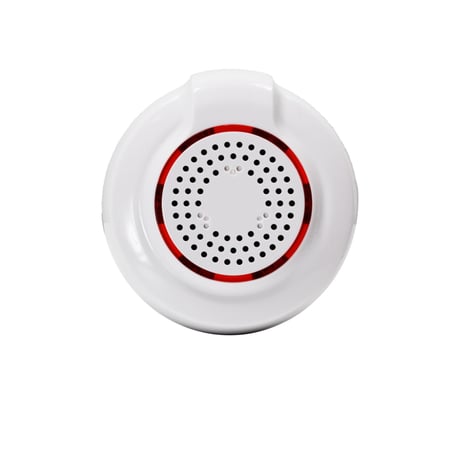
Product Picture


1 - Siren Volume
Choose from 3 volume levels for the alarm siren sound. Set volume to low, medium, or high.Size: 1 byte
Default: 3
Minimum: 0
Maximum: 0
Possible values
| From | To | Desription |
|---|---|---|
| 1 | 3 | Low (1), medium (2), high (3) |
2 - Siren Alarm Duration
Choose from 5 modes to set the duration for siren alarm: 0 – alarm is off 1 – alarm goes off for 30 seconds 2 – alarm goes off for 60 seconds 3 – alarm goes off for 5 minutes 255 – alarm continues until battery drainsSize: 1 byte
Default: 1
Minimum: 0
Maximum: 0
Possible values
| From | To | Desription |
|---|---|---|
| 0 | 0 | alarm is off |
| 1 | 1 | alarm goes off for 30 seconds |
| 2 | 2 | alarm goes off for 60 seconds |
| 3 | 3 | alarm goes off for 5 minutes |
| 255 | 255 | alarm continues until battery drains |
3 - Chime Sound Duration
Choose how many times the chime should repeat the doorbell sound once triggered by a BASIC_SET alarm command from a door sensor. Values: 0 – chime is off, 1 – 254 (cycles); 255 – chime sound continues until battery drains; 2 – default setting.Size: 1 byte
Default: 2
Minimum: 0
Maximum: 0
Possible values
| From | To | Desription |
|---|---|---|
| 0 | 0 | Chime is off |
| 1 | 254 | Number of cycles |
| 255 | 255 | chime sound continues until battery drains |
4 - Chime Volume
Choose from 3 volume levels for the doorbell sound. Set volume to low, medium, or high.Size: 1 byte
Default: 3
Minimum: 0
Maximum: 0
Possible values
| From | To | Desription |
|---|---|---|
| 1 | 3 | Low (1), medium (2), high (3) |
5 - Siren Alarm Tone
Choose one of the 10 different tones for alarm siren.Size: 1 byte
Default: 10
Minimum: 0
Maximum: 0
Possible values
| From | To | Desription |
|---|---|---|
| 1 | 10 | Alarm tones from library |
6 - Chime Tone
Choose one of the 10 different tones for doorbell.Size: 1 byte
Default: 4
Minimum: 0
Maximum: 0
Possible values
| From | To | Desription |
|---|---|---|
| 1 | 10 | Chime tones from library |
7 - Siren Alarm or Chime Mode
Switch between Siren Alarm (configured by parameters 1, 2, 5, 8) and Chime / Doorbell (parameters 3, 4, 6, 9) modes. Values: 1 – Siren Alarm enabled; 2 – Chime enabled (default).Size: 1 byte
Default: 2
Minimum: 0
Maximum: 0
Possible values
| From | To | Desription |
|---|---|---|
| 1 | 1 | Siren Alarm enabled |
| 2 | 2 | Chime enabled |
8 - LED Notifications for Siren Alarm
Enable or disable visual alarm for Siren mode. The LED will blink when triggered. Values: 0 – LED disabled; 1 – LED enabled (default).Size: 1 byte
Default: 1
Minimum: 0
Maximum: 0
Possible values
| From | To | Desription |
|---|---|---|
| 0 | 0 | LED disabled |
| 1 | 1 | LED enabled |
9 - LED Notifications for Chime
Enable or disable visual alarm for Chime mode. The LED will blink when triggered. Values: 0 – LED disabled (default); 1 – LED enabled.Size: 1 byte
Default: 0
Minimum: 0
Maximum: 0
Possible values
| From | To | Desription |
|---|---|---|
| 0 | 0 | LED disabled |
| 1 | 1 | LED enabled |
Auto Inclusion: 1. Put your Z-Wave controller in inclusion mode 2. Carefully remove the cover from the device 3. Remove the plastic pull-tab from the battery slot – the Chime will automatically enter inclusion mode for 20 seconds 4. A new alarm siren / doorbell device will appear on your controller's device list Manual Inclusion: 1. Bring the Smart Chime within direct range of your controller 2. Carefully remove the cover from the device 3. Remove the plastic pull-tab from the battery slot. The LED indicator will blink slowly 4. Put your Z-Wave controller in inclusion mode 5. Press and release the Z-Wave button on the Smart Chime 3 TIMES quickly. The LED indicator will flash quickly 6. A new alarm siren / doorbell device will appear on your controller's device list (if it connects as an on/off switch, you may need to change the device type manually. Contact us for instructions).
1. Make sure the Smart Chime is powered on and located within direct range of your Z-Wave gateway controller 2. Put your Z-Wave controller in exclusion mode 3. Press and release the Z-Wave button 3 TIMES quickly. The LED indicator will flash quickly 4. The Smart Chime should disappear from your controller's device list If the first attempt is unsuccessful, please repeat the process following all steps carefully.
Press and release the Z-Wave button three times.
When your network’s primary controller is missing or otherwise inoperable, you may need to reset the device to factory settings manually. To complete the process, make sure the Smart Chime is powered on, then PRESS AND HOLD the Z-Wave button for AT LEAST 10 SECONDS until the LED indicator flashes ONCE. Release the button. NOTE: All previously recorded activity and custom settings will be erased from the device’s memory.
| Type | Value(s) |
|---|