Qolsys Inc.
IQPanel2
QS9201-1230-840
Central Controller
1.4.18.2.0
ZM5202
6.51.07
0x012A (298)
0x0001 (1)
0x0002 (2)
ZC10-17065640
2017-06-08 04:07:40.810639
N/A
Static Controller
Central Static Controller
The IQ Panel 2 is a 7” HD touchscreen designed for residential security, life safety and smart home control. It includes a built-in 5MP camera and multiple wireless radios including LTE, Wi-Fi ac, Z-Wave Plus, BLE and S-Line encrypted 319.5 radio.
The IQ Panel 2 is a 7” HD Touchscreen with built-in 5MP panel camera used for residential and small business security, life safety, and smarthome applications. Behind the ultra-thin bezel with intuitive swipe based user interface lie multiple wireless radios including LTE and WiFi dual-path connectivity, Bluetooth for touchless disarming, S-Line encrypted 319.5 for secure security and life safety communication and Z-Wave Plus for the fastest, most reliable smarthome automation experience possible. At only 7.5” wide by 5” tall and 1” deep the IQ Panel looks amazing on the wall and also includes a table stand for mounting on counters, tables or other surfaces. The IQ Panel leverages the powerful Alarm.com interactive service platform including the AirFX remote tool kit which provides full access to every setting and system function from the cloud, allowing you to retire the truck, reduce service requests, and improve the overall customer experience. Learn more at Qolsys.com.
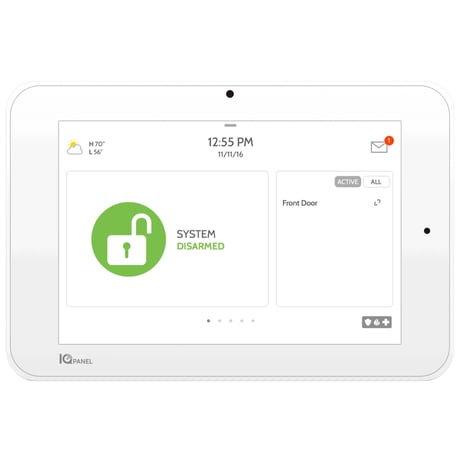
Product Picture
Swipe down to access “Settings” < Touch “Advanced Settings” < Enter code < Touch “Installation” < Touch “Devices” < Touch “Z-Wave Devices” < Touch “Add Device” < Touch “Pair” < Press pair or learn button on device < Adjust device name as needed < Select “Automation” < Click “Add” to save
Swipe down to access “Settings” < Touch “Advanced Settings” < Enter code < Touch “Installation” < Touch “Devices” < Touch “Z-Wave Devices” < Touch “Delete failed device from panel” < Check boxes next to devices you want to delete < Touch “Delete”
Swipe down to access “Settings” < Touch “Advanced Settings” < Enter code < Touch “Installation” < Touch “Devices” < Touch “Z-Wave Devices” < Touch “Add/Remove Controller” Please use this procedure only when the network primary controller is missing or otherwise inoperable.
Swipe down to access “Settings” < Touch “Advanced Settings” < Enter code < Touch “Installation” < Touch “Devices” < Touch “Z-Wave Devices” < Touch “Remove All Devices”
7” HD Touchscreen 5MP Panel Camera sends disarm photos to your phone Bluetooth Touchless Disarming S-Line encrypted sensor technology with support for up to 128 security and life safety devices LTE and Wi-Fi Dual Path Connectivity Built-in Glassbreak Built-in Router creates secure private network for IP devices Z-Wave Plus Radio with support for up to 128 Z-Wave devices Software updates over the air
| Type | Value(s) |
|---|