Aeotec
Smart Dimmer 6
ZW099-A02
Light Dimmer Switch
HW: 99 FW: 1.11
ZM5101
6.51.09
0x0086 (134)
0x0103 (259)
0x0063 (99)
ZC10-17035455
2017-03-01 19:00:07.185634
N/A
Enhanced 232 Slave
Always On Slave
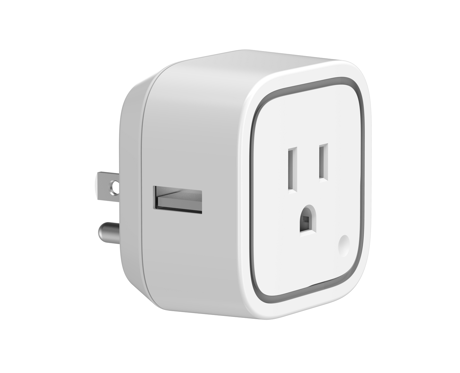
Smart Dimmer 6 is a plug-in on/off/dim switch module that also provides energy metering.
Aeotec Smart Dimmer 6 is a low-cost Z-Wave Dimmer plug-in module specifically used to enable Z-Wave command and control (on/off/dim) of any plug-in tool. It can report immediate wattage consumption or kWh energy usage over a period of time. In the event of power failure, non-volatile memory retains all programmed information relating to the unit’s operating status. Its surface has a Smart RGB LED, which can be used for indicating the output load status or strength of the wireless signal. You can configure its indication colour according to your favour. The Smart Dimmer 6 is also a security Z-Wave device and supports Over The Air (OTA) feature for the products firmware upgrade.


2 - Make Dimmer blink
This parameter is used to set the Smart Dimmer to start the blinking state.Size: 2 bytes
Default: 3850
Minimum: 0
Maximum: 0
Possible values
| From | To | Desription |
|---|---|---|
| 1 | 255 | Specify the cycle of On/Off. |
| 256 | 32512 | Specify the time of Dimmer blinking. |
3 - Current overload protection
When this parameter is enabled, the output Load will be turned off automatically when the Current overrun 2.6A and the time more than 2 minutes.Size: 1 byte
Default: 0
Minimum: 0
Maximum: 0
Possible values
| From | To | Desription |
|---|---|---|
| 0 | 0 | Disable |
| 1 | 1 | Enable |
20 - Configure the output load status after re-power on
Configure the output load status after re-power on.Size: 1 byte
Default: 0
Minimum: 0
Maximum: 0
Possible values
| From | To | Desription |
|---|---|---|
| 0 | 0 | Last status. |
| 1 | 1 | Always On |
| 2 | 2 | Always Off |
33 - Set the RGB LED color value for factory testing.
Set the RGB LED color value for factory testing. Note: this is a Set-only parameter.Size: 4 bytes
Default: 0
Minimum: 0
Maximum: 0
Possible values
| From | To | Desription |
|---|---|---|
| 1 | 255 | Blue color value |
| 256 | 65280 | Green color value |
| 65536 | 16711680 | Red color value |
80 - To set which notification report can be sent to associated Nodes in association Group 1
To set which notification report can be sent to associated Nodes in association Group 1 when the state of Smart Dimmer’s load is changedSize: 1 byte
Default: 0
Minimum: 0
Maximum: 0
Possible values
| From | To | Desription |
|---|---|---|
| 0 | 0 | Send Nothing |
| 1 | 1 | Send Hail CC |
| 2 | 2 | Send Basic Report CC |
| 3 | 3 | Send Hail CC when using Action Button to change the output load state. |
81 - Configure the state of LED
Configure the state of LED when it is in Energy mode, Momentary indicate mode or N ight light mode.Size: 1 byte
Default: 0
Minimum: 0
Maximum: 0
Possible values
| From | To | Desription |
|---|---|---|
| 0 | 0 | Energy mode, the LED will follow the status (on/off) of its load |
| 1 | 1 | Momentary indicate mode, when the state of Dimmer’s load changed, The LED will follow the status (on/off) of its load, but the LED will turn off after 5 seconds if there is no any switch action. |
| 2 | 2 | Night light mode. |
83 - Configure the RGB value when it is in Night light mode.
Configure the RGB value when it is in Night light mode.Size: 4 bytes
Default: 1774619
Minimum: 0
Maximum: 0
Possible values
| From | To | Desription |
|---|---|---|
| 1 | 255 | Blue color value |
| 256 | 65280 | Green color value |
| 65536 | 16711680 | Red color value |
84 - Configure the brightness level of RGB LED (0%-100%) when it is in Energy Mode/momentary indicate mode.
Configure the brightness level of RGB LED (0%-99%) when it is in Energy Mode/momentary indicate mode.Size: 4 bytes
Default: 3289650
Minimum: 0
Maximum: 0
Possible values
| From | To | Desription |
|---|---|---|
| 0 | 99 | The brightness level of Green color |
| 256 | 355 | The brightness level of Yellow color |
| 65536 | 65635 | The brightness level of Red color |
90 - Enable or disable the parameter 91 and 92
Enable or disable the parameter 91 and 92.Size: 1 byte
Default: 0
Minimum: 0
Maximum: 0
Possible values
| From | To | Desription |
|---|---|---|
| 0 | 0 | Disable |
| 1 | 1 | Enable |
91 - Minimum change in wattage (in terms of wattage) to induce a Meter Report
The value here represents minimum change in wattage (in terms of wattage) to induce a Meter Report.Size: 2 bytes
Default: 25
Minimum: 0
Maximum: 0
Possible values
| From | To | Desription |
|---|---|---|
| 0 | 60000 | The available range is 0 to 60000 |
92 - Minimum change in wattage percent (in terms of percentage) to induce a Meter Report
The value here represents minimum change in wattage percent (in terms of percentage) to induce a Meter Report.Size: 1 byte
Default: 0
Minimum: 0
Maximum: 0
Possible values
| From | To | Desription |
|---|---|---|
| 0 | 100 | The available range is 0 to 100% |
100 - Set 101-103 to default.
Set 101-103 to default value.Size: 1 byte
Default: 0
Minimum: 0
Maximum: 0
Possible values
| From | To | Desription |
|---|---|---|
| 1 | 1 | Set 101-103 to default value. |
101 - To set which report needs to be sent in Report group 1
To set which report needs to be sent in Report group 1Size: 4 bytes
Default: 0
Minimum: 0
Maximum: 0
Possible values
| From | To | Desription |
|---|---|---|
| 1 | 1 | Send Meter Report for Voltage |
| 2 | 2 | Send Meter Report for Current |
| 4 | 4 | Send Meter Report for Watt |
| 8 | 8 | Send Meter Report for kWh |
102 - To set which report needs to be sent in Report group 2
To set which report needs to be sent in Report group 2Size: 4 bytes
Default: 0
Minimum: 0
Maximum: 0
Possible values
| From | To | Desription |
|---|---|---|
| 1 | 1 | Send Meter Report for Voltage |
| 2 | 2 | Send Meter Report for Current |
| 4 | 4 | Send Meter Report for Watt |
| 8 | 8 | Send Meter Report for kWh |
103 - To set which report needs to be sent in Report group 3
To set which report needs to be sent in Report group 3Size: 4 bytes
Default: 0
Minimum: 0
Maximum: 0
Possible values
| From | To | Desription |
|---|---|---|
| 1 | 1 | Send Meter Report for Voltage |
| 2 | 2 | Send Meter Report for Current |
| 4 | 4 | Send Meter Report for Watt |
| 8 | 8 | Send Meter Report for kWh |
110 - Set 111-113 to default.
Set 111-113 to default.Size: 1 byte
Default: 0
Minimum: 0
Maximum: 0
Possible values
| From | To | Desription |
|---|---|---|
| 1 | 1 | Set 111-113 to default. |
111 - The time interval of sending Report group 1
The time interval of sending Report group 1Size: 4 bytes
Default: 3
Minimum: 0
Maximum: 0
Possible values
| From | To | Desription |
|---|---|---|
| 1 | 2147483647 | the available range is 1 to 2147483647 seconds |
112 - The time interval of sending Report group 2
The time interval of sending Report group 2Size: 4 bytes
Default: 600
Minimum: 0
Maximum: 0
Possible values
| From | To | Desription |
|---|---|---|
| 1 | 2147483647 | the available range is 1 to 2147483647 seconds |
113 - The time interval of sending Report group 3
The time interval of sending Report group 3Size: 4 bytes
Default: 600
Minimum: 0
Maximum: 0
Possible values
| From | To | Desription |
|---|---|---|
| 1 | 2147483647 | the available range is 1 to 2147483647 seconds |
200 - Partner ID
Set the Partner IDSize: 1 byte
Default: 0
Minimum: 0
Maximum: 0
Possible values
| From | To | Desription |
|---|---|---|
| 0 | 0 | Aeon Labs Standard Product |
| 1 | 255 | Others |
252 - Enable/disable the Configuration parameters to be Locked.
Enable/disable the Configuration parameters to be Locked.Size: 1 byte
Default: 0
Minimum: 0
Maximum: 0
Possible values
| From | To | Desription |
|---|---|---|
| 0 | 0 | Disable |
| 1 | 1 | Enable |
254 - Device Tag
Set the Device tag for Smart Dimmer 6Size: 2 bytes
Default: 0
Minimum: 0
Maximum: 0
Possible values
| From | To | Desription |
|---|---|---|
| 1 | 32767 | The available range is 1 to 32767. |
255 - Reset the Smart Dimmer 6
Reset the Smart Dimmer 6Size: 4 bytes
Default: 0
Minimum: 0
Maximum: 0
Possible values
| From | To | Desription |
|---|---|---|
| 0 | 0 | Reset all configuration parameters to factory default setting |
| 1431655765 | 1431655765 | Reset Smart Dimmer 6 to factory default setting and exclude from the network |
Turn the primary controller of Z-Wave network into inclusion mode, short press the product’s Action button that you can find on the product's housing.
Turn the primary controller of Z-Wave network into exclusion mode, short press the product’s Action button that you can find on the product's housing.
Press and hold the Action button that you can find on the product's housing for 20 seconds and then release. This procedure should only be used when the primary controller is inoperable.
1, Support ""Over the Air Firmware Updating"" and “Z-Wave Security”. 2, Its surface has a Smart RGB LED, which can be used for indicating the output load status.
| Type | Value(s) |
|---|
| Meter type |
|---|
| Electric Meter Consumption |