Anchor
Door Contact
ZD2102EU-5
Notification Sensor
HW: 2 FW: 5.01:10.02
ZM5202
6.51.06
0x032B (811)
0x2001 (8193)
0x0106 (262)
ZC10-17035514
2017-03-28 21:52:55.029171
N/A
Enhanced 232 Slave
Reporting Sleeping Slave
Yes
Battery powered door and window sensor with magnetic reed switch and external switch contacts for adding additional sensor contacts.
The ZD2102-5 Door and Window sensor is used in any Z-Wave network to detect the opening or closing of a door or window. Special Design can fit most of door/window frame. The primary sensing element is a magnetic reed switch, the ZD2102-5 is supplied with the sensor, sensor mounting bracket and the trigger magnet. An additional set of sensor inputs are provided through a 2 position screw terminal and can be used to expand the sensor capability to multiple inputs. The ZD2102-5 is powered by a single CR123A Lithium Battery (supplied with unit, battery life is more than 5 years) and is intended for indoor use only. The ZD2102-5 features tamper proof switch, low battery warning and can be firmware updated over the air.
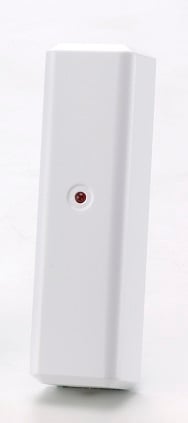
Product Picture


1 - Configuration - External Switch
Enable - 0xFF Disable - 0x00Size: 1 byte
Default: 0
Minimum: 0
Maximum: 0
Possible values
| From | To | Desription |
|---|---|---|
| 0 | 255 | 0xFF |
For “Inclusion” (adding to) a network: Put the Z-Wave™ network controller into “inclusion” mode following its instructions. To add the ZD2102-5 to your controller press the program switch of ZD2102-5 to send the Node Information Frame (NIF). After sending NIF, the network controller will send the auto inclusion request; otherwise, ZD2102-5 will go to sleep after 15 seconds.
For “Exclusion” (removing from) a network: Put the Z-Wave™ network controller into “exclusion” mode, following its instructions. To delete the ZD2102-5 from your controller press the program switch of ZD2102-5 for at least 1 second to be excluded. Note: All user and network settings will be cleared and the device reset to factory setting defaults when the device is excluded.
The ZD2102-5 is forced awake by opening the rear cover, the red LED will stay on and the 2102-5 will stay awake for 10 seconds. The ZD2102-5 will send “Wake Up Notification”. If ZD2102-5 receives a “Wake Up No More Information” command then the red LED will go off and it will go to sleep. Auto Wake Up: The wakeup interval is user settable from 10 minutes to 1 week using COMMAND_CLASS_WAKE_UP, Interval increment is 3 minutes.
Factory Default Reset: Trigger the rear cover switch to send the Alarm Report and trigger the reed switch (close & open) 5 times in 10 seconds, ZD2102-5 will send the “Device Reset Locally Notification” command and reset to the factory default condition. Please use this procedure only when the network primary controller is missing or otherwise inoperable.
PowerLevel Control, Battery Votlage Detection(Auto report low battery),OTA function
| Type | Value(s) |
|---|
| Group | Type |
|---|---|
| Appliance | (Refer to parameters): State idle |