Climax Technology
Clamp Meter
CLMT-1ZW
Whole Home Meter - Simple
HW: 255 FW: 1.29
ZM5202
6.61.00
0x018E (398)
0x0004 (4)
0x001D (29)
ZC10-17035457
2017-03-06 16:24:12.312787
N/A
Enhanced 232 Slave
Always On Slave
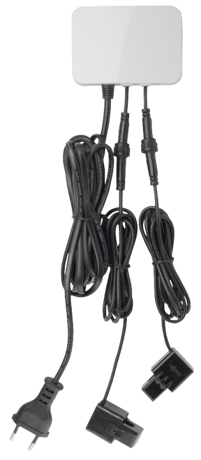
CL Meter is an energy metering device designed to measure, monitor, and report the energy consumption of an entire household or apartment building directly from the electric box or breaker panel, for users to look for energy-saving opportunities or provide tenant-specific billing.
CL Meter is an energy metering device designed to measure, monitor, and report the energy consumption of an entire household or apartment building directly from the electric box or breaker panel, for users to look for energy-saving opportunities or provide tenant-specific billing. Installed directly in the home’s main circuit box, with the clamps attached to it, the CLMT-1ZW will monitor the total amount of electricity the entire home uses with accuracy and speed. With the CL Meter, users can easily track their power usage, allowing them to make the most out of reducing energy consumption and achieving greater energy efficiency.
This product can be included and operated in any Z-Wave network with other Z-Wave certified devices from other manufactures and/or other applications. All non-battery operated nodes within the network will act as repeaters regardless of vendor to increase reliability of the network. -Plug in the AC Input cable into the socket to power on the Clamp Meter. -Put the Control Panel into Inclusion mode (please refer to the Z- Wave control panel manual). -Within 1.5 seconds, press the Function Button 3 times. -Refer to the operation manual of Z-Wave Gateway or Control Panel to complete the adding process. -If the device has already been added (included) into another Z-Wave Gateway/Control Panel, or if the device is unable to be added into the current Z-Wave Gateway/Control Panel, try removing it first (see Removing Device).
The device must be removed from existing Z-Wave network before being added into another. Exclusion Mode -Put the Z-Wave Gateway or Control Panel into Exclusion mode (please refer to the Z-Wave or control panel manual). -Within 1.5 seconds, press the Function Button 3 times and the device will be removed from the Z-Wave network.
Factory resetting the device will restore it to factory default settings (i.e. not included into any Z-Wave network). Please only use this procedure if the Z-Wave Gateway or Control Panel is lost or otherwise inoperable. -Press and hold the Function Button of the device for 10 seconds to factory reset.
| Type | Value(s) |
|---|
| Meter type |
|---|
| Electric Meter Consumption |