Aeotec
Garage Door Controller Gen5
ZW062-A
Barrier Operator
HW: 62 FW: 11.11
ZM5101
6.51.06
0x012A (298)
0x0103 (259)
0x003E (62)
ZC10-17085731
2017-08-11 21:56:17.951883
N/A
Enhanced 232 Slave
Always On Slave
Aeon Labs Garage Door Controller is a smart and wireless Garage Door Control system, you can control the garage door to open, close, or stop moving via wireless signal on your gateway client or phone application.
Aeon Labs Garage Door Controller is a smart and wireless Garage Door Control system, you can control the garage door to open, close, or stop moving via wireless signal on your gateway client or phone application. The Garage Door Controller allows you to configure different alarm sounds to indicate the door’s action. Each action alarm sound can be customized. To change or update new alarm sounds for the Garage Door Controller, connect the Garage Door Controller to your PC host with a USB cable and download your sound files to the flash memory (128 MB) of the Garage Door Controller. It can be included and operated in any Z-Wave network with other Z-Wave certified devices from other manufacturers and/or other applications. All non-battery operated nodes within the network will act as repeaters regardless of vendor to increase reliability of the network. It is also a security Z-Wave device and supports the Over The Air (OTA) feature for the product’s firmware upgrade.
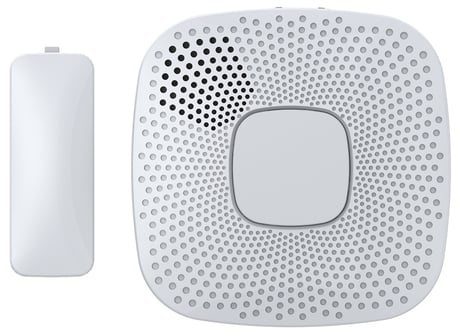
Product Picture


32 - Configure the default startup ringtone.
Configure the default startup ringtone.Size: 1 byte
Default: 1
Minimum: 0
Maximum: 0
Possible values
| From | To | Desription |
|---|---|---|
| 0 | 0 | disable the startup ringtone. |
| 1 | 127 | enable and select a startup ringtone for the Garage Door Controller. |
34 - Sensor Calibration.
Sensor Calibration.Size: 1 byte
Default: 0
Minimum: 0
Maximum: 0
Possible values
| From | To | Desription |
|---|---|---|
| 1 | 1 | Garage Door Controller enters calibration mode |
35 - Set the timeout of all calibration steps for the Sensor.
Set the timeout of all calibration steps for the Sensor.Size: 1 byte
Default: 60
Minimum: 0
Maximum: 0
Possible values
| From | To | Desription |
|---|---|---|
| 1 | 127 | The time unit is second and time range is 1 to 127 seconds |
36 - Get the numbers of alarm music.
Get the numbers of alarm music. Note: this parameter is a get- only parameter.Size: 1 byte
Default: 0
Minimum: 0
Maximum: 0
Possible values
| From | To | Desription |
|---|---|---|
| 1 | 1 | Get the numbers of alarm music |
37 - Configure the alarm mode when the garage door is opening.
Configure the alarm mode when the garage door is opening.Size: 4 bytes
Default: 133121
Minimum: 0
Maximum: 0
Possible values
| From | To | Desription |
|---|---|---|
| 0 | 0 | disable the alarm prompt. |
| 1 | 1 | enable the alarm prompt. |
| 256 | 266 | configure the volume of alarm sound (there are 10 levels, the min volume is 1 level and the max volume is 10 levels |
| 65536 | 65636 | configure the alarm sound |
| 16777216 | 16777226 | configure the frequency of blinking for the Alarm LED, there are 10 levels that 1 to10 level, the minimum frequency is level 1 and the max frequency is level 10. |
38 - Configure the alarm mode when the garage door is closing
Configure the alarm mode when the garage door is closingSize: 4 bytes
Default: 134416385
Minimum: 0
Maximum: 0
Possible values
| From | To | Desription |
|---|---|---|
| 0 | 0 | disable the alarm prompt. |
| 1 | 1 | enable the alarm prompt. |
| 256 | 266 | configure the volume of alarm sound (there are 10 levels, the min volume is 1 level and the max volume is 10 levels |
| 65536 | 65636 | configure the alarm sound |
| 16777216 | 16777226 | configure the frequency of blinking for the Alarm LED, there are 10 levels that 1 to10 level, the minimum frequency is level 1 and the max frequency is level 10. |
39 - Configuration alarm mode when the garage door is in "unknown" position
Configuration alarm mode when the garage door is in "unknown" positionSize: 4 bytes
Default: 100927488
Minimum: 0
Maximum: 0
Possible values
| From | To | Desription |
|---|---|---|
| 0 | 0 | disable the alarm prompt. |
| 1 | 1 | enable the alarm prompt. |
| 256 | 266 | configure the volume of alarm sound (there are 10 levels, the min volume is 1 level and the max volume is 10 levels |
| 65536 | 65636 | configure the alarm sound |
| 16777216 | 16777226 | configure the frequency of blinking for the Alarm LED, there are 10 levels that 1 to10 level, the minimum frequency is level 1 and the max frequency is level 10. |
40 - Configure the alarm mode when the garage door is in closed position
Configure the alarm mode when the garage door is in closed positionSize: 1 byte
Default: 33883392
Minimum: 0
Maximum: 0
Possible values
| From | To | Desription |
|---|---|---|
| 0 | 0 | disable the alarm prompt. |
| 1 | 1 | enable the alarm prompt. |
| 256 | 266 | configure the volume of alarm sound (there are 10 levels, the min volume is 1 level and the max volume is 10 levels |
| 65536 | 65636 | configure the alarm sound |
| 16777216 | 16777226 | configure the frequency of blinking for the Alarm LED, there are 10 levels that 1 to10 level, the minimum frequency is level 1 and the max frequency is level 10. |
41 - Configuration Report for the tamper switch state
Configuration Report for the tamper switch stateSize: 1 byte
Default: 0
Minimum: 0
Maximum: 0
Possible values
| From | To | Desription |
|---|---|---|
| 0 | 0 | Sensor is not removed |
| 15 | 15 | Sensor is removed |
42 - Configuration report for the battery state of Sensor
Configuration report for the battery state of SensorSize: 1 byte
Default: 0
Minimum: 0
Maximum: 0
Possible values
| From | To | Desription |
|---|---|---|
| 0 | 0 | battery power is much more. |
| 15 | 15 | battery power of Sensor is in low battery. |
43 - Start playing or Stop playing the ringtone
Start playing or Stop playing the ringtoneSize: 1 byte
Default: 0
Minimum: 0
Maximum: 0
Possible values
| From | To | Desription |
|---|---|---|
| -1 | -1 | stop playing ringtone |
| 1 | 100 | start playing the ringtone that you selected. |
44 - Test the volume of the current ringtone
Test the volume of the current ringtoneSize: 1 byte
Default: 0
Minimum: 0
Maximum: 0
Possible values
| From | To | Desription |
|---|---|---|
| 1 | 10 | the volume level 1 to level 10. |
45 - Get the environment temperature
Get the environment temperatureSize: 2 bytes
Default: 0
Minimum: 0
Maximum: 0
Possible values
| From | To | Desription |
|---|---|---|
| 0 | 500 | Rang is 0 to 500 (0℃ to 50.0℃). |
47 - Define the function of Button- or Button+
Define the function of Button- or Button+Size: 1 byte
Default: 0
Minimum: 0
Maximum: 0
Possible values
| From | To | Desription |
|---|---|---|
| 0 | 0 | short pressing the “Button +/-” will be used to adjust the volume of sound. Long pressing the “Button +/-” will be used to switch the sound to the next. |
| 1 | 1 | short pressing the “Button +/-” will be used to switch the sound to the next. Long pressing the “Button +/-” will be used to adjust the volume of sound |
80 - It will send the Hail CC/configuration report CC when the state of garage door is changed
It will send the Hail CC/configuration report CC when the state of garage door is changedSize: 1 byte
Default: 2
Minimum: 0
Maximum: 0
Possible values
| From | To | Desription |
|---|---|---|
| 1 | 1 | send Hail CC |
| 2 | 2 | send Barrier operator report CC |
241 - Pair the Sensor with Garage Door Controller
Pair the Sensor with Garage Door ControllerSize: 4 bytes
Default: 0
Minimum: 0
Maximum: 0
Possible values
| From | To | Desription |
|---|---|---|
| 1431655681 | 1431655681 | trigger to start the pairing of Sensor |
252 - Enable/disable to lock the configuration parameters.
Enable/disable to lock the configuration parameters.Size: 1 byte
Default: 0
Minimum: 0
Maximum: 0
Possible values
| From | To | Desription |
|---|---|---|
| 0 | 0 | Disable |
| 1 | 1 | Enable |
255 - Reset rhe Garage Door Controller
Reset rhe Garage Door ControllerSize: 4 bytes
Default: 0
Minimum: 0
Maximum: 0
Possible values
| From | To | Desription |
|---|---|---|
| 1 | 1 | Reset all configuration parameters to factory default settings |
| 1431655765 | 1431655765 | Reset the device to factory default and excluded from the network |
Turn the primary controller of Z-Wave network into inclusion mode, short press the product’s Z-Wave button that you can find on the product's housing.
Turn the primary controller of Z-Wave network into exclusion mode, short press the product’s Z-Wave button that you can find on the product's housing.
Press and hold the Z-Wave button that you can find on the product's housing for 20 seconds and then release. This procedure should only be used when the primary controller is missing or inoperable.
1. Support ""Over the Air Firmware Updating"" and “Z-Wave Security”. 2. Support alarm sound updating.
| Type | Value(s) |
|---|
| Group | Type |
|---|---|
| Access Control | (Refer to parameters): State idle |