FIBARO
FIBARO Door/Window Sensor 2
FGDW-002
Notification Sensor
HW: 2 FW: 3.02
ZM5101
6.51.09
0x010F (271)
0x0702 (1794)
0x4000 (16384)
ZC10-17035511
2017-03-24 21:12:30.175244
N/A
Enhanced 232 Slave
Reporting Sleeping Slave
Yes
FIBARO Door/Window Sensor 2 is a wireless, battery powered, Z-Wave Plus compatible magnetic contact sensor.
FIBARO Door/Window Sensor 2 is a wireless, battery powered, Z-Wave Plus compatible magnetic contact sensor. Changing the device’s status will automatically send signal to the Z-Wave controller and associated devices. In addition the FIBARO Door/Window Sensor 2 is equipped with a built-in temperature sensor. Sensor can be used to trigger scenes and wherever there is a need for information about opening or closing of doors, windows, garage doors, etc. Opening is detected by separating the sensor’s body and the magnet.
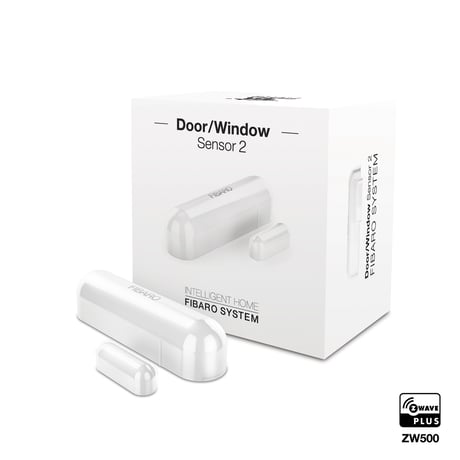
Product Picture


1 - Door window state
This parameter allows to set in what state is door window when the magnet is close to the sensor. 0 - closed when magnet near 1 - opened when magnet nearSize: 1 byte
Default: 0
Minimum: 0
Maximum: 1
Possible values
| From | To | Desription |
|---|---|---|
| 0 | 0 | closed when magnet near |
| 1 | 1 | opened when magnet near |
2 - Visual LED indications
This parameter defines events indicated by the visual LED indicator. Disabling events might extend battery life. 1 - indication of opening-closing status change 2 - indication of wake up (1 x click or periodical) 4 - indication of device tampering NOTE Parameter 2 values may be combined, e.g. 1+2=3 means that in -dications for opening/ closing and waking up are enabled.Size: 1 byte
Default: 6
Minimum: 0
Maximum: 7
Possible values
| From | To | Desription |
|---|---|---|
| 1 | 1 | indication of opening-closing status change |
| 2 | 2 | indication of wake up (1 x click or periodical) |
| 4 | 4 | indication of device tampering |
3 - Associations in Z-Wave network Security Mode
This parameter defines how commands are sent in specified association groups: as secure or non-secure. Parameter is active only in Z-Wave network Security Mode. It does not apply to 1st group Lifeline. 0 - none of the groups sent as secure 1 - 2nd group On-Off sent as secure 2 - 3rd group Tamper sent as secure 3 - 2nd and 3rd group sent as secureSize: 1 byte
Default: 3
Minimum: 0
Maximum: 3
Possible values
| From | To | Desription |
|---|---|---|
| 0 | 0 | none of the groups sent as secure |
| 1 | 1 | 2nd group On-Off sent as secure |
| 2 | 2 | 3rd group Tamper sent as secure |
| 3 | 3 | 2nd and 3rd group sent as secure |
11 - 2nd association group triggers
Parameter defines events which result in sending on-off commands to devices added to the 2nd association group. These commands are sent alternately to switch the devices on and off. 0 - switch after opening and closing 1 - switch after opening (parameter 12) 2 - switch after closing (parameter 13)Size: 1 byte
Default: 0
Minimum: 0
Maximum: 2
Possible values
| From | To | Desription |
|---|---|---|
| 1 | 1 | switch after opening (parameter 12) |
| 2 | 2 | switch after closing (parameter 13) |
| 0 | 0 | switch after opening and closing |
12 - Association for opening - value sent
Value sent to devices in 2nd association group when opening is detected. The value of 0 turns OFF the device, 255 turns it On. In case of associating devices allowing smooth control, values 1-99 allow to set an associated device to a specified level.Size: 2 bytes
Default: 255
Minimum: 0
Maximum: 255
Possible values
| From | To | Desription |
|---|---|---|
| 0 | 0 | turns OFF the device |
| 255 | 255 | turns ON the device |
13 - Association for closing - value sent
Value sent to devices in 2nd association group when closing is detected The value of 0 turns OFF the device, 255 turns it On. In case of associating devices allowing smooth control, values 1-99 allow to set an associated device to a specified level.Size: 2 bytes
Default: 0
Minimum: 0
Maximum: 255
Possible values
| From | To | Desription |
|---|---|---|
| 0 | 0 | turns OFF the device |
| 255 | 255 | turns ON the device |
14 - Association for opening - time delay
Time that must elapse from opening to send the command frame to to devices in 2nd association group. 0-32400 - time in secondsSize: 2 bytes
Default: 0
Minimum: 0
Maximum: 32400
Possible values
| From | To | Desription |
|---|---|---|
| 0 | 32400 | time in seconds |
15 - Association for closing - time delay
Time that must elapse from closing to send the command frame to devices in 2nd association group. 0-32400- time in secondsSize: 2 bytes
Default: 0
Minimum: 0
Maximum: 32400
Possible values
| From | To | Desription |
|---|---|---|
| 0 | 32400 | time in seconds |
30 - Tamper - alarm cancellation delay
Time period after which a tamper alarm will be cancelled. 0-32400- time in seconds .Size: 2 bytes
Default: 5
Minimum: 0
Maximum: 32400
Possible values
| From | To | Desription |
|---|---|---|
| 0 | 32400 | time in seconds |
31 - Tamper - reporting alarm cancellation
Reporting cancellation of tamper alarm to the controller and 3rd association group. 0 - do not send tamper cancellation report 1 - send tamper cancellation reportSize: 1 byte
Default: 1
Minimum: 0
Maximum: 1
Possible values
| From | To | Desription |
|---|---|---|
| 1 | 1 | send tamper cancellation report |
| 0 | 0 | do not send tamper cancellation report |
50 - Interval of temperature measurements
This parameter defines how often the temperature will be measured. The shorter the time, the more frequently the temperature will be measured, but the battery life will shorten. 0 - temperature measurements disabled 5-32400 - time in secondsSize: 2 bytes
Default: 300
Minimum: 0
Maximum: 32400
Possible values
| From | To | Desription |
|---|---|---|
| 0 | 0 | temperature measurements disabled |
| 5 | 32400 | time in seconds |
51 - Temperature reports threshold
This parameter defines the change of temperature in comparison with last reported, resulting in temperature report being sent to the main controller. 0 - temperature reports based on threshold disabled 1-300 - temperature threshold (0.1-30C, 0.1C step) NOTE Parameter 51 is active only if parameter 50 is not set to 0. Temperature measurement is performed before sending any report (regardless of parameter no. 50). Excessive reporting can affect battery lifetime. Reporting on the basis of temperature change (parameter no. 51) is recommended.Size: 2 bytes
Default: 10
Minimum: 0
Maximum: 300
Possible values
| From | To | Desription |
|---|---|---|
| 0 | 0 | temperature reports based on threshold disabled |
| 1 | 300 | temperature threshold (0.1-30C, 0.1C step) |
52 - Interval of temperature reports
This parameter determines how often the temperature reports will be sent to the main controller (regardless of parameters 50 and 51). 0 - periodic temperature reports disabled 300-32400 - time in secondsSize: 2 bytes
Default: 0
Minimum: 0
Maximum: 32400
Possible values
| From | To | Desription |
|---|---|---|
| 0 | 0 | periodic temperature reports disabled |
| 300 | 32400 | time in seconds |
53 - Temperature offset
The value to be added to the actual temperature, measured by the sensor (temperature compensation). - 1000–1000 (-100–100C, 0.1C step)Size: 2 bytes
Default: 0
Minimum: -1000
Maximum: 1000
Possible values
| From | To | Desription |
|---|---|---|
| -1000 | 1000 | (-100–100C, 0.1C step) |
54 - Temperature alarm reports
Temperature alarms reported to the Z-Wave controller. Thresholds are set in parameters 55 and 56. 0 - temperature alarms disabled 1 - high temperature alarm 2 - low temperature alarm 3 - high and low temperature alarms enabled.Size: 1 byte
Default: 0
Minimum: 0
Maximum: 3
Possible values
| From | To | Desription |
|---|---|---|
| 0 | 0 | temperature alarms disabled |
| 1 | 1 | high temperature alarm |
| 2 | 2 | low temperature alarm |
| 3 | 3 | high and low temperature alarms enabled |
55 - High temperature alarm threshold
If temperature is higher than set value, overheat notification will be sent and high temperature scene will be triggered (if activated). 1-600 (0.1-60C, 0.1C step)Size: 2 bytes
Default: 350
Minimum: 1
Maximum: 600
Possible values
| From | To | Desription |
|---|---|---|
| 1 | 600 | (0.1-60C, 0.1C step) |
56 - Low temperature alarm threshold
If temperature is lower than the set value, underheat notification will be sent and low temperature scene will be triggered (if activated). 0-599 (0-59.9C, 0.1C step)Size: 2 bytes
Default: 100
Minimum: 0
Maximum: 599
Possible values
| From | To | Desription |
|---|---|---|
| 0 | 599 | (0-59.9C, 0.1C step) |
1) Place the Door/Window Sensor 2 within the direct range of your Z-Wave controller. 2) Set the main controller in (security/non-security) add mode (see the controller’s manual). 3) Click the Button at least six times. 4) Quickly, three times press one of the TMP buttons (while the other button is pressed). 5) Wait for the adding process to end. 6) Successful adding will be confirmed by the Z-Wave controller’s message.
1) Place the Door/Window Sensor 2 within the direct range of your Z-Wave controller. 2) Set the main controller into remove mode (see the controller’s manual). 3) Quickly, three times press one of the TMP buttons (while the other button is pressed). 4) Wait for the removing process to end. 5) Successful removing will be confirmed by the Z-Wave controller’s message.
The Door/Window Sensor 2 needs to be woken up to receive informa¬tion about the new configuration from the controller, like parameters and associations. 1) To wake up the sensor manually, click one of the TMP buttons (while the other button is pressed).
Reset procedure allows to restore the device back to its factory settings, which means all information about the Z-Wave controller and user configuration will be deleted. In order to reset the device: 1) Open the cover. 2) Remove the battery. 3) Install the battery while holding both TMP buttons. 4) Release the TMP button within 5 seconds. 5) Visual indicator will blink 3 times to confirm launching of reset procedure. 6) Wait around 30s for the resetting process to end, do not remove the battery. 7) Visual LED indicator will blink 6 times to confirm the reset. *Resetting the device is not the recommended way of removing the device from the Z-Wave network. Use reset procedure only if the primary controller is missing or inoperable.
| Type | Value(s) |
|---|
| Group | Type |
|---|---|
| Heat Alarm | (Refer to parameters): State idle |
| Access Control | (Refer to parameters): State idle |
| Home Security | (Refer to parameters): State idle |
| Power Management | (Refer to parameters): State idle |
| Sensor type |
|---|
| Air Temperature |