Hank
Multisensor
HKZW-MS01
Notification Sensor
HW: 1 FW: 1.04
ZM5101
6.51.09
0x0208 (520)
0x0200 (512)
0x0006 (6)
ZC10-17045529
2017-03-24 19:56:52.784945
N/A
Enhanced 232 Slave
Reporting Sleeping Slave
Yes
Multisensor is a universal Z-Wave device. Along with detecting motion the device measures the temperature, humidity and luminance .
Multisensor is a universal Z-Wave device. Along with detecting motion the device measures the temperature, humidity and luminance . It can communicate with associated Z-Wave devices, such as Siren, Smart Switch, etc.
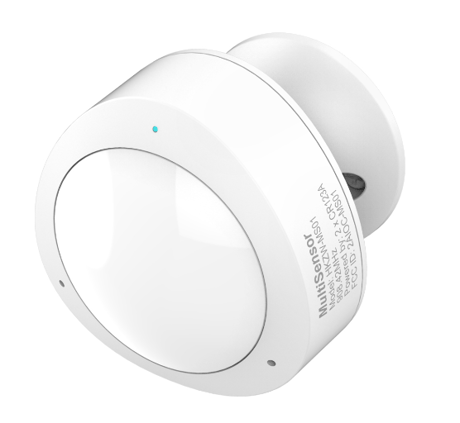
Product Picture


12 - MOTION SENSOR’S SENSITIVITY.
The higher the value is set, the more sensitive the PIR sensor are.Size: 1 byte
Default: 8
Minimum: 0
Maximum: 0
Possible values
| From | To | Desription |
|---|---|---|
| 1 | 8 | Level 0 to 8 |
| 0 | 0 | Disabled |
13 - MOTION SENSOR’S BLIND TIME (INSENSITIVITY)
Period of time through which the PIR sensor is “blind” (insensitive) to motion. After this time period the PIR sensor will be again able to detect motion. The longer the insensitivity period, the longer the battery life. If the sensor is required to detect motion quickly, the time period may be shortened.Size: 2 bytes
Default: 30
Minimum: 0
Maximum: 0
Possible values
| From | To | Desription |
|---|---|---|
| 1 | 60 | blink time is 1 to 60 |
14 - ENABLE/DISABLE BASIC COMMAND
Multisensor can send BASIC ON/OFF COMMAND CLASS to nodes associated with group 2.Size: 1 byte
Default: 0
Minimum: 0
Maximum: 0
Possible values
| From | To | Desription |
|---|---|---|
| 0 | 0 | Disable |
| 1 | 1 | Enable |
15 - BASIC COMMAND VALUE
Multisensor can reverse the BASIC ON/OFF.Size: 1 byte
Default: 0
Minimum: 0
Maximum: 0
Possible values
| From | To | Desription |
|---|---|---|
| 0 | 0 | Detecting motion: BASIC ON, motion alarm cancellation: BASIC OFF. |
| 1 | 1 | Detecting motion: BASIC OFF, motion alarm cancellation: BASIC ON. |
32 - LEVEL OF LOW BATTERY
Define a battery level as the “low battery”.Size: 1 byte
Default: 20
Minimum: 0
Maximum: 0
Possible values
| From | To | Desription |
|---|---|---|
| 10 | 50 | The low level from 10% to 50% |
170 - No.170 SET PARAMETER 171 – 174 TO DEFAULT SETTINGS
Set parameter 171,172,173,174 to default settingsSize: 1 byte
Default: 0
Minimum: 0
Maximum: 0
Possible values
| From | To | Desription |
|---|---|---|
| 85 | 85 | Set parameter 171,172,173,174 to default settings |
171 - BATTERY REPORT INTERVAL
The interval of sending battery report to association device (Group Lifeline). The reports are sent even if there are no changes in the battery level.Size: 4 bytes
Default: 1800
Minimum: 0
Maximum: 0
Possible values
| From | To | Desription |
|---|---|---|
| 5 | 2678400 | The interval of sending battery report |
172 - TEMPERATURE REPORT INTERVAL
The interval of sending temperature report to association device (Group Lifeline). The reports are sent even if there are no changes in the temperature level.Size: 4 bytes
Default: 1800
Minimum: 0
Maximum: 0
Possible values
| From | To | Desription |
|---|---|---|
| 5 | 2678400 | The interval of sending temperature report |
173 - HUMIDITY REPORT INTERVAL
The interval of sending Humidity report to association device (Group Lifeline). The reports are sent even if there are no changes in the humidity level.Size: 4 bytes
Default: 1800
Minimum: 0
Maximum: 0
Possible values
| From | To | Desription |
|---|---|---|
| 5 | 2678400 | The interval of sending Humidity report |
174 - LUMINANCE REPORT INTERVAL
The interval of sending luminance report to association device (Group Lifeline). The reports are sent even if there are no changes in the luminance level.Size: 4 bytes
Default: 1800
Minimum: 0
Maximum: 0
Possible values
| From | To | Desription |
|---|---|---|
| 5 | 2678400 | The interval of sending luminance report |
181 - BATTERY REPORT THRESHOLD
The parameter determines the change in battery level resulting in battery report being sent to the main controller.Size: 1 byte
Default: 10
Minimum: 0
Maximum: 0
Possible values
| From | To | Desription |
|---|---|---|
| 0 | 100 | the change in battery level resulting in battery report being sent to the main controller. |
182 - TEMPERATURE REPORT THRESHOLD
The parameter determines the change in temperature level resulting in temperature report being sent to the main controller.(Degrees Celsius)Size: 1 byte
Default: 20
Minimum: 0
Maximum: 0
Possible values
| From | To | Desription |
|---|---|---|
| 0 | 0 | reports are not sent |
| 1 | 255 | the change in temperature level resulting in temperature report being sent to the main controller. |
183 - HUMITIDY REPORT THRESHOLD
The parameter determines the change in humidity level resulting in humidity report being sent to the main controller.Size: 1 byte
Default: 5
Minimum: 0
Maximum: 0
Possible values
| From | To | Desription |
|---|---|---|
| 0 | 0 | reports are not sent |
| 1 | 255 | the change in humidity level resulting in humidity report being sent to the main controller. |
184 - LUMINANCE REPORT THRESHOLD
The parameter determines the change in luminance level resulting in luminance report being sent to the main controller.Size: 2 bytes
Default: 200
Minimum: 0
Maximum: 0
Possible values
| From | To | Desription |
|---|---|---|
| 0 | 0 | Reports are not sent |
| 1 | 65535 | the change in luminance level resulting in luminance report being sent to the main controller. |
2. Add for inclusion (non-security): 1) Insert two CR123A batteries. 2) Set the Z-Wave network main controller into learning mode (see Z-Wave network controller operating manual). 3) Triple clicking the Z-button. 4) If the inclusion is successful, the LED will blink less than 5 seconds and then keep on for 3 seconds, otherwise the LED will blink 5 seconds and then turn off, in which you need to repeat the process from step 2. Add for inclusion (security): 1) Insert two CR123A batteries. 2) Set the Z-Wave network main controller into learning mode (see Z-Wave network controller operating manual). 3) Press and hold the Z-button for 3 seconds. 4) If the inclusion is successful, the LED will blink fast for less than 5 seconds and then keep on for 3 seconds, otherwise the LED will blink fast for 5 seconds and then turn off, in which you need to repeat the process from step 2.
Remove for exclusion; 1. Insert two CR123A batteries. 2. Set the Z-Wave network main controller into removing mode (see Z-Wave controller operating manual). 3. Triple clicking the Z-button. 4. If the removing is successful, the LED will blink slowly for 5 seconds and then turn off, otherwise you need to repeat the process from step 2.
Press and hold the Z-button for 20 seconds, Multisensor will send “Device_Reset_Locally” to the main controller and exclude from the Z-Wave network when the Z-Button is released, this procedure will reset the Sensor to factory default. Please include a request to use the reset procedure only when the primary controller is missing or inoperable.
| Type | Value(s) |
|---|
| Group | Type |
|---|---|
| Access Control | (Refer to parameters): State idle |
| Sensor type |
|---|
| General Purpose |
| Illuminance |
| Humidity |