Aeotec
Nano Switch
ZW139-A
On/Off Power Switch
HW: 139 FW: 1.01:01.00
ZM5101
6.51.09
0x0086 (134)
0x0103 (259)
0x008B (139)
ZC10-17035510
2017-03-24 20:55:53.105568
N/A
Enhanced 232 Slave
Always On Slave
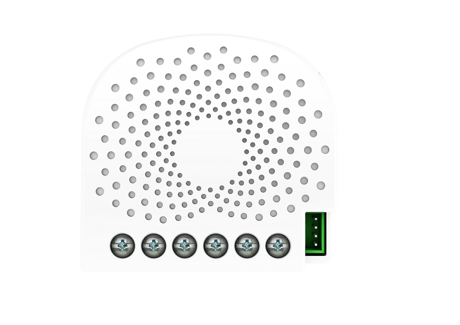
Aeotec Nano Switch is a Z-Wave Smart Switch specifically used to enable Z-Wave command and control (on/off) of any wall switches.
Aeotec Nano Switch is a Z-Wave Smart Switch specifically used to enable Z-Wave command and control (on/off) of any wall switches. In the event of power failure, non-volatile memory retains all programmed information relating to the unit’s operating status. It can connect to 2 external manual switches to control the load ON/OFF independently. Its surface has a pin socket, which can be used for connecting to the touch panel, so you can also use the touch panel to control the Dual Nano Switch. The Nano Switch is also a security Z-Wave device and supports Over The Air (OTA) feature for the products firmware upgrade.


4 - Overheat protection.
Output Load will be turned off automatically after 30 seconds and if the temperature of product inside exceeds 100 ℃.Size: 1 byte
Default: 0
Minimum: 0
Maximum: 0
Possible values
| From | To | Desription |
|---|---|---|
| 0 | 0 | Disable |
| 1 | 1 | Enable |
20 - Configure the output status after re-power on it.
Configure the output status after re-power on it.Size: 1 byte
Default: 0
Minimum: 0
Maximum: 0
Possible values
| From | To | Desription |
|---|---|---|
| 1 | 1 | Always on |
| 0 | 0 | Last status |
| 2 | 2 | Always off |
80 - To set which notification would be sent to the associated devices (Group 1)
To set which notification would be sent to the associated devices (Group 1) when the state of Nano Dimmer’s load is changed.Size: 1 byte
Default: 3
Minimum: 0
Maximum: 0
Possible values
| From | To | Desription |
|---|---|---|
| 0 | 0 | Send Nothing |
| 1 | 1 | Send Hail CC |
| 2 | 2 | Send Basic Report CC |
| 3 | 3 | Send Hail CC when using the manual switch to change the load state. |
81 - To set which notification would be sent to the associated nodes in association group 3
To set which notification would be sent to the associated nodes in association Group 3 when using the external switch 1 to switch the loads.Size: 1 byte
Default: 1
Minimum: 0
Maximum: 0
Possible values
| From | To | Desription |
|---|---|---|
| 0 | 0 | Send Nothing |
| 1 | 1 | Send Basic Set CC |
82 - To set which notification would be sent to the associated nodes in association group 4
To set which notification would be sent to the associated nodes in association Group 4 when using the external switch 2 to switch the loads.Size: 1 byte
Default: 1
Minimum: 0
Maximum: 0
Possible values
| From | To | Desription |
|---|---|---|
| 0 | 0 | Send Nothing |
| 1 | 1 | Send Basic Set CC |
83 - Configure the state of LED when it is in 3 modes
Configure the state of LED when it is in 3 modes (Energy mode, Momentary indicate mode, Night light mode)Size: 1 byte
Default: 0
Minimum: 0
Maximum: 0
Possible values
| From | To | Desription |
|---|---|---|
| 2 | 2 | Night light mode. The LED will remain ON state. |
| 0 | 0 | Energy mode. The LED will follow the status (on/off). |
| 1 | 1 | Momentary indicate mode. When the state of Switch’s load changed, the LED will follow the status (on/off) of its load, but the LED will turn off after 5 seconds if there is no any switch action. |
84 - Set the ON/OFF time of the LED when it is in Night light mode.
Set the ON/OFF time of the LED when it is in Night light mode.Size: 1 byte
Default: 301991936
Minimum: 0
Maximum: 0
Possible values
| From | To | Desription |
|---|---|---|
| 0 | 60 | The minute time of OFF |
| 256 | 316 | The hour time of OFF |
| 65536 | 65596 | The minute time of ON |
| 16777216 | 16777276 | The hour time of ON |
86 - Set appointment 1
Set the ON time of output load.Size: 4 bytes
Default: 8327680
Minimum: 0
Maximum: 0
Possible values
| From | To | Desription |
|---|---|---|
| 65536 | 65543 | The day value (Mon to Sun) |
| 16777216 | 16777216 | Enable the setting. |
| 256 | 316 | The hour value of ON time |
| 16777215 | 16777215 | Disable the setting. |
| 0 | 60 | The minute value of ON time |
87 - Set appointment 2
Set the OFF time of output load.Size: 4 bytes
Default: 8327680
Minimum: 0
Maximum: 0
Possible values
| From | To | Desription |
|---|---|---|
| 256 | 316 | The hour value of ON time |
| 65536 | 65543 | The day value (Mon to Sun) |
| 16777215 | 16777215 | Disable the setting. |
| 0 | 60 | The minute value of ON time |
| 16777216 | 16777216 | Enable the setting. |
120 - Configure the external switch mode for S1.
Configure the external switch mode for S1.Size: 1 byte
Default: 0
Minimum: 0
Maximum: 0
Possible values
| From | To | Desription |
|---|---|---|
| 0 | 0 | Enter automatic identification mode |
| 1 | 1 | 2-state switch mode |
| 2 | 2 | 3 way switch mode |
| 3 | 3 | Momentary push button mode |
121 - Configure the external switch mode for S2.
Configure the external switch mode for S2.Size: 1 byte
Default: 0
Minimum: 0
Maximum: 0
Possible values
| From | To | Desription |
|---|---|---|
| 0 | 0 | Enter automatic identification mode |
| 1 | 1 | 2-state switch mode |
| 2 | 2 | 3 way switch mode |
| 3 | 3 | Momentary push button mode |
122 - Set the control destination for external switch
Set the control destination for external switchSize: 1 byte
Default: 3
Minimum: 0
Maximum: 0
Possible values
| From | To | Desription |
|---|---|---|
| 1 | 1 | control the output loads of itself. |
| 2 | 2 | control the other nodes |
| 3 | 3 | control the output loads of itself and other nodes. |
252 - Lock/unlock configuration parameters
Lock/unlock configuration parameters.Size: 1 byte
Default: 0
Minimum: 0
Maximum: 0
Possible values
| From | To | Desription |
|---|---|---|
| 0 | 0 | Unlock |
| 1 | 1 | Lock |
255 - Reset the Nano Switch
Reset the Nano Switch to factory default.Size: 4 bytes
Default: 0
Minimum: 0
Maximum: 0
Possible values
| From | To | Desription |
|---|---|---|
| 0 | 0 | Reset all configuration parameters to factory default setting |
| 1431655765 | 1431655765 | Reset to factory default setting and removed from the z-wave network |
Turn the primary controller of Z-Wave network into inclusion mode, short press the product’s Action button that you can find on the product's housing.
Turn the primary controller of Z-Wave network into exclusion mode, short press the product’s Action button that you can find on the product's housing.
Press and hold the Action button that you can find on the product's housing for 20 seconds and then release. This procedure should only be used when the primary controller is inoperable.
Support ""Over the Air Firmware Updating"" and “Z-Wave Security”.
| Type | Value(s) |
|---|
| Group | Type |
|---|---|
| Heat Alarm | (Refer to parameters): State idle |