Steinel GmbH
IS 140-2 Z-Wave
40111677001.0
Notification Sensor
HW: 1 FW: 1.00:01.00
ZM5202
6.51.09
0x0271 (625)
0x0002 (2)
0x1A72 (6770)
ZC10-17045540
2017-03-30 22:25:00.586109
N/A
Enhanced 232 Slave
Always On Slave
Infrared motion detector IS 140-2 Z-Wave, can be integrated into the Smart Friends system or any other Z-Wave network, for indoors and out, ideal for targeted detection close to the building, 140° angle of coverage, reach up to 14 m, selectable time and twilight threshold, sensor turns through 90° and tilts through 180°.
Are you toying with the idea of fitting a motion detector to your building? The infrared controlled IS 140-2 motion detector gives you all the benefits of a modern detector. Needless to say, we always use the very latest technology for our bestsellers too. For instance, we have given the product in its current generation even more class: larger adjustment angle, even longer reach and even better detection performance. Treat your home to intelligent sensor technology. Smart home included. The optional Smart Friends box and the free Smart Friends app make it easy to set the motion detector via smart phone or tablet. The light connected can also be switched ON or OFF via app. Other Steinel products can also be interconnected. If you wish, this also works via remote control when you are out. That completes your own light management system. Along with STEINEL products, Smart Friends solutions from PAULMANN, SCHELLENBERG and ABUS can also integrated. Smart homes from a brand-name provider.
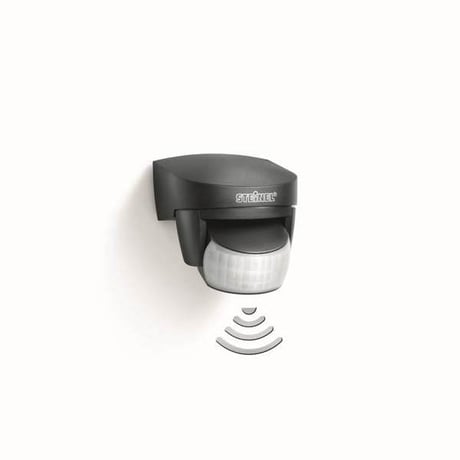
Product Picture


1 - TIME
Duration of light after motion detection.Size: 2 bytes
Default: 180
Minimum: 0
Maximum: 0
Possible values
| From | To | Desription |
|---|---|---|
| 5 | 900 | seconds |
2 - LIGHT
Light threshold [ lx ] Value can be controlled via potentiometer – potentiometer value is used as the default value and any potentiometer movement rewrites the current setting.Size: 2 bytes
Default: 2000
Minimum: 0
Maximum: 0
Possible values
| From | To | Desription |
|---|---|---|
| 2000 | 2000 | 2000 - is used as daylight ( always night mode) |
| 0 | 0 | run Learn ambient light sequence (the level is set automatically) |
| 2 | 1999 | lux |
5 - SENSITIVITY
Motion Sensor (PIR) Sensitivity [%] Value can be controlled via potentiometer – potentiometer value is used as the default value and any potentiometer movement rewrites the current settingSize: 1 byte
Default: 100
Minimum: 0
Maximum: 0
Possible values
| From | To | Desription |
|---|---|---|
| 2 | 100 | % |
8 - GLOBAL_LIGHT
Use External Ambient Light Value When GLOBAL_LIGHT mode is ON – device overrides its own light sensor values and uses Light report values from any Z-Wave light sensor instead – this has to be configured appropriately to send light automatically. If the last remote light level value is older than 30 minutes, the internal light value is used again until the next external value is received.Size: 1 byte
Default: 1
Minimum: 0
Maximum: 0
Possible values
| From | To | Desription |
|---|---|---|
| 1 | 1 | ON function |
| 0 | 0 | OFF function |
9 - SLAVE_MODE
Can disable sensor controll “Stupid” mode (bit 2 = 1): - has higher priority then slave mode. - lamp is permanently on (usefull for simple power wall switch controlling). Slave mode ( bit 0 = 1 ): - only if included in Z-Wave network - usefull for controlling via third-party sensor - relay is directly controlled via Z-Wave, internal sensors are not used for controlling it. Central unit checking ( bit 1 = 1 ): ( usefull especialy for controlling via gateway ) When Slave bit is 0: - lamp signalises fail of lifeline connection ( if this bit is zero fail of lifeline connection is not signalised ) When slave bit is 1: - device checks presence of Z-Wave device in lifeline group ( gateway ). If it is not present for 2 minutes ( testing repeatedly every 30 seconds ) device switches to normal mode in the same way as after the end of local disabled mode ( ON_BEHAVIOUR ) - The device checks every 1 minute for recovery of Lifeline connection. - if no lifeline specified - it works in normal mode Be careful with this option, lamp stops using it’s own motion sensor in Slave and Stupid mode.Size: 1 byte
Default: 2
Minimum: 0
Maximum: 0
Possible values
| From | To | Desription |
|---|---|---|
| 0 | 0 | Normal mode |
| 1 | 1 | Slave mode without gateway checking |
| 2 | 2 | Normal mode with lifeline error signalisation |
| 3 | 3 | Slave mode with gateway checking |
| 4 | 4 | Stupid mode - lamp permanetly on |
10 - OFF_BEHAVIOUR
Behaviour after BASIC OFF ( and similar commands ). If a transition ( even with zero change ) with a non-default duration is to be processed, the transition cannot be interrupted by any motion event in any case. for values 1-209 - Lamp is switched off and remains so until after a specified timeout once a new motion event (local or remote) is received.Size: 2 bytes
Default: 10
Minimum: 0
Maximum: 0
Possible values
| From | To | Desription |
|---|---|---|
| 0 | 0 | Lamp is switched off and remains so until any new motion event (local or remote) is received. |
| 1 | 100 | timeout: 1 second (1) to 100 seconds (100) in 1-second resolution |
| 101 | 200 | timeout: 1 minute (101) to 100 minutes (200) 1-minute resolution |
| 201 | 209 | timeout: 1 hour (201) to 9 hours (209) in 1-hour resolution |
| 255 | 255 | Lamp is switched off for TIME (cfg 1). It does not wait for a motion event and works normally via current motion evaluation |
11 - ON_BEHAVIOUR
Behaviour after BASIC ON (and similar commands). If a transition (even with zero change) with a non-default duration is to be processed, the transition cannot be interrupted by any motion event in any case. for values 1-209 - Lamp is switched on and remains so until after a specified timeout once a new motion event (local or remote) is received. It then works normally via current motion evaluation.Size: 2 bytes
Default: 255
Minimum: 0
Maximum: 0
Possible values
| From | To | Desription |
|---|---|---|
| 0 | 0 | Lamp is switched on and remains so until any new motion event (local or remote) is received. It then works normally via current motion evaluation. Notice – during the day, this mode cannot be ended remotely due to motion events not being transmitted – only via local motion sensor if enabled. |
| 1 | 100 | timeout: 1 second (1) to 100 seconds (100) in 1-second resolution |
| 101 | 200 | timeout: 1 minute (101) to 100 minutes (200) 1-minute resolution |
| 201 | 209 | timeout: 1 hour (201) to 9 hours (209) in 1-hour resolution |
| 255 | 255 | Lamp is switched on for TIME (cfg 1). It does not wait for a motion event and works normally via current motion evaluation. |
12 - ON_TIME_OVER
Time limit to stop waiting for motion after timeout of ON_BEHAVIOUR or OFF_ON_BEHAVIOUR ( 0-209 ) to prevent staying ON forever when is no motion.Size: 2 bytes
Default: 204
Minimum: 0
Maximum: 0
Possible values
| From | To | Desription |
|---|---|---|
| 0 | 0 | o additional waiting for motion. |
| 1 | 100 | timeout: 1 second (1) to 100 seconds (100) in 1-second resolution |
| 101 | 200 | timeout: 1 minute (101) to 100 minutes (200) 1-minute resolution |
| 201 | 209 | timeout: 1 hour (201) to 9 hours (209) in 1-hour resolution |
| 255 | 255 | Never stop waiting before motion. |
13 - ON_OFF_BEHAVIOR
Behaviour after after a rapid sequence of BASIC ON and BASIC OFF commands. The intention is to use a much longer timeout value than the time after a single ON command which should then be followed by a short timeout value. The behaviour is almost the same as for parameter 10 (OFF_LOCAL_DISABLE) for values 1-209 - Lamp is switched off and remains so until after a specified timeout once a new motion event (local or remote) is received.Size: 2 bytes
Default: 204
Minimum: 0
Maximum: 0
Possible values
| From | To | Desription |
|---|---|---|
| 0 | 0 | Lamp is switched off and remains so until any new motion event (local or remote) is received. |
| 1 | 100 | timeout: 1 second (1) to 100 seconds (100) in 1-second resolution |
| 101 | 200 | timeout: 1 minute (101) to 100 minutes (200) 1-minute resolution |
| 201 | 209 | timeout: 1 hour (201) to 9 hours (209) in 1-hour resolution |
| 255 | 255 | device ignores ON - OFF sequence and uses OFF behavior |
14 - OFF_ON_BEHAVIOUR
Behaviour after after a rapid sequence of BASIC OFF and BASIC ON commands. The intention is to use a much longer timeout value than the time after a single OFF command which should then be followed by a short timeout value. The behaviour is amost the same as for parameter 11 for values 1-209 - Lamp is switched on and remains so until after a specified timeout once a new motion event (local or remote) is received. It then works normally via current motion evaluation.Size: 2 bytes
Default: 204
Minimum: 0
Maximum: 0
Possible values
| From | To | Desription |
|---|---|---|
| 0 | 0 | Lamp is switched on and remains so until any new motion event (local or remote) is received. It then works normally via current motion evaluation. Notice – during the day, this mode cannot be ended remotely due to motion events not being transmitted – only via local motion sensor if enabled. |
| 1 | 100 | timeout: 1 second (1) to 100 seconds (100) in 1-second resolution. |
| 101 | 200 | timeout: 1 minute (101) to 100 minutes (200) 1-minute resolution |
| 201 | 209 | timeout: 1 hour (201) to 9 hours (209) in 1-hour resolution |
| 255 | 255 | device ignores OFF - ON sequence and uses ON behaviour |
15 - SEQUENCY_TIME
Time in [ 100 miliseconds ] of maximum delay between BASIC ON and BASIC OFF ( and vice versa ) to consider this as a sequence. It is typically 1 second, but can be exceptionally longer due to retransmissions and overload – in this case, a longer interval can be allowed ( up to 5 seconds ).Size: 1 byte
Default: 255
Minimum: 0
Maximum: 0
Possible values
| From | To | Desription |
|---|---|---|
| 10 | 50 | tenth of second |
16 - MOTION_DISABLE
Motion disable timeout after BASIC SET to motion endpoint when the internal motion sensor is not used for evaluating the behaviour of the lamp and groups 2 and 3. Events are, however, still transmitted to the Lifeline, and the lamp can be controlled via remote motion sensors. for values 1-209 - Internal motion sensor is disabled for specified timeout after BASIC SET 0x00 to Motion endpoint.Size: 2 bytes
Default: 0
Minimum: 0
Maximum: 0
Possible values
| From | To | Desription |
|---|---|---|
| 0 | 0 | BASIC SET to Motion sensor endpoint ignored, BASIC to root is mapped to relay endpoint, motion sensor still enabled |
| 1 | 100 | timeout: 1 second (1) to 100 seconds (100) in 1-second resolution |
| 101 | 200 | timeout: 1 minute (101) to 100 minutes (200) 1-minute resolution |
| 201 | 209 | timeout: 1 hour (201) to 9 hours (209) in 1-hour resolution |
| 255 | 255 | BASIC SET to Motion sensor endpoint ignored, BASIC to root is mapped to relay endpoint, motion sensor still disabled |
Inclusion = Add To start the motion detector's inclusion mode, turn the device's control dial (E) to ""Set"" and back to ""0"" within 5 seconds. Adding IS 140-2 to the Smart Friends system: 1) Download the Smart Friends app from the app store. 2) In the rooms view, activate the edit mode. 3) Select the chosen room and press the ""Add device"" button. 4) To put the device into inclusion mode, turn the device's control dial (E) to ""Set"" and back to ""0"" within 5 seconds. The status LED (F) lights up to show that this mode is selected. 5) The app displays a confirmation message once inclusion has been successfully completed.
Exclusion = Remove To start the motion detector's exclusion mode, turn the device's control dial (E) to ""Set"" and back to ""0"" within 5 seconds. Removing IS 140-2 from the Smart Friends system: 1) In the rooms view, activate the edit mode. 2) Select the device in the chosen room and press the ""delete"" button. Press delete and follow the instructions in the app. 3) To put the device into exclusion mode, turn the device's control dial (E) to ""Set"" and back to ""0"" within 5 seconds. The red status LED (F) lights up to show that this mode is selected. 4) The app displays a confirmation message once exclusion has been successfully completed.
Resetting IS 140-2 to factory settings: Please use this procedure only when the network primary controller is missing or otherwise inoperable. 1) Turn the device's control dial (E) to ""Set"" and move it to ""Reset"" within 5 seconds. 2) The status LED (F) briefly flashes to show that the light has been reset. 3) The device is now no longer included in the Z-Wave system and has been returned to factory settings.
Setting IS 140-2 with the app: –– After programming, an ON/OFF scene is automatically created in the app. –– The following setting values are then automatically stored: a) Twilight setting = control-dial setting b) Time setting = 3 min switch-OFF delay –– The twilight and time settings can be selected to the accuracy of one lux and one second respectively in the ""Scene"" menu.
| Type | Value(s) |
|---|
| Group | Type |
|---|---|
| Home Security | (Refer to parameters): State idle |
| System | (Refer to parameters): State idle |
| Sensor type |
|---|
| General Purpose |
| Illuminance |