FIBARO
FIBARO CO Sensor
FGCD-001
Notification Sensor
HW: 1 FW: 3.02:03.02
ZM5101
6.51.09
0x010F (271)
0x1201 (4609)
0x1000 (4096)
ZC10-17055584
2017-04-06 15:21:53.27656
N/A
Enhanced 232 Slave
Reporting Sleeping Slave
Yes
FIBARO CO Sensor is a compact, wall-mounted, battery-powered carbon monoxide detector.
FIBARO CO Sensor is an ultra-light, compact, battery-powered carbon monoxide detector, designed to be placed on a wall. Its high sensitivity allows to detect the presence of the carbon monoxide (CO) gas at the early stage in order to prevent carbon monoxide poisoning. Alarm is signalled with a built-in siren, blinking LED indicator and by sending commands to Z-Wave network devices. Additionally, the device is equipped with a temperature sensor.
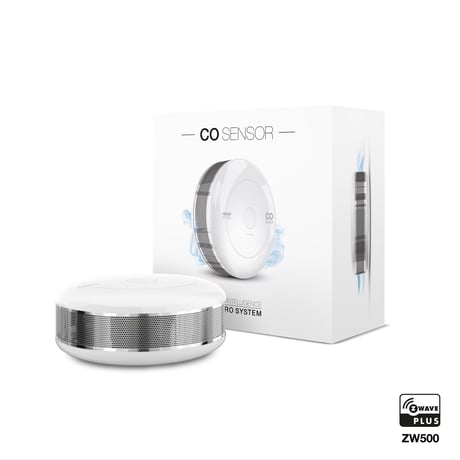
Product Picture


2 - Z-Wave notifications
This parameter allows to set the actions which result in sending notifications to the Z-Wave network controller.Size: 1 byte
Default: 0
Minimum: 0
Maximum: 0
Possible values
| From | To | Desription |
|---|---|---|
| 0 | 0 | both actions disabled |
| 1 | 1 | tampering (opened casing) |
| 2 | 2 | exceeding the temperature |
| 3 | 3 | both actions enabled |
3 - LED diode indications
This parameter allows to set the actions which result in LED diode indications. This parameter does not apply to the most important actions, such as CO Alarm, Malfunction Alarm and Low Battery Alarm.Size: 1 byte
Default: 0
Minimum: 0
Maximum: 0
Possible values
| From | To | Desription |
|---|---|---|
| 0 | 0 | all actions disabled |
| 1 | 1 | tampering (opened casing) |
| 2 | 2 | exceeding the temperature |
| 4 | 4 | lack of Z-Wave range |
4 - Acoustic signals
This parameter allows to set the actions which result in acoustic signals. This parameter does not apply to the most important actions, such as CO Alarm, Malfunction Alarm and Low Battery Alarm.Size: 1 byte
Default: 0
Minimum: 0
Maximum: 0
Possible values
| From | To | Desription |
|---|---|---|
| 0 | 0 | all actions disabled |
| 1 | 1 | tampering (opened casing) |
| 2 | 2 | exceeding the temperature |
| 4 | 4 | lack of Z-Wave range |
7 - Associations in Z-Wave network security mode
Parameter defines how commands are sent in specified association groups: as secure or non-secure. Parameter is active only in Z-Wave network security mode. It does not apply to 1st “Lifeline” association group. Parameter 7 values may be combined, e.g. 1+2=3 means that 2nd & 3rd group are sent as secure.Size: 1 byte
Default: 63
Minimum: 0
Maximum: 0
Possible values
| From | To | Desription |
|---|---|---|
| 1 | 63 | group sent as secure |
10 - Commands sent to 2nd association group (CO Alarm)
This parameter defines commands sent to devices associated in 2nd association group (CO Alarm). Values of specified commands may be set in parameters 11 and 12.Size: 1 byte
Default: 3
Minimum: 0
Maximum: 0
Possible values
| From | To | Desription |
|---|---|---|
| 1 | 1 | BASIC ON |
| 2 | 2 | BASIC OFF |
| 3 | 3 | BASIC ON & BASIC OFF |
11 - Value of BASIC ON command sent to 2nd association group
This parameter defines the value of BASIC ON command sent to devices in 2nd association group after the CO Alarm activation. 1-99 - forcing level of associated devices 255 - setting associated devices to the last remembered state or turning them onSize: 2 bytes
Default: 255
Minimum: 0
Maximum: 0
Possible values
| From | To | Desription |
|---|---|---|
| 0 | 99 | forcing level of associated devices |
| 255 | 255 | setting associated devices to the last remembered state or turning them on |
12 - Value of BASIC OFF command sent to 2nd association group
This parameter defines the value of BASIC OFF command sent to devices in 2nd association group after the CO Alarm cancellation. 1-99 - forcing level of associated devices 255 - setting associated devices to the last remembered state or turning them onSize: 2 bytes
Default: 0
Minimum: 0
Maximum: 0
Possible values
| From | To | Desription |
|---|---|---|
| 0 | 99 | forcing level of associated devices |
| 255 | 255 | setting associated devices to the last remembered state or turning them on |
13 - Commands sent to 4th association group (CO Level)
This parameter defines commands sent to devices associated in 4th association group (CO Level). Values of specified commands may be set in parameters 16 and 19.Size: 1 byte
Default: 3
Minimum: 0
Maximum: 0
Possible values
| From | To | Desription |
|---|---|---|
| 1 | 1 | BASIC ON |
| 2 | 2 | BASIC OFF |
| 3 | 3 | BASIC ON & BASIC OFF |
14 - CO level required for sending BASIC ON command to 4th association group
This parameter defines the minimum level of CO concentration which exceeding will result in starting the timer set in parameter 15.Size: 2 bytes
Default: 40
Minimum: 0
Maximum: 0
Possible values
| From | To | Desription |
|---|---|---|
| 20 | 400 | CO concentration level in ppm |
15 - Time required for sending BASIC ON command to 4th association group
This parameter defines the time during which the level of CO concentration should remain above the value set in parameter 14 to send the BASIC ON command to 4th association group.Size: 2 bytes
Default: 0
Minimum: 0
Maximum: 0
Possible values
| From | To | Desription |
|---|---|---|
| 0 | 0 | immediate sending of BASIC ON command |
| 1 | 2880 | (30s - 24h, in 30s steps) |
16 - Value of BASIC ON command sent to 4th association group
This parameter defines the value of BASIC ON command sent to devices in 4th association group after exceeding the CO level set in parameter 14 through the time set in parameter 15. 1-99 - forcing level of associated devices 255 - setting associated devices to the last remembered state or turning them onSize: 2 bytes
Default: 255
Minimum: 0
Maximum: 0
Possible values
| From | To | Desription |
|---|---|---|
| 0 | 99 | 1-99 - forcing level of associated devices |
| 255 | 255 | 255 - setting associated devices to the last remembered state or turning them on |
17 - CO Level required for sending BASIC OFF command to 4th association group
This parameter defines the maximum level of CO concentration below which falling will result in starting the timer set in parameter 18.Size: 2 bytes
Default: 25
Minimum: 0
Maximum: 0
Possible values
| From | To | Desription |
|---|---|---|
| 10 | 400 | CO concentration level in ppm |
18 - Time required for sending BASIC OFF command to 4th association group
This parameter defines the time during which the level of CO concentration should remain below the value set in parameter 17 to send the BASIC OFF command to 4th association group.Size: 2 bytes
Default: 0
Minimum: 0
Maximum: 0
Possible values
| From | To | Desription |
|---|---|---|
| 0 | 0 | immediate sending of BASIC OFF command |
| 1 | 2880 | (30s - 24h, in 30s steps) |
19 - Value of BASIC OFF command sent to 4th association group
This parameter defines the value of BASIC OFF command sent to devices in 4th association group after falling below the CO level set in parameter 17 through the time set in parameter 18. 1-99 - forcing level of associated devices 255 - setting associated devices to the last remembered state or turning them onSize: 2 bytes
Default: 0
Minimum: 0
Maximum: 0
Possible values
| From | To | Desription |
|---|---|---|
| 0 | 99 | forcing level of associated devices |
| 255 | 255 | setting associated devices to the last remembered state or turning them on |
20 - Temperature reporting time interval
Time interval (in seconds) between consecutive reports of temperature (done by built-in temperature sensor). Short time interval means more frequent communication, which results in shortened battery life.Size: 2 bytes
Default: 0
Minimum: 0
Maximum: 0
Possible values
| From | To | Desription |
|---|---|---|
| 0 | 0 | no periodical reports |
| 10 | 2880 | (5min - 24h, in 30s steps) |
21 - Temperature reporting hysteresis
This parameter defines a minimum change in temperature resulting in a report being sent to the main Z-Wave controller.Size: 1 byte
Default: 2
Minimum: 0
Maximum: 0
Possible values
| From | To | Desription |
|---|---|---|
| 1 | 20 | (0.5°C - 10°C, each 0.5°C) |
22 - Threshold of exceeding the temperature
This parameter defines the temperature level, which exceeding will result in sending actions set in parameters 2, 3 and 4.Size: 1 byte
Default: 55
Minimum: 0
Maximum: 0
Possible values
| From | To | Desription |
|---|---|---|
| 1 | 85 | (1°C - 85°C, each 1°C) |
23 - CO meter activation
This parameter activates reporting the value of CO concentration level to the main Z-Wave controller.Size: 1 byte
Default: 1
Minimum: 0
Maximum: 0
Possible values
| From | To | Desription |
|---|---|---|
| 0 | 0 | disabled |
| 1 | 1 | enabled |
25 - CO level reporting hysteresis
This parameter defines a minimum change in CO concentration level which results in sending a new value to the main Z-Wave controller.Size: 1 byte
Default: 2
Minimum: 0
Maximum: 0
Possible values
| From | To | Desription |
|---|---|---|
| 2 | 6 | 10 ppm - 30 ppm, each 5 ppm |
26 - Threshold of CO meter activation
This parameter defines the CO concentration level, which exceeding will result in sending a new value to the main Z-Wave controller, according to parameter 25 settings. Adjusting the value allows to get the accurate data in case of danger and helps to save the battery in normal conditions.Size: 2 bytes
Default: 30
Minimum: 0
Maximum: 0
Possible values
| From | To | Desription |
|---|---|---|
| 10 | 255 | ppm |
1) Place the device within direct range of the Z-Wave controller. 2) Set the main Z-Wave controller in (security/non-security) adding mode (see the controller’s manual). 3) Quickly, triple click the button located on the casing. 4) Wait for the device to be added into the system. 5) Successful adding will be confirmed by the Z-Wave controller’s message.
1) Place the device within direct range of the Z-Wave controller. 2) Set the main Z-Wave controller in remove mode (see the controller’s manual). 3) Quickly, triple click the button located on the casing. 4) Wait for the removing process to end. 5) Successful removing will be confirmed by the Z-Wave controller’s message.
The CO Sensor needs to be woken up to receive information about the new configuration from the Z-Wave controller, like parameters and associations. To wake up the sensor manually click the button located on the casing.
1) Press and hold the button. 2) Release the button when LED indicator glows white. 3) Click the button when LED indicator glows yellow. 4) After few seconds the device will be reset (confirmed by red LED indicator).
| Type | Value(s) |
|---|
| Group | Type |
|---|---|
| CO Alarm | (Refer to parameters): State idle |
| Sensor type |
|---|
| Air Temperature |
| Carbon Monoxide (CO) Level |