NEEO AG
NEEO Brain, EU
6336-BRAIN-00008
Central Controller
HW: 1 FW: 4.33:01.00
ZM5202
6.61.00
0x0241 (577)
0x0001 (1)
0x0001 (1)
ZC10-17125909
2017-08-30 21:53:25.338415
N/A
Static Controller
Central Static Controller
NEEO is a smart home system, consisting of the NEEO Brain and the NEEO Thinking Remote. It’s the simplest way to connect and control all the devices in your home.
Having to use several remotes and apps for our smart home gadgets and AV-devices in our homes is cumbersome, inconvenient and overwhelming. We believe the interaction with our daily technology should feel natural, simple and magical. That is why we have created NEEO. To control everything from one place. Instantly. The NEEO Thinking Remote is the most instant interface to control your AV devices and smart home gadgets. No need for multiple remotes or smart phone apps. The solid and long lasting anodized aluminium case protects against damage, resists fingerprints and feels just right thanks to its premium surface finish. It has just the buttons which are absolutely needed, designed for an optimal tactile experience. The amazing 291ppi touch screen display facilitates richest browsing and control. The remote comes with an embedded hand recognition technology for personal profiles, parental controls and more. The NEEO Brain connects to all of the devices in our homes and makes them available on the NEEO Thinking Remote or the NEEO app. Built in support for all smart home languages and protocols allows full control of your smart devices and gadgets out of the box. Via Wi-Fi, Bluetooth, Z-Wave, ZigBee, 6LowPan and incredibly strong IR blasters embedded in one device, NEEO simplifies control for more than 50’000 AV and home automation products. The high-end antenna, hardware and case design as well as built in redundancy systems guarantee frictionless communication between the devices, facilitating a smooth user experience.
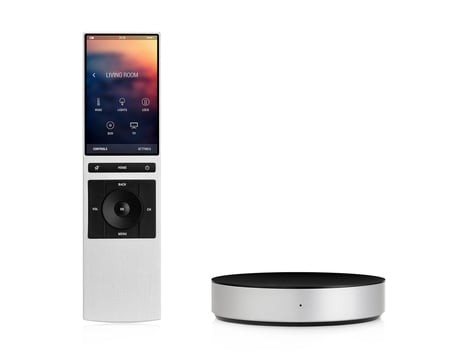
Product Picture
1. Open the settings 2. Click on „NEEO Brain“ 3. In the „Z-Wave“ section click „Advanced actions“ 4. Click on „Include in existing Network“
If this controller is the primary controller for your network, resetting it will result in the nodes in your network being orphaned and it will be necessary after the reset to exclude and re-include all of the nodes in the network. If this cont- roller is being used as a secondary controller in the network, use this procedure to reset this controller only in the event that the network primary controller is missing or otherwise inoperable. 1. Open the settings 2. Click on „NEEO Brain“ 3. Click on „Remove all data (reset)“ and follow the instructions
1. Open the settings 2. Click on „Devices“ 3. Click on „Add a device“ 4. Search for the desired device and select it 5. Click the „Include device“ button and follow the instructions
1. Open the settings 2. Click on the device to remove 3. Choose „Delete“ in the context menu 4. Click on the „Exclude“ button and follow the instructions
| Type | Value(s) |
|---|