Powerley
Thermostat
PWLY-7828-A1
Thermostat - HVAC
HW: 1 FW: 4.05:01.10
ZM5202
6.51.10
0x028c (652)
0xa55a (42330)
0x0001 (1)
ZC10-17065620
2017-05-31 22:07:03.54103
N/A
Routing Slave
Listening Sleeping Slave
Yes
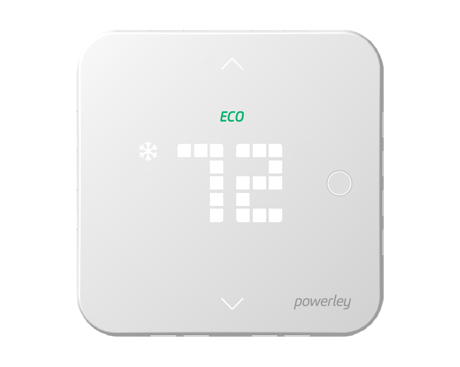
The Powerley Thermostat can be seamlessly integrated into the connected home via the Powerley Energy Bridge. It provides the user with the ability to remotely control home temperature and also allows Powerley to optimize the HVAC system's use balancing energy usage and comfort.
Residential energy usage is driven by the home's heating and cooling system, and Powerley provides the connectivity to understand usage of the home's HVAC and control remotely or automatically with the Powerley Thermostat. The Powerley Thermostat uses the Z-Wave protocol and can be seamlessly integrated into the connected home via the Powerley Energy Bridge to facilitate communication and control between the devices. The thermostat provides the user with the ability to remotely control home temperature and also allows Powerley to optimize the HVAC system's use balancing energy usage and comfort. The device also provides for the ability to facilitate Demand Response events, including allowing the consumer to choose whether or not to participate in the event via push notifications.


1 - Display Units
This configuration setting controls the units of which the temperature is displayed in.Size: 1 byte
Default: 1
Minimum: 0
Maximum: 0
Possible values
| From | To | Desription |
|---|---|---|
| 0 | 0 | C |
| 1 | 1 | F |
2 - HVAC Settings
This configuration setting allows the user to set the HVAC system type the thermostat is controlling.Size: 1 byte
Default: 1
Minimum: 0
Maximum: 0
Possible values
| From | To | Desription |
|---|---|---|
| 0 | 0 | 1 Stage Conventional |
| 1 | 1 | 2 Stage Conventional |
| 2 | 2 | Heat Pump w/ O-Wire |
| 3 | 3 | Heat Pump w/ B-Wire |
| 4 | 4 | Heat Pump w/ O-Wire & aux heating |
| 5 | 5 | Heat Pump w/ B-Wire & aux heating |
3 - ECO Mode
this configuration setting displays if the thermostat is currently operating in ECO Mode.Size: 1 byte
Default: 0
Minimum: 0
Maximum: 0
Possible values
| From | To | Desription |
|---|---|---|
| 0 | 0 | Off |
| 1 | 1 | On |
4 - Thermostat Default Settings
This configuration setting controls factory reset of the physical device.Size: 1 byte
Default: 0
Minimum: 0
Maximum: 0
Possible values
| From | To | Desription |
|---|---|---|
| 0 | 0 | No Change |
| 1 | 1 | Restore Thermostat Factory Settings (minus z-wave) |
5 - Temperature Calibration
Your thermostat was accurately calibrated at the factory, however, you can change the display temperature to match that of a previous thermostat, or to match another thermostat already in your home. The range of change is from -5F to 5F.Size: 1 byte
Default: 0
Minimum: 0
Maximum: 0
Possible values
| From | To | Desription |
|---|---|---|
| 0 | 5 | 0 - 5F; 0-2.8C |
| 251 | 255 | (-5)-(-1)F; (-1) - (-2.8)C |
6 - LED Dimming (If applicable)
This configuration setting controls brightness of the LED display in the thermostat.Size: 1 byte
Default: 3
Minimum: 0
Maximum: 0
Possible values
| From | To | Desription |
|---|---|---|
| 0 | 0 | Low |
| 1 | 1 | Medium |
| 2 | 2 | High |
| 3 | 3 | Auto |
7 - Demand Response Mode
This configuration setting controls the LED indicator light to signify the thermostat setpoint is part of a utility-set Demand Response Event.Size: 1 byte
Default: 0
Minimum: 0
Maximum: 0
Possible values
| From | To | Desription |
|---|---|---|
| 0 | 0 | Off |
| 1 | 1 | On |
8 - Swing Setting
This configuration setting allows the user to control at what setpoint variance the HVAC system turns on at. The thermostat swing temperature is in units of 1 degrees Fahrenheit.Size: 1 byte
Default: 1
Minimum: 0
Maximum: 0
Possible values
| From | To | Desription |
|---|---|---|
| 0 | 10 | 0 - 10F; 0 - 5.6C |
| 0 | 0 |
9 - Differential Setting
The Differential is the number of degrees between the room temperature and the target temperature at which the 2nd stage will engage to bring the room temperature back to the target. The default is 3F. The programmable range is 0-10F.Size: 1 byte
Default: 3
Minimum: 0
Maximum: 0
Possible values
| From | To | Desription |
|---|---|---|
| 0 | 10 | 0 - 10F; 0 - 5.6C |
10 - OTA (Over The Air) programming error code
This configuration setting gives feedback on the status of an OTA programming update.Size: 1 byte
Default: 0
Minimum: 0
Maximum: 0
Possible values
| From | To | Desription |
|---|---|---|
| 0 | 0 | No error |
| 1 | 1 | Battery low, reflashing not possible |
| 2 | 2 | OTA cancelled before completion |
| 3 | 3 | Fragment CRC error |
| 4 | 4 | Total image CRC error |
| 5 | 5 | External flash error |
| 6 | 6 | Fragment received out of order |
| 7 | 7 | Invalid firmware or manufacture ID |
| 8 | 8 | OTA session not properly initialized |
| 9 | 9 | Same image currently running |
| 10 | 10 | Time out during OTA download between fragments |
11 - Display always on
This configuration setting allows a user to turn the always-on display on or off. This functionality is dependent on a C-Wire connection. *Note: This setting can be modified in battery powered applications but affects are only seen in C-Wire powered applications.Size: 1 byte
Default: 1
Minimum: 0
Maximum: 0
Possible values
| From | To | Desription |
|---|---|---|
| 0 | 0 | Display off in C-Wire powered mode |
| 1 | 1 | Display on in C-Wire powered mode |
Z-Wave Inclusion Process First, be sure your Energy Bridge has power and the green light is illuminated. Follow the in-app instructions along with the steps below to include your Thermostat. To put your thermostat into inclusion mode, press and hold Mode for 5 seconds. • CONNECT will scroll across the thermostat display once in inclusion mode. • SUCCESS will scroll across the thermostat display once included. • FAIL will scroll across the thermostat display if inclusion is unsuccessful, or if process takes longer than 1 minute. See the next page for troubleshooting. To learn more about which Z-Wave command classes this thermostat supports, visit: www.powerley.com/thermostat/command-classes
Z-Wave Exclusion Process To exclude your Thermostat, press and hold Mode for 5 seconds to initiate Z-Wave exclusion process. • DELETE will scroll across the thermostat display once in inclusion mode. • To cancel the exclusion process, press Mode. • To complete exclusion press either of the up/down arrows. • SUCCESS will scroll across the thermostat display once excluded. NOTE: Excluding the thermostat will restore it to the default state for Z-Wave and temperature set points.
Factory Reset Please use Factory Reset only when the network primary controller is missing or otherwise inoperable. To reset to factory defaults, turn the thermostat off by pressing Mode repeatedly until OFF scrolls across the display, then press and hold the down and up Setpoint arrows at the same time for 5 sec. If successful, RESET will scroll across the display and the device will be restored to its default settings. NOTE: If a reset to factory default settings is performed, all settings including Z-Wave configuration parameter values and temperature setpoints will return to default values: Heat: 68 Cool: 78 Measure: Fahrenheit Swing: +/- 1 Multi-stage temp differential: 3 System Type: 2-stage conventional heating & cooling
| Type | Value(s) |
|---|
| Sensor type |
|---|
| Humidity |