RCS
Remote Temperature and Humidty
RTH100Z
Notification Sensor
HW: 2 FW: 1.40
ZM5202
6.51.07
0x0010 (16)
0x5253 (21075)
0x5433 (21555)
ZC10-17115888
2017-11-29 18:25:12.453855
N/A
Enhanced 232 Slave
Reporting Sleeping Slave
Yes
Remote Temperature and Humidity Sensor
Remote Temperature and Humidity Sensor for HVAC market
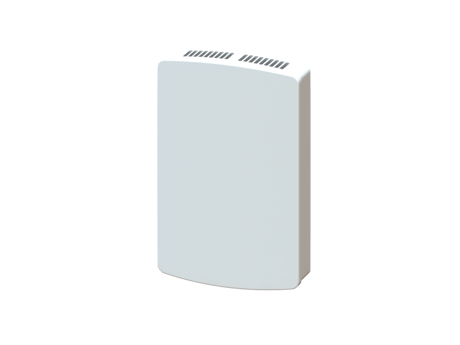
Product Picture


1 - Time between sending Battery Reports in Hours
Time between sending Battery Reports in HoursSize: 1 byte
Default: 0
Minimum: 0
Maximum: 0
Possible values
| From | To | Desription |
|---|---|---|
| 1 | 127 | 1 – 127 hours |
| 0 | 0 | Disabled |
2 - Send Basic Set On above temp
Send Basic Set On above temp See also Register 20Size: 1 byte
Default: 121
Minimum: 0
Maximum: 0
Possible values
| From | To | Desription |
|---|---|---|
| 15 | 120 | 15 – 120 Degrees F |
| 121 | 121 | Disabled |
3 - Send Basic Set On below temp
Send Basic Set On above temp See also Register 20Size: 1 byte
Default: 121
Minimum: 0
Maximum: 0
Possible values
| From | To | Desription |
|---|---|---|
| 15 | 120 | 15 – 120 Degrees F |
| 121 | 121 | Disabled |
4 - Send Basic Set On below temp
Send Basic Set On below temp See also Register 20Size: 1 byte
Default: 121
Minimum: 0
Maximum: 0
Possible values
| From | To | Desription |
|---|---|---|
| 15 | 120 | 15 – 120 Degrees F |
| 121 | 121 | Disabled |
5 - Send Basic Set Off below temp
Send Basic Set Off below temp See also Register 20Size: 1 byte
Default: 121
Minimum: 0
Maximum: 0
Possible values
| From | To | Desription |
|---|---|---|
| 15 | 120 | 15 – 120 Degrees F |
| 121 | 121 | Disabled |
6 - Make multiple attempts for all Basic Set Commands
Make multiple attempts for all Basic Set CommandsSize: 1 byte
Default: 0
Minimum: 0
Maximum: 0
Possible values
| From | To | Desription |
|---|---|---|
| 1 | 5 | Number of extra attempts sent every minute after first send |
| 0 | 0 | Disabled |
7 - Temp Units
Temp UnitsSize: 1 byte
Default: 1
Minimum: 0
Maximum: 0
Possible values
| From | To | Desription |
|---|---|---|
| 1 | 1 | Fahrenheit |
| 0 | 0 | Celsius |
8 - Group1 Temperature Delta Autosend Threshold
Group1 Temperature Delta Autosend Threshold (how many degree change from the last autosend)Size: 1 byte
Default: 10
Minimum: 0
Maximum: 0
Possible values
| From | To | Desription |
|---|---|---|
| 1 | 200 | In tenths of degrees |
9 - Group1 Periodic Temperature Send Interval
Group1 Periodic Temperature Send Interval (minutes)Size: 1 byte
Default: 0
Minimum: 0
Maximum: 0
Possible values
| From | To | Desription |
|---|---|---|
| 1 | 120 | Temperature Send Interval (minutes) |
| 0 | 0 | Disabled |
10 - Group2 Temperature Delta Autosend Threshold
Group2 Temperature Delta Autosend Threshold (how many degree change from the last autosend)Size: 1 byte
Default: 10
Minimum: 0
Maximum: 0
Possible values
| From | To | Desription |
|---|---|---|
| 1 | 50 | In tenths of degrees |
| 0 | 0 | Disabled |
11 - Group2 Periodic Temperature Send Interval
Group2 Periodic Temperature Send Interval (minutes)Size: 1 byte
Default: 0
Minimum: 0
Maximum: 0
Possible values
| From | To | Desription |
|---|---|---|
| 1 | 120 | Minutes |
| 0 | 0 | Disabled |
12 - Send Basic Set On above humidity
Send Basic Set On above humidity See also Register 20Size: 1 byte
Default: 0
Minimum: 0
Maximum: 0
Possible values
| From | To | Desription |
|---|---|---|
| 0 | 100 | Percent |
| 0 | 0 | Disabled |
13 - Send Basic Set On below humidity
Send Basic Set On below humidity See also Register 20Size: 1 byte
Default: 0
Minimum: 0
Maximum: 0
Possible values
| From | To | Desription |
|---|---|---|
| 0 | 100 | Percent |
| 0 | 0 | Disabled |
14 - Send Basic Set Off above humidity
Send Basic Set Off above humidity See also Register 20Size: 1 byte
Default: 0
Minimum: 0
Maximum: 0
Possible values
| From | To | Desription |
|---|---|---|
| 0 | 100 | Percent |
| 0 | 0 | Disabled |
15 - Send Basic Set Off below humidity
Send Basic Set Off below humidity See also Register 20Size: 1 byte
Default: 0
Minimum: 0
Maximum: 0
Possible values
| From | To | Desription |
|---|---|---|
| 0 | 100 | Percent |
| 0 | 0 | Disabled |
16 - Group1- Humidity Delta Autosend Threshold
Group1- Humidity Delta Autosend Threshold (how many degree change from the last autosend)Size: 1 byte
Default: 5
Minimum: 0
Maximum: 0
Possible values
| From | To | Desription |
|---|---|---|
| 1 | 50 | Percent |
17 - Group1- Periodic Humidity Send Interval
Group1- Periodic Humidity Send IntervalSize: 1 byte
Default: 0
Minimum: 0
Maximum: 0
Possible values
| From | To | Desription |
|---|---|---|
| 1 | 120 | Minutes |
| 0 | 0 | Disabled |
18 - Group3- Humidity Delta Autosend Threshold
Group3- Humidity Delta Autosend Threshold (how many degree change from the last autosend)Size: 1 byte
Default: 5
Minimum: 0
Maximum: 0
Possible values
| From | To | Desription |
|---|---|---|
| 1 | 30 | Percent |
| 0 | 0 | Disabled |
19 - Group3- Periodic Humidity Send Interval
Group3- Periodic Humidity Send Interval (minutes)Size: 1 byte
Default: 0
Minimum: 0
Maximum: 0
Possible values
| From | To | Desription |
|---|---|---|
| 1 | 120 | Minutes |
| 0 | 0 | Disabled |
20 - Basic Set Options for Temp and Humidity
Basic Set Options for Temp and HumiditySize: 1 byte
Default: 1
Minimum: 0
Maximum: 0
Possible values
| From | To | Desription |
|---|---|---|
| 2 | 2 | Enable Configuration Registers 2, 5, 13, 14 |
| 1 | 1 | Enable Configuration Registers 2, 5, 12, 15 |
| 3 | 3 | Enable Configuration Registers 3, 4, 12, 15 |
| 4 | 4 | Enable Configuration Registers 3, 4, 13, 14 |
21 - Temp offset
Temp offsetSize: 1 byte
Default: 0
Minimum: 0
Maximum: 0
Possible values
| From | To | Desription |
|---|---|---|
| 249 | 7 | Degrees(-7 to 7) |
22 - Humidity offset
Humidity offsetSize: 1 byte
Default: 0
Minimum: 0
Maximum: 0
Possible values
| From | To | Desription |
|---|---|---|
| 249 | 7 | Percent(-7 to 7) |
23 - Humidity Filter Time Constant
Humidity Filter Time ConstantSize: 1 byte
Default: 30
Minimum: 0
Maximum: 0
Possible values
| From | To | Desription |
|---|---|---|
| 1 | 60 | Minutes |
Inclusion: Including the RTH100Z into an Existing Network: 1. Set your primary controller to Include mode, to add the RTH100Z as a node on your network (see your controller’s user manual for detailed instructions). 2. Press and release the Install button. The controller will indicate the device has been included into the network. Your controller will indicate the RTH100Z was successfully added to its network (see your controller’s user manual for details). Inclusion and exclusion are always done at normal transmit power mode. If your controller supports NWI, then you can optionally set the primary to NWI include mode. Please note that NWI inclusion mode does not end when you have included a new node. This allows multiple nodes to be included without having to physically go back to the controller to initiate the next inclusion. Therefore you must manually terminate NWI inclusion mode at the controller when you have finished including any new nodes to the network. Since intermediate included nodes will assist the inclusion process by routing messages, we recommend that nodes close to the primary controller be installed first, proceeding out in consecutive rings from the controller. Note: Consult your controller’s user manual for details on removing a device from a Z-Wave network.
Exclusion: Removing the RTH100Z from a Network: 1. Set your primary controller to Remove mode, to remove the RTH100Z as a node on your network (see your controller’s user manual for detailed instructions). 2. Press and release the Install button. The controller will indicate the device has been removed from the network. 3. The device will automatically be restored to its default settings
To wake-up the device for configuration you can triple-press the install button.
Factory Reset To reset the RTH100Z’s configurations and Z-Wave parameters to Factory Settings (Including association groups and scene configurations), and remove the RTH100Z from any Z-Wave network: Note: Please use this procedure only when the network primary controller is missing or otherwise inoperable 1. Hold down the Install button for approximately 10 seconds 2. Release the install button (the RTH100Z will reset all internal configuration including z-wave configurations). The unit will then reset. 3. When the Status LED begins to blink (un-enrolled) the unit has finished restoring configurations is running in normal mode.
| Type | Value(s) |
|---|
| Sensor type |
|---|
| Air Temperature |
| Humidity |