Popp
Z-Wave Rain Sensor
700168.0
Notification Sensor
HW: 1 FW: 1.02
ZM5202
6.51.09
0x0154 (340)
0x0004 (4)
0x0011 (17)
ZC10-17065642
2017-06-07 22:41:39.096085
N/A
Enhanced 232 Slave
Reporting Sleeping Slave
Yes
This device measures the rain level on a certain position. The device is IP55 rated and can be used outside the home in the garden or on any other place exposed to rain.
This device measures the rain level on a certain position. The device is IP55 rated and can be used outside the home in the garden or on any other place exposed to rain. The device has a funnel on the top-side that will collect the rain on a certain diameter. The internal mechanics and electronics counts the rain level and will report it every about 4 minutes if and only if there is rain. The device also monitors a heavy rain condition (10 l/sqm within 5 minutes) and will send out alarm messages when detected.
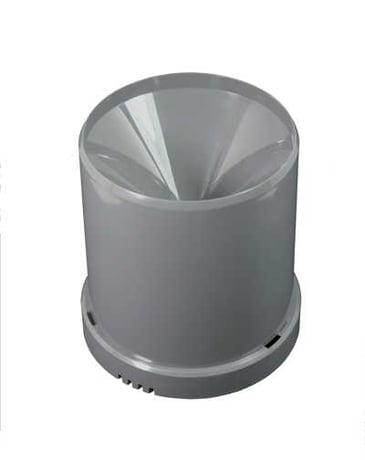
Product Picture


1 - Rain Counter
This values shows the total count of rain from the moment of inclusion in mm water level. By writing this value this counter can be reset.Size: 2 bytes
Default: 0
Minimum: 0
Maximum: 0
Possible values
| From | To | Desription |
|---|---|---|
| 0 | 32000 | mm |
2 - Rain Start Command
This BASIC Set Command value is sent out into Association Group 2 when the device detects start of rain.Size: 1 byte
Default: 99
Minimum: 0
Maximum: 0
Possible values
| From | To | Desription |
|---|---|---|
| 0 | 99 | Set Command |
3 - Rain Stop Command
This BASIC Set Command value is sent out into Association Group 2 when the device detects stop of rain.Size: 1 byte
Default: 0
Minimum: 0
Maximum: 0
Possible values
| From | To | Desription |
|---|---|---|
| 0 | 99 | Set Command |
4 - Meter Multiplier
This multiplier allows to adapt the display to certain controllers not being able to handle very low numbers.Size: 2 bytes
Default: 1
Minimum: 0
Maximum: 0
Possible values
| From | To | Desription |
|---|---|---|
| 1 | 1 | 1 |
| 10 | 10 | 10 |
| 100 | 100 | 100 |
| 1000 | 1000 | 1000 |
5 - Heavy Rain
This threshold defines when a heavy rain condition is hit. In most countries this is defined as > 15 mm rain per hour. The default value however is to turn this function off.Size: 1 byte
Default: 255
Minimum: 0
Maximum: 0
Possible values
| From | To | Desription |
|---|---|---|
| 0 | 255 | mm |
6 - Heavy Rain Start Command
This BASIC Set Command value is sent out into Association Group 3 when the device detects start of heavy rain.Size: 1 byte
Default: 99
Minimum: 0
Maximum: 0
Possible values
| From | To | Desription |
|---|---|---|
| 0 | 99 | Set Command |
7 - Heavy Rain Stop Command
This BASIC Set Command value is sent out into Association Group 3 when the device detects stop of heavy rain.Size: 1 byte
Default: 0
Minimum: 0
Maximum: 0
Possible values
| From | To | Desription |
|---|---|---|
| 0 | 99 | Set Command |
Push the Z-Wave button one time. You find the Z-Wave button by removing the electronics module from the base.
Push the Z-Wave button one time. You find the Z-Wave button by removing the electronics module from the base.
Push the Z-Wave button one time. You find the Z-Wave button by removing the electronics module from the base.
Push the button inside the device for at least 10 seconds. Use this procedure only in the event that the network primary controller is missing or otherwise inoperable.
| Type | Value(s) |
|---|
| Sensor type |
|---|
| Rain Rate |
| Meter type |
|---|
| Water Meter Consumption |