LEEDARSON
A60 LED BULB RGBW
6VA-A806ST-Q1G
Light Dimmer Switch
HW: 255 FW: 2.00
ZM5101
6.51.09
0x0300 (768)
0x0003 (3)
0x0006 (6)
ZC10-17065650
2017-06-08 14:22:44.387179
N/A
Enhanced 232 Slave
Always On Slave
The Leedarson RGBW bulb is based on Z-Wave protocol, realizing basic function of on/of/dim/tunable white, and having capability allows combinations of 16 million colors.
Our RGBW bulb has three functional categories: Good, Better and Best. Good is your basic On, Off and Dim. Using your app and controller/gateway, you can turn your lights on, off and dim them down to 5% brightness from anywhere in the world, using your smartphone. At 2700K and 800 lumens, it is a true 60W equivalent. At Better, this is where the innovative technology takes over. You get your basic On, Off and Dim, but now you have the ability to tune the white color from a warm 1800K to a cool 6500K. The ability to tune the white is what we call Tunable White, or TW. The last functional category is Best. With Best, not only do you get On, Off, Dim, and Tunable White, but now we add the colors of Red, Green and Blue. This lighting is what we call RGBW. With Leedarson’s RGBW bulbs, you will get full, saturated colors that are true Reds, true Greens and true Blues. Having this capability allows combinations of 16 Million colors. With all of our lighting, and the app that supports it, you can group lights together, set different lighting scenes for different groups and set schdules to autotmatically turns lights, and groups, on and off. Automatically turning your lights on and off when you’re away, gives the impression you are actually home and this will help deter unwanted entry.
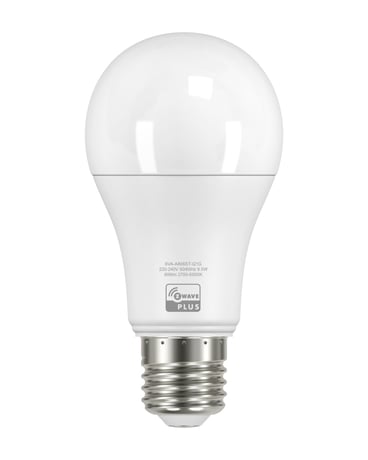
Product Picture


1 - get the temperature of NTC.
It was used to get the temperature of NTC.Size: 1 byte
Default: 0
Minimum: 0
Maximum: 0
Possible values
| From | To | Desription |
|---|---|---|
| 0 | -1 | It was used to get the temperature of NTC. |
255 - reset
Reset to factory configuration and removed the Z-Wave network. Reset Configuration parameter to default value.Size: 4 bytes
Default: 0
Minimum: 0
Maximum: 0
Possible values
| From | To | Desription |
|---|---|---|
| -2004318072 | -2004318072 | Reset to factory configuration and removed the Z-Wave network. |
| -2013265920 | -2013265920 | Reset Configuration parameter to default value. |
1. Screw the RGBW bulb into a standard E27 socket. 2. Turn on the bulb with your wall switch to apply power to the bulb. a) If you’re not using a wall switch, then use your alternate method to apply power to the bulb. 3. Activate the “included/excluded” mode on your Z-Wave controller or gateway. a) This may also be done through your associated app, if your ecosystem has that capability. 4. Toggle the wall-switch, from OFF, then to ON. a) Or use your alternate method to toggle power from OFF, then to ON. 5. The LED bulb will flash once if it has been successfully “included/ excluded” into your Z-Wave network. Note: If you are using 3rdparty Z-Wave Controller or Gateway, please refer to 3rdParty’s instruction on how to add a new device to your network. Note 2: If the bulb will not join the network after repeated attempts, please use the Factory Reset procedures to clear the bulb’s settings.
1. Screw the RGBW bulb into a standard E27 socket. 2. Turn on the bulb with your wall switch to apply power to the bulb. a) If you’re not using a wall switch, then use your alternate method to apply power to the bulb. 3. Activate the “included/excluded” mode on your Z-Wave controller or gateway. a) This may also be done through your associated app, if your ecosystem has that capability. 4. Toggle the wall-switch, from OFF, then to ON. a) Or use your alternate method to toggle power from OFF, then to ON. 5. The LED bulb will flash once if it has been successfully “included/ excluded” into your Z-Wave network. Note: If you are using 3rdparty Z-Wave Controller or Gateway, please refer to 3rdParty’s instruction on how to add a new device to your network. Note 2: If the bulb will not join the network after repeated attempts, please use the Factory Reset procedures to clear the bulb’s settings.
Physically switch the bulb on and off six (6) times for intervals of 0.5-2 seconds. After the 6th time, the bulb will flash twice indicating that it’s successfully reset.A factory default is performed when the bulb is excluded from the Z-Wave network. Please use this procedure only when the network primary controller is missing or otherwise inoperable.
| Type | Value(s) |
|---|