Zipato
Smoke Sensor, Z-Wave
ph-psg01.eu
Notification Sensor
HW: 1 FW: 1.23:01.24
SD3502
6.51.02
0x0131 (305)
0x0002 (2)
0x001E (30)
ZC10-17055607
2017-05-23 05:10:52.630142
N/A
Enhanced 232 Slave
Reporting Sleeping Slave
Yes
Zipato Smoke Sensor (Z-Wave) is designed to give early warning of developing fires by giving off the alarm sounds from its build-in alarm horn, based on Z-Wave technology.
Zipato Smoke Sensor (Z-Wave) is designed to give early warning of developing fires by giving off the alarm sounds from its build-in alarm horn, based on Z-Wave technology. Zipato Smoke Sensor is Z-Wave Plus product, it supports security, OTA and all other new features of 500 Series Z-Wave chipset.
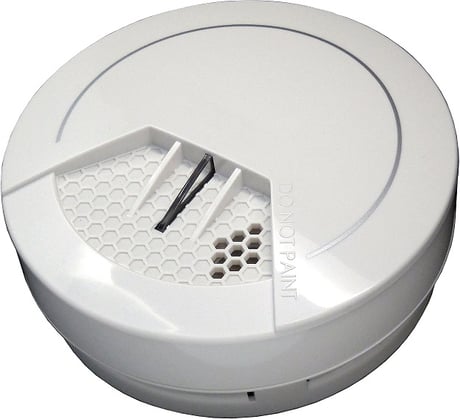
Product Picture


7 - Customer Function
Customer function switch, using bit controlSize: 1 byte
Default: 4
Minimum: 0
Maximum: 0
Possible values
| From | To | Desription |
|---|---|---|
| 4 | 4 | Notification type 0: Using Notification Report 1: Using Sensor Binary Report |
10 - Auto Report Battery Time
The interval time for auto report the battery level. 0 means turn off auto report battery. Each tick means 30 minutes. The default value is 12(6 hours)Size: 1 byte
Default: 12
Minimum: 0
Maximum: 0
Possible values
| From | To | Desription |
|---|---|---|
| 0 | 127 | The interval time for auto report the battery level. |
1. Have Z-Wave Controller entered inclusion mode. 2. Press test button three times within 1.5 seconds to enter the inclusion mode. 3. After the adding was successful, the device will wake to receive the setting from Z-Wave Controller about 20 seconds.
1. Have Z-Wave Controller entered inclusion mode. 2. Pressing test button three times within 1.5 seconds to enter the exclusion mode. Node ID has been removed.
After device is added to the network, it will wake-up once per day by default.When it wakes-up it will broadcast the “Wake Up Notification” message to the network, and wake-up 10 seconds to receive the setting commands. The wake-up interval minimum setting is 30 minutes, and maximum setting is 120 hours. Interval step is 30 minutes. If you want to wake-up device immediately, please press the button once. The device will wake-up for 10 seconds.
Notice: Use this procedure only in the event that the primary controller is lost or otherwise inoperable. 1. Have Z-Wave Controller entered inclusion mode. 2. After the red LED flash 9 times, release the test button within 2 seconds. 3. IDs are removed and all settings will reset to factory default.
| Type | Value(s) |
|---|
| Group | Type |
|---|---|
| Smoke Alarm | State Idle |
| Home Security | (Refer to parameters): State idle |