Zipato
Multisensor QUAD - MODOLITE, Z-wave
ph-psm02.eu
Notification Sensor
HW: 1 FW: 1.29:01.22
SD3502
6.51.06
0x0131 (305)
0x0002 (2)
0x000C (12)
ZC10-17065644
2017-06-08 04:20:06.448897
N/A
Enhanced 232 Slave
Reporting Sleeping Slave
Yes
Zipato Multisensor Quad offers elaborate security and ambient sensing options.
Zipato Multisensor Quad offers elaborate security and ambient sensing options. Multifunctional nature of this product allows you to detect motion, monitor opened/closed status of any opening object, measure room’s ambient temperature and light intensity.
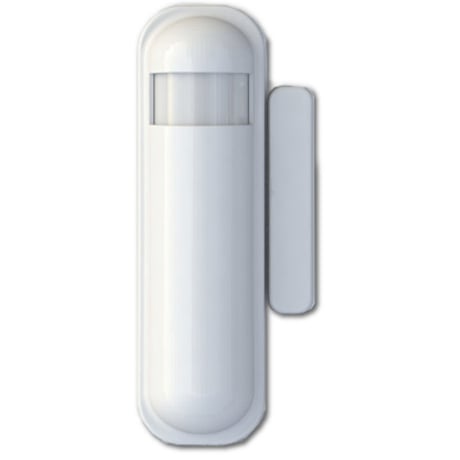
Product Picture


2 - Basic Set Level
Setting the BASIC command value to turn on the light. The 0xFF(-1) means turn on the light. For dimmer equipment 1 to 100 means the light strength.Size: 1 byte
Default: -1
Minimum: 0
Maximum: 0
Possible values
| From | To | Desription |
|---|---|---|
| -128 | 127 |
3 - PIR Sensitivity
PIR sensitivity settings. 0 means disable the PIR motion. 1 means the lowest sensitivity, 99 means the highest sensitivity. High sensitivity means can detected long distance, but if there is more noise signal in the environment, it will re-trigger too frequency.Size: 1 byte
Default: 80
Minimum: 0
Maximum: 0
Possible values
| From | To | Desription |
|---|---|---|
| 0 | 99 | PIR sensitivity settings. |
4 - Light Threshold
Setting the illumination threshold to turn on the light. When the event triggered and the environment illumination lower then the threshold, the device will turn on the light. 0 means turn off illumination detected function. And never turn on the light. 1 means darkest. 99 means brightest. 100 means turn off illumination detected function. And always turn on the light. Notice: In none test mode, only the value in 1 to 99 will enable the illumination detected function and update the illumination value.Size: 1 byte
Default: 99
Minimum: 0
Maximum: 0
Possible values
| From | To | Desription |
|---|---|---|
| 0 | 100 |
5 - Operation Mode
Operation mode. Using bit to control.Size: 1 byte
Default: 0
Minimum: 0
Maximum: 0
Possible values
| From | To | Desription |
|---|---|---|
| 2 | 2 | 1 means test mode, 0 means normal mode. |
| 4 | 4 | Disable the door/ window function. |
| 8 | 8 | Setting the temperature scale. |
| 16 | 16 | Disable the illumination report after event triggered. |
| 32 | 32 | Disable the temperature report after event triggered. |
| -128 | -128 | Disable the back key release into test mode. |
6 - Multi-Sensor Function Switch
Multisensor function switch. Using bit to control.Size: 1 byte
Default: 4
Minimum: 0
Maximum: 0
Possible values
| From | To | Desription |
|---|---|---|
| 1 | 1 | Disable magnetic integrate illumination to turn ON the lighting nodes in the association group 2. |
| 2 | 2 | Disable PIR integrate Illumination to turn ON the lighting nodes in the association group 2. |
| 4 | 4 | Disable magnetic integrate PIR to turn ON the lighting nodes in the association group 2. |
| 8 | 8 | When Bit2 is 0 (Enable), Are the device and the lighting in the same room? |
| 16 | 16 | Disable delay 5 seconds to turn off the light, when door/window closed. |
| 32 | 32 | Disable auto turn off the light, after door/ window opened to turn on the light. |
7 - Customer Function
Customer function switch, using bit control.Size: 1 byte
Default: 4
Minimum: 0
Maximum: 0
Possible values
| From | To | Desription |
|---|---|---|
| 2 | 2 | Enable sending motion OFF report. |
| 4 | 4 | Enable PIR super sensitivity mode. |
| 8 | 8 | Disable send out BASIC OFF after door closed. |
| 16 | 16 | Notification Type, 0: Using Notification Report. 1: Using Sensor Binary Report. |
| 32 | 32 | Disable Multi CC in auto report. |
| 64 | 64 | Disable to report battery state when the device triggered. |
8 - PIR Re- Detect Interval Time
In the normal mode, after the PIR motion detected, setting the re-detect time. 8 seconds per tick, default tick is 3 (24 seconds). Setting the suitable value to prevent received the trigger signal too frequently. Also can save the battery energy.Size: 1 byte
Default: 3
Minimum: 0
Maximum: 0
Possible values
| From | To | Desription |
|---|---|---|
| 1 | 127 | In the normal mode, after the PIR motion detected, setting the re-detect time. |
9 - Turn Off Light Time
After turn on the lighting, setting the delay time to turn off the lighting when the PIR motion is not detected. 8 seconds per tick, default tick is 4 (32 seconds). 0 means never send turn off light command.Size: 1 byte
Default: 4
Minimum: 0
Maximum: 0
Possible values
| From | To | Desription |
|---|---|---|
| 0 | 127 | After turn on the lighting, setting the delay time to turn off the lighting when the PIR motion is not detected. |
10 - Auto Report Battery Time
The interval time for auto report the battery level. 0 means turn off auto report battery. The default value is 12. The tick time can setting by the configuration No.20.Size: 1 byte
Default: 12
Minimum: 0
Maximum: 0
Possible values
| From | To | Desription |
|---|---|---|
| 0 | 127 | The interval time for auto report the battery level. |
11 - Auto Report Door/ Window State Time
The interval time for auto report the door/ window state. 0 means turn off auto report door/window state. The default value is 12. The tick time can setting by the configuration No.20.Size: 1 byte
Default: 12
Minimum: 0
Maximum: 0
Possible values
| From | To | Desription |
|---|---|---|
| 0 | 127 | The interval time for auto report the door/ window state. |
12 - Auto Report Illumination Time
The interval time for auto report the illumination. 0 means turn off auto report illumination. The default value is 12. The tick time can setting by the configuration No.20.Size: 1 byte
Default: 12
Minimum: 0
Maximum: 0
Possible values
| From | To | Desription |
|---|---|---|
| 0 | 127 | The interval time for auto report the illumination. |
13 - Auto Report Temperature Time
The interval time for auto report the temperature. 0 means turn off auto report illumination. The default value is 12. The tick time can setting by the configuration No.20.Size: 1 byte
Default: 12
Minimum: 0
Maximum: 0
Possible values
| From | To | Desription |
|---|---|---|
| 0 | 127 | The interval time for auto report the illumination. |
20 - Auto Report Tick Interval
The interval time for auto report each tick. Setting this configuration will effect configuration No.10, No.11, No.12 and No.13. Caution: Setting to 0 means turn off all auto report function.Size: 1 byte
Default: 30
Minimum: 0
Maximum: 0
Possible values
| From | To | Desription |
|---|---|---|
| -128 | 127 | The interval time for auto report each tick. |
21 - Temperature Differential Report
The temperature differential to report. 0 means turn off this function. The unit is Fahrenheit. Enable this function the device will detect every minutes. And when the temperature is over 140 degree Fahrenheit, it will continue report. Enable this functionality will cause some issue please see the detail in the “Temperature Report” section.Size: 1 byte
Default: 1
Minimum: 0
Maximum: 0
Possible values
| From | To | Desription |
|---|---|---|
| 0 | 127 | The temperature differential to report. |
22 - Illumination Differential Report
The illumination differential to report. 0 means turn off this function. The unit is percentage. Enable this function the device will detect every minutes. Enable this functionality will cause some issue please see the detail in the “Illumination Report” section.Size: 1 byte
Default: 0
Minimum: 0
Maximum: 0
Possible values
| From | To | Desription |
|---|---|---|
| 0 | 99 | The illumination differential to report. |
Put the Z-Wave Controller in inclusion mode. Pressing tamper key three times within 1.5 seconds will enter inclusion mode. After successful inclusion, the device will wake to receive the setting command from Z-Wave Controller in about 20 seconds.
Put the Z-Wave Controller in exclusion mode. Pressing tamper key three times within 1.5 seconds will enter exclusion mode. Node ID has been excluded.
If the user want to wake-up the device immediately, please remove the front cover, and press the tamper key once. The device will wake-up 10 seconds.
Use this procedure only in the event that the primary controller is lost or otherwise inoperable. Pressing tamper key four times within 1.5 seconds and during 4th press, hold the tamper key until LED lights up. After 3 seconds the LED will turn OFF, and after next 2 seconds, release the tamper key. If successful, the LED will light ON for one second. Otherwise, the LED will flash once.IDs are excluded and all settings will reset to factory default.
| Type | Value(s) |
|---|
| Group | Type |
|---|---|
| Home Security | (Refer to parameters): State idle |
| Sensor type |
|---|
| Air Temperature |
| Illuminance |
| Humidity |