NOKIA
Nokia Smart Home GPON ONT
G-240WZ-A
Central Controller
HW: 1 FW: 4.33:04.02
ZM5202
6.61.00
0x027E (638)
0x0002 (2)
0x0001 (1)
ZC10-17095788
2017-09-07 21:35:42.008563
N/A
Static Controller
Central Static Controller
Nokia 7368 ISAM Smart Home ONT G-240WZ-A
The Nokia 7368 Intelligent Services Access Manager (ISAM) Optical Network Terminal (ONT) G-240WZ-A is the answer for home networking delivered by Gigabit Passive Optical Network (GPON). The device is a fully integrated residential gateway with the latest Wi-Fi technology that allows for a full gigabit experience toward every device with limited wiring and boxes in a GPON fiber to the home (FTTH) environment. It has built-in concurrent dualband Wi-Fi® 802.11b/g/n and 802.11ac networking with triple play capability that simplifies the home equipment experience. Additionally, this ONT has a built-in Z-Wave interface to connect a wide range of Internet of Things (IoT) devices.
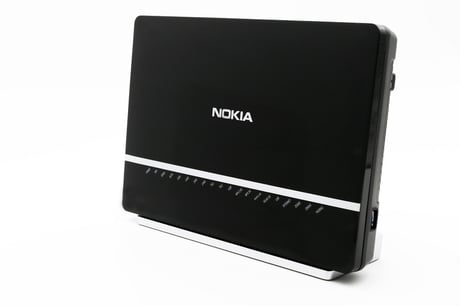
Product Picture
To include Nokia G-240WZ-A ONT into existing Z-Wave network, please use the WebGUI and follow the below steps. 1. Before starting learn mode in Nokia G-240WZ-A ONT, start inclusion mode in the another controller 2. Open webGUI 3. Select Home Device Management Page 4. Select Detailed Device page option under Z-wave controller 5. In the Device Detail page of Z-Wave controller, under Mode menu, select learn Mode Learn Mode is eanbled on Nokia G-240WZ-A ONT, it will start learning the existing Z-Wave network details from the other controller.
Follow below process to reset Nokia G-240WZ-A to factory default: 1. Login to Nokia G-240WZ-A WebGUI using credentials & IP address mentioned on the back of the device. 2. After successful login, go to SmartHome>Maintenance page 3. Click "" Factory Default"" button, confirming this operation Nokia G-240WZ-A will be reset to factory default condition. RESETTING CONTROLLER: ""If this controller is the primary controller for your network, resetting it will result in the nodes in your network being orphaned and it will be necessary after the reset to exclude and re-include all of the nodes in the network. If this controller is being used as a secondary controller in the network, use this procedure to reset this controller only in the event that the network primary controller is missing or otherwise inoperable.""
Nokia G-240WZ-A ONT supports backup and restore option of configuration details. Nokia G-240WZ-A ONT does not only support Z-Wave devices, but also supports other technologies making it possible to combine Z-Wave devices and other wireless smart devices in a single ONT box. Using Nokia SmartHome App end user can create a perfect automation scenarios where Z-Wave devices can interact with other wireless devices.
To include a Z-Wave device into the Z-Wave network using the Nokia G-240WZ-A ONT: 1. Click Pair option under device operation section in Nokia SmartHome Mobile App. This will start the Z-Wave Inclusion process and begin searching for any new device. 2. Follow the device specific inclusion instructions as mentioned in device User Manual to Pair the same into Nokia G-240WZ-A network. 3. Once the pairing is successfull Nokia G-240WZ-A will automatically identify the included device into it's Z-Wave network & displayed under All device section/Unkonwn group in Mobile APP.
To Exclude a Z-Wave device from the Z-Wave network using the Nokia G-240WZ-A ONT 1. Click Remove option under device operation section in Nokia SmartHome Mobile App. This will start the Z-Wave exclusion process. 2. Follow the device specific exclusion instructions as mentioned in device User Manual to remove the same from Nokia G-240WZ-A network. 3. Once the exclusion is successfull, Nokia G-240WZ-A will automatically remove the device from Nokia Mobile APP.
| Type | Value(s) |
|---|