Sensative
Strips-Multi-sensor
11 02 012
Notification Sensor
HW: 1 FW: 0.01:00.01
ZM5101
6.51.10
0x019A (410)
0x0003 (3)
0x000A (10)
ZC10-17085743
2017-06-07 22:51:20.472662
N/A
Routing Slave
Reporting Sleeping Slave
Ambient light, Water Leakage & Temperature: Sensor for detection of ambient light, water leakage (flood sensor) including temperature sensor. The product will be packaged in different kits together with the mounting devices to support the ambient light use case or the water leakage use case.
Strips, the ultra-thin multi sensor is now available in two new sensor models, Strips Drip and Strips Comfort. Drip and Comfort join Strips Guard, the thinnest magnet sensor in the world detecting if your windows are open and closed invisibly since 2015. Strip Drip sends an alarm signal if it detects a water leak. Its unique design allows it to be easily placed almost everywhere, including most places other sensors simply can’t fit. With soaking pads integrated in the mounting plate even small amounts of water will be detected. The built-in temperature sensor gives the possibility to combine the leakage alarm with a freeze alarm. There is also a built-in ambient light sensor that may be useful in special applications. Strips Comfort is a very accurate temperature and ambient light sensor. The unique design and mounting plate makes it easy to place almost invisibly in your home to measure temperature or control heating, air conditioning and even windows blinds which are connected to your Z-Wave smart home system. All Strips products can be used both in-doors and out-doors and the integrated custom battery gives Strips an expected lifetime of up to 10 years. For you, this means no hassle needing to change or charge batteries in your Strips sensors for the lifetime of the products!
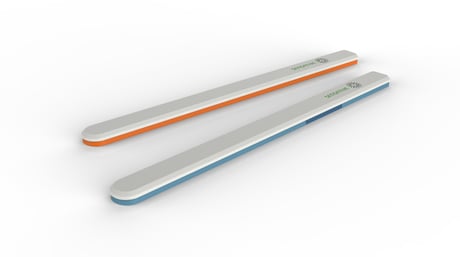
Product Picture


3 - Temperature reporting mode
0: Off 1: Normal 2: High AccuracySize: 1 byte
Default: 1
Minimum: 0
Maximum: 0
Possible values
| From | To | Desription |
|---|---|---|
| 1 | 1 | Normal |
| 2 | 2 | High Accuracy |
| 0 | 0 | Off |
4 - Temperature reporting unit
0: Celcius 1: FahrenheitSize: 1 byte
Default: 0
Minimum: 0
Maximum: 0
Possible values
| From | To | Desription |
|---|---|---|
| 0 | 0 | Celcius |
| 1 | 1 | Fahrenheit |
5 - High Temperature alarm
0: Off 1: OnSize: 1 byte
Default: 0
Minimum: 0
Maximum: 0
Possible values
| From | To | Desription |
|---|---|---|
| 0 | 0 | Off |
| 1 | 1 | On |
6 - High Temperature alarm level
-20 to + 60 degree CSize: 1 byte
Default: 60
Minimum: 0
Maximum: 0
Possible values
| From | To | Desription |
|---|---|---|
| -20 | 60 | Temperature alarm level |
7 - Low Temperature alarm
0: Off 1: OnSize: 1 byte
Default: 0
Minimum: 0
Maximum: 0
Possible values
| From | To | Desription |
|---|---|---|
| 0 | 0 | Off |
| 1 | 1 | On |
8 - Low Temperature alarm level
-20 to + 60 degree CSize: 1 byte
Default: -20
Minimum: 0
Maximum: 0
Possible values
| From | To | Desription |
|---|---|---|
| -20 | 60 | Temperature alarm level |
9 - Ambient light reporting
0: Off 1: OnSize: 1 byte
Default: 1
Minimum: 0
Maximum: 0
Possible values
| From | To | Desription |
|---|---|---|
| 0 | 0 | Off |
| 1 | 1 | On |
10 - Leakage alarm
0: Off 1: OnSize: 1 byte
Default: 1
Minimum: 0
Maximum: 0
Possible values
| From | To | Desription |
|---|---|---|
| 0 | 0 | Off |
| 1 | 1 | On |
11 - Leakage alarm level
1 to 100 (1= almost dry, 100= soaking wet)Size: 1 byte
Default: 25
Minimum: 0
Maximum: 0
Possible values
| From | To | Desription |
|---|---|---|
| 1 | 100 | (1= almost dry, 100= soaking wet) |
12 - Moisture reporting period
0-240: Number of hours between moisture reportsSize: 1 byte
Default: 0
Minimum: 0
Maximum: 0
Possible values
| From | To | Desription |
|---|---|---|
| 0 | 240 | Number of hours between moisture reports |
Set your controller to add mode (see your controller’s manual). Follow the instruction for Wake up. A long LED blink indicates that the add/remove was successful.
Set your controller to remove mode (see your controller’s manual). Follow the instruction for Wake up. A long LED blink indicates that the add/remove was successful.
Wake up Strips manually for Z-Wave communication. Place the magnet at the rounded edge. When the LED blinks, move the magnet away. Repeat twice within 10 seconds.
You may need to reset Strips if your Z-Wave controller is missing or not responding. Follow the instructions for “Wake up”, but on the 3rd repetition, leave the magnet at the rounded edge for 10 seconds. A long LED signal indicates success.
| Type | Value(s) |
|---|
| Group | Type |
|---|---|
| Heat Alarm | (Refer to parameters): State idle |
| Water Alarm | (Refer to parameters): State idle |
| Home Security | (Refer to parameters): State idle |
| Sensor type |
|---|
| Air Temperature |
| Illuminance |
| Moisture |