Kuju
insert module swtich
IMZ6220
On/Off Power Switch
HW: 2 FW: 2.23
ZM5202
6.51.09
0x0111 (273)
0x5001 (20481)
0x6260 (25184)
ZC10-17065660
2017-06-22 21:14:43.725636
N/A
Routing Slave
Always On Slave
2 Gang Insert Module Switch ,single live wire,light control
2 Gang Insert Module Switch is designed to operate without neutral wire. It operates with different loads, including Incandescent lamps, halogen lamps or LEDS. It can act as repeaters regardless of vendor to increase reliability of the network.
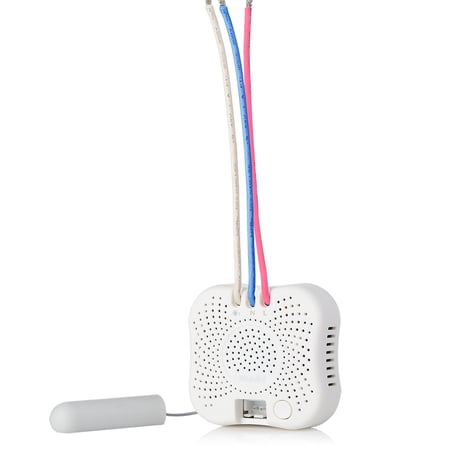
Product Picture


1 - Selection of Switch types
Size: 1 byte
Default: 255
Minimum: 0
Maximum: 0
Possible values
| From | To | Desription |
|---|---|---|
| 0 | 0 | Momentary switch panel |
| 255 | 255 | Rocker switch panel |
2 - synchronize
Rocket switch button “on/off location” synchronize with insert module on/off statusSize: 1 byte
Default: 255
Minimum: 0
Maximum: 0
Possible values
| From | To | Desription |
|---|---|---|
| 255 | 255 | Not Synchronize |
| 0 | 0 | Synchronize |
3 - power on
Default Lighting on/off when power turn onSize: 1 byte
Default: 255
Minimum: 0
Maximum: 0
Possible values
| From | To | Desription |
|---|---|---|
| 0 | 0 | Off |
| 255 | 255 | Resume last status |
Step 1) Start the gateway in Add device mode. Step 2) Trigger module start ""Device Add/Remove"" mode by program button on the module or local switch connected to the module as following: a) By program button on the module: Quick pressing the program button 3 times in 1.5 seconds ( LED quick flashing ) to enter “Device Add/Remove” mode. LED lights up for 3 sec to indicate Add process complete. b) By switch connected to the module (only available after 10 mins of AC power on ): ● Rocker Switch: Quick toggle channel 1 or channel 2 switch turn on and off 5 times( LED quick flashing ) to enter “Device Add/Remove” mode. LED lights up for 3 sec to indicate Add process complete. ● Momentary Switch: Quick pressing channel 1 or channel 2 switch button 5 times ( LED quick flashing ) to enter “Device Add/Remove” mode. LED lights up for 3 sec to indicate Add process complete.
Step 1) Start the gateway in Remove device mode. Step 2) Trigger module start ""Device Add/Remove"" mode by program button on the module or local switch connected to the module as following: a) By program button on the module: Quick pressing the program button 3 times in 1.5 seconds ( LED quick flashing ) to enter “Device Add/Remove” mode. LED lights up for 3 sec to indicate Remove process complete. b) By switch connected to the module (only available after 10 mins of AC power on ): ● Rocker Switch: Quick toggle channel 1 or channel 2 switch turn on and off 5 times( LED quick flashing ) to enter “Device Add/Remove” mode. LED lights up for 3 sec to indicate Remove process complete. ● Momentary Switch: Quick pressing channel 1 or channel 2 switch button 5 times ( LED quick flashing ) to enter “Device Add/Remove” mode. LED lights up for 3 sec to indicate Remove process complete.
Press and hold the program button for 10 sec, LED lights up for 3 sec to indicate the factory default reset complete. Note:Please use this procedure only when the network primary controller is missing or otherwise inoperable.
Advanced Configuration 1、Selection of Switch types Parameter number Parameter Size Value Description 1 1 00 Momentary switch panel 1 1 FF (default) Rocker switch panel 2、Rocket switch button “on/off location” synchronize with insert module on/off status Parameter number Parameter Size Value Description 2 1 00 Synchronize 2 1 FF (default) Not Synchronize 3、Default Lighting on/off when power turn on Parameter number Parameter Size Value Description 3 1 00 Load 1&2: off 3 1 FF(default) Load 1&2:resume last status
| Type | Value(s) |
|---|