BENETEK
Smart Hidden Door Lock with Deadbolt
BSL01
Door Lock - Keypad
HW: 33 FW: 1.01
ZM5202
6.51.09
0x032D (813)
0x3002 (12290)
0x0006 (6)
ZC10-17115834
2017-11-06 22:26:53.363608
N/A
Routing Slave
Listening Sleeping Slave
Yes
A great traditional and stylish appearance and robust door lock. it is night lock style with dead bolt, remote, key, RF card, keypad, Z-Wave.
BENETEK smart lock is night lock style with dead bolt, remote, key, RF card, keypad, Z-Wave. Material: The lock was made of zinc alloy. The lock shell is 4mm thick. And the inside structure was made of metal. 304 stainless steel panel, the thickness of 1.5mm Weight: 1800g, Power supply method: Four AA alkaline batteries and one 18650 rechargeable backup battery. Batteries lifetime: 2 groups of batteries, Rechargeable battery, Alkaline Batteries: Approximate 1 Year battery life (depend on the usage of the lock) Features of the Latch: Lock Latch length > 25mm, Comply with GA/T73-94 5.16B standard. Latch size: 25x30x15mm, it is even stronger! Low battery indicator: Prompt indicator in low pressure and It will unlock automatically when no electricity(optional) Urgent method: Mechanical damage to unlock(It has mounting hole on the lock for mechanical lock) Working environment: -30~70℃ Humidity<90% Working current (MAX): <500mA Static current of battery: <95μA Wireless remote distance: 10m (Depend on environment) Z-Wave distance(to Z-Wave server): 30m indoor Appearance size: Lock body 152x80x40(mm) Panel: 125x50x25(mm) Voltage of entrance guard: DC 6V~30V Voltage of urgent power supply: DC 5V~6.5V (Optional) Capacity of remote: 25pcs Can expand Capacity of password: 13 sets capacity of card: 104pcs can expand Z-Wave frequency: 868.4 MHz - China/Europe, 908.4 MHz - USA, 921.4 MHz – Australia/New Zealand, 869.2 MHz - Russia
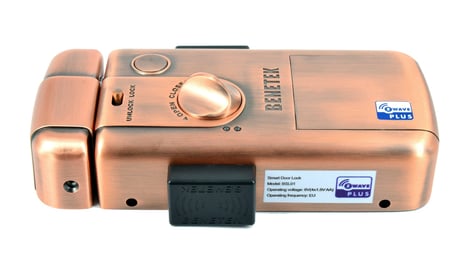
Product Picture
1) Ensure the SHDL is powered and the battery is fully charged. 2) Set the main controller into the Add device mode (see a main controller’s operating manual). 3) Triple click Z-Wave button on the Z-Wave module(inside lock body) within 1.5 seconds, the LED will flicker rapidly while inclusion process implement and light on 2 second after processing complete.
1) Ensure the SHDL is powered and the battery is fully charged. 2) Set the main controller into the Remove device mode (see a main controller’s operating manual). 3) Triple click Z-Wave button on the Z-Wave module(inside lock body) within 1.5 seconds, the LED will flicker rapidly while exclusion process implement and light on 2 second after processing complete.
Smart Hidden Door Lock restores factory default automatically when the device is excluded. Please use this procedure only when the network primary controller is missing or otherwise inoperable.
BASIC command class maps to Door Lock Operation command class. Due to SHDL only re-lock automatic while door close and detect by magnetic on the lock, so if Door Lock receives either a Door Lock Operation Set (secure the door) or a Basic Set (0xFF) the command is rejected and always fail in Application Reject Command reply and follow with current door lock status report.
| Type | Value(s) |
|---|