Good Way Technology, Co., Ltd
Light Dimmer Switch
TD14000
Light Dimmer Switch
HW: 255 FW: 2.07
ZM5101
6.51.07
0x0068 (104)
0x0003 (3)
0x000B (11)
ZC10-17075687
2017-06-15 18:47:06.396925
N/A
Enhanced 232 Slave
Always On Slave
Light Dimmer Switch
*Apart from traditional RGB channels,it supports the additional white light channel, which allows for adding pastel color to the color scheme *RGBW Dimmer allows to connect four output channels and independently control each light sources.(single channel output power max to 8A) *Control your color lighting either manually via switches or your smartphone,or automatically via a presence detector *LED lighting perfectly suits modern design, you can create your own color compositions depending on your mood, helping you feel warm or peaceful
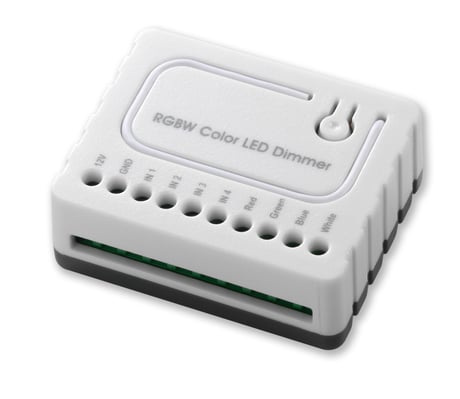
Product Picture


1 - Switch Type
1 1:Toggle Mode 2: Momentary ModeSize: 1 byte
Default: 1
Minimum: 0
Maximum: 0
Possible values
| From | To | Desription |
|---|---|---|
| 1 | 2 | Toggle/Momentary Mode |
2 - Switch mode
1: Normal Mode 2: Brightness Mode 3: Rainbow ModeSize: 1 byte
Default: 1
Minimum: 0
Maximum: 0
Possible values
| From | To | Desription |
|---|---|---|
| 1 | 3 | Normal/Brightness/Rainbow Mode |
3 - Auto Scene Mode Set
1: Ocean 2: Lightning 3: Rainbow 4: Snow 5: SunSize: 1 byte
Default: 0
Minimum: 0
Maximum: 0
Possible values
| From | To | Desription |
|---|---|---|
| 1 | 5 | Scen Change |
4 - Auto Scene Mode Duration
Adjust Scene delay time: 1. When Value is 1(0x01)~127(0x7F), the delay duration is 1 sec.~127 sec. 2. When Value is 128(0x80)~255(0xFE), the delay duration is 1 min.~127 min.Size: 1 byte
Default: 1
Minimum: 0
Maximum: 0
Possible values
| From | To | Desription |
|---|---|---|
| 1 | 127 | duration is second |
| 128 | 255 | duration is min |
Include Button - Inclusion, press 3 times in 2 seconds
Exclude Button - exclusion, press 3 times in 2 seconds
Exclude the R.G.B.W. Color LED Dimmer into the Z-Wave network, press 3 times in 2 seconds. If the device is properly excluded, the green light will blink and the data will be reset to the factory default values. Please note that re-including the product will reset the data to the default values. Use this procedure only in the event that the network primary controller is missing or otherwise inoperable.
| Type | Value(s) |
|---|