Popp
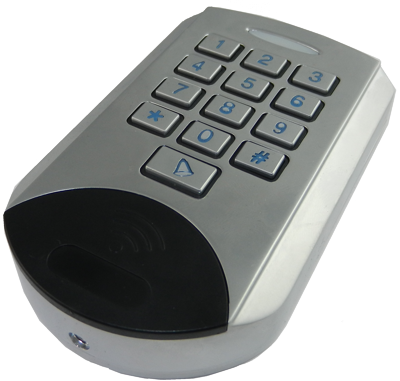
Z-Wave Keypad
700045.0
Notification Sensor
HW: 1 FW: 1.06
ZM5101
6.51.10
0x0154 (340)
0x0005 (5)
0x0002 (2)
ZC10-17085733
2017-06-22 22:28:53.80558
N/A
Portable Controller
Reporting Portable Controller
Yes
12 button numerical keypad with extra ring button, can work as primary or as secondary controller
This keypad is a security enabled Z-Wave Plus product. An security enabled Z-Wave controller must be used to fully utilize this product. The keypad allows securely controlling devices - such as door locks - and trigger actions in a gateway – such as arm/disarm alarm system– based on the entry of certain key codes. Additionally a bell key allows emulating a doorbell by operating e.g. a chimney or a light or both. The device can operate in two different modes. The mode is chosen the way the device is included into a Z-Wave network: (a) Stand Alone Mode. In this case the keypad acts as the primary network controller and will include other devices such as e.g. a strike lock control or a chimney. No other central controller is needed. The management of user codes is done using the keypad itself. (b) Network Mode. The keypad is included as additional device into an exiting network. In Z-Wave terms it will then act as secondary controller. It will send commands to a central controller and is managed by this controller. In this mode the device can still directly control door locks but it can also be used to trigger scenes in a central controller. The device is protected by a tamper switch sending out an alarm message when the enclosure is opened.


1 - Door Lock Automatic Secure Timeout
After this time a CLOSE command is sent to the controlled door lock. On default no CLOSE command is sent assuming that the strike lock has its own timeout setSize: 1 byte
Default: 0
Minimum: 0
Maximum: 0
Possible values
| From | To | Desription |
|---|---|---|
| 0 | 127 | seconds |
2 - Ring Button Press Basic Command OFF Timeout
After this time the Door Bell will receive an OF command regardless of the actuall button is pressed or notSize: 1 byte
Default: 3
Minimum: 0
Maximum: 0
Possible values
| From | To | Desription |
|---|---|---|
| 0 | 127 | seconds |
3 - Ring Button ON Command
This value is sent into Association Group 3 when the door bell button is pressed.Size: 1 byte
Default: 255
Minimum: 0
Maximum: 0
Possible values
| From | To | Desription |
|---|---|---|
| 0 | 99 | Basic Set Command Value |
| 255 | 255 | Basic Set Command Value |
4 - Ring Button OFF Command
This value is sent into Association Group 3 when the door bell button is released or the timeout has reached.Size: 1 byte
Default: 0
Minimum: 0
Maximum: 0
Possible values
| From | To | Desription |
|---|---|---|
| 0 | 99 | Basic Set Command Value |
| 255 | 255 | Basic Set Command Value |
5 - Central Scene ID for User Codes
This parameter defines if different user codes shall cause individual or similar scene ID sent to the main controller.Size: 1 byte
Default: 0
Minimum: 0
Maximum: 0
Possible values
| From | To | Desription |
|---|---|---|
| 0 | 0 | Constant Scene ID 20 for all User Codes |
| 1 | 1 | Individual User Codes 1 ... 20 |
6 - Buzzer Confirmation
This parameter defines if the internal buzzer shall be used to confirm button presses.Size: 1 byte
Default: 0
Minimum: 0
Maximum: 0
Possible values
| From | To | Desription |
|---|---|---|
| 0 | 0 | Disabled |
| 1 | 1 | Enabled |
Turn into Management Mode (remove cover), hit button 1 and confirm with * (Star Key)
Turn into Management Mode (remove cover), hit button 2 and confirm with * (Star Key)
Turn into Management Mode (remove cover), hit button 4 and confirm with * (Star Key)
Hit the RING button
Turn into Management Mode (remove cover), hit button 5 and keep button * (star key) pushed for 10 seconds. This procedure should only be used when the primary controller is inoperable.
| Type | Value(s) |
|---|
| Group | Type |
|---|---|
| Access Control | (Refer to parameters): State idle |