Wink
Wink Motion Sensor
Wink Motion Sensor
Notification Sensor
HW: 66 FW: 3.80
ZM5202
6.51.06
0x017F (383)
0x0101 (257)
0x0001 (1)
ZC10-17075686
2017-07-11 19:46:59.437881
N/A
Routing Slave
Reporting Sleeping Slave
Yes
Z-Wave Plus passive Infrared (PIR) motion sensor with ambient light sensing capabilities and a magnetic mount.
The Wink Motion Sensor is a Z-Wave Plus battery-powered device that senses motion in your home, helping you monitor activity around your home to keep your family safe. When motion is detected, your sensor will blink with a blue LED indicator and your Wink Hub or other Z-Wave Plus certified hub can send an alert to your smartphone, set off an alarm or chime, or trigger an automation such as turning on your lights. This sensor has flexible mounting options, convenient for multi surface installation on wall, ceiling, shelf or tabletop. The sensor body design with magnetic cradle and angled facet offers easy line-of-sight perspective of the area you wish to monitor, with an extra-wide 110° coverage area, and uses a spherical magnet to hold the sensor body in place, so that it can point in any direction. The Wink Motion Sensor offers an extra-long z-wave wireless range of up to 150 feet, and requires a Wink Hub or other Z-Wave Plus certified hub for operation. The Motion Sensor comes with a CR123A 3.0V battery and has a three-year battery life, and will send an alert to your smartphone when the device has low battery. · Z-Wave Plus Certified · Requires a Z-Wave Plus Certified Hub to operate · Works with all Z-Wave Plus compatible networks · Flexible Mounting Options · 110° Extra-Wide Coverage Area · Up to 150 feet range · Three-Year Battery Life (CR123A Battery included) · Low Battery Indication · Measurements in millimeters: 45 x 45 x 56.2 mm (combined depth of mount and sensor)
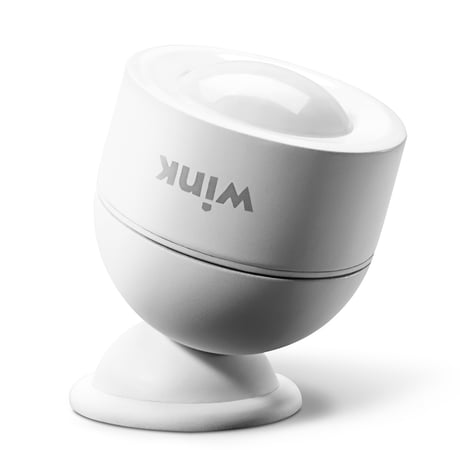
Product Picture


1 - Sensitivity Level
This parameter sets the sensitivity of the Motion Detector. It is a unitless parameter ranging in values from 8 up to 255, with 8 being the highest sensitivity level and 255 being the lowest. After physical installation, make sure the farthest part of the coverage area is still “visible” to the Motion Detector by adjusting this parameter.Size: 1 byte
Default: 12
Minimum: 0
Maximum: 0
Possible values
| From | To | Desription |
|---|---|---|
| 8 | 255 | Sensitivity Level |
2 - Motion Cleared Time Delay
This parameters sets the amount of time after a motion event before the Motion Detector reports no activity to the main controller (see “Notification” and “Binary Sensor” command classes on page 14-15 for more information.) This also sets the amount of time before a BASIC_SET(00) command is sent to Association Group 2 to turn off any activated devices. This value must be higher than the value of Parameter 6, and if this parameter is reset to default settings, Parameter 6 will also be reset. See “Group 2” on page 14 for more information.Size: 2 bytes
Default: 30
Minimum: 0
Maximum: 0
Possible values
| From | To | Desription |
|---|---|---|
| 5 | 600 | In Seconds |
3 - Basic Set Level
This parameter sets the value sent by the BASIC_SET command to Association Group 2 (for more information, see “Group 2” on page 14.)Size: 1 byte
Default: 255
Minimum: 0
Maximum: 0
Possible values
| From | To | Desription |
|---|---|---|
| 0 | 0 | Turn Off |
| 1 | 99 | Dim Level |
| 255 | 255 | On |
4 - Enable/Disable Motion Detection
This setting enables or disables motion detection.Size: 1 byte
Default: 1
Minimum: 0
Maximum: 0
Possible values
| From | To | Desription |
|---|---|---|
| 0 | 0 | Motion Detection Disabled |
| 1 | 1 | Motion Detection Enabled |
5 - Group 2 Ambient Light Threshold
If Parameter 8 is enabled, this setting sets the light level below which the Motion Detector will send BASIC_SET commands to Association Group 2 when motion is detected. For more information, see “Group 2” on page 14.Size: 2 bytes
Default: 100
Minimum: 0
Maximum: 0
Possible values
| From | To | Desription |
|---|---|---|
| 5 | 1000 | in Lux |
6 - Retrigger Interval
After each motion event, the Motion Detector is disabled for the amount of time set by this parameter before it can send out another “Motion Detected” Notification Report/Binary Sensor Report. This value must be lower than the value of Parameter 2, and if this parameter is reset to default settings, Parameter 2 will also be reset.Size: 1 byte
Default: 8
Minimum: 0
Maximum: 0
Possible values
| From | To | Desription |
|---|---|---|
| 1 | 8 | in Seconds |
7 - Light Sensing Interval
This parameter sets the amount of time between each successive ambient light level reading that is sent. This value must be less than the Wakeup Interval Time (which is 43,200 seconds or 12 hours by default.)Size: 2 bytes
Default: 180
Minimum: 0
Maximum: 0
Possible values
| From | To | Desription |
|---|---|---|
| 60 | 3600 | in Seconds |
8 - Enable/Disable Group 2 Ambient Light Threshold
If this parameter is enabled, the Motion Detector will only send Basic Set commands to Associon Group 2 if the ambient light level is below the value set in Parameter 05. For more information, see “Group 2” on page 14.Size: 1 byte
Default: 0
Minimum: 0
Maximum: 0
Possible values
| From | To | Desription |
|---|---|---|
| 0 | 0 | Group 2 Ambient Light Threshold Disabled |
| 1 | 1 | Group 2 Ambient Light Threshold Enabled |
9 - Ambient Light Sensitivity Level
This Parameter sets the minimum change in ambient light level (in lux) the Motion Detector must detect before a Multilevel Sensor Report is sent to the main controller.Size: 1 byte
Default: 100
Minimum: 0
Maximum: 0
Possible values
| From | To | Desription |
|---|---|---|
| 0 | 255 | in Lux |
10 - Enable/Disable LED INDICATOR
If this parameter is enabled, the LED INDICATOR will flash everytime there motion is detected. If this is disabled, the LED INDICATOR will not flash to indicate motion events.Size: 1 byte
Default: 1
Minimum: 0
Maximum: 0
Possible values
| From | To | Desription |
|---|---|---|
| 0 | 0 | LED Disabled |
| 1 | 1 | LED Enabled |
Follow the instructions for your Z-Wave certified Controller to enter inclusion mode. When prompted by the Controller: 1. For proper inclusion, bring the Motion Detector within range of your Controller. 2. Pull the tab on the side of the sensor to power on, or remove then re-install the batteries. The LED indicator will flash five times indicating inclusion.
Follow the instructions for your Z-Wave certified Controller to enter exclusion mode. When prompted by the Controller: 1. Remove the cover of the Motion Detector and be sure it is powered on. 2. Press the Connect Button on the bottom of the device quickly 3 times in a row. The LED Indicator will flash five times indicating exclusion/disconnection.
Because the Motion Detector is a battery powered device, it wakes up on regular intervals to give battery and other status updates to the controller, as well as to accept configuration settings from the controller. This helps to extend the battery life. The device can be forced to wake up to submit these reports or accept new settings immediately by simply pressing and holding the BUTTON for two seconds. The LED INDICATOR will flash once indicating successful wake up.
To disconnect from the Z-Wave Network and restore factory default settings: 1. Remove the cover of the Motion Detector and be sure it is powered on. 2. Hold the Connect Button for 10 seconds until the LED indicator blinks once, then release the button. Only do this if the controller is disconnected or otherwise unreachable!
| Type | Value(s) |
|---|
| Group | Type |
|---|---|
| Access Control | (Refer to parameters): State idle |
| Sensor type |
|---|
| General Purpose |
| Illuminance |