White Rabbit Electronics
White Rabbit Smart Hub
SH-ZW+CBB+UT
Central Controller
HW: 1 FW: 4.33:01.00
ZM5304
6.61.00
0x027B (635)
0x0001 (1)
0x0003 (3)
ZC10-17105789
2017-09-28 21:49:52.817694
N/A
Static Controller
Central Static Controller
Yes
White Rabbit Electronics is developing the Smart Hub, with smartphone apps & cloud services, for a fully integrated security and home automation controller for the residential market.
There were several key concepts in the development of the Smart Hub. The product relies on the high acceptance of smartphones in our society and the presence of Wi-Fi networks in the homes. The Smart Hub utilizes a patent-pending technology to determine who is home and who is away based upon these two assumptions. The Smart Hub is always aware of the presence of the members of the household and the members of the household are always aware of the status of their home. Other guiding attributes were: • A “security first” approach plus home automation • A simplistic installation • User friendly interfaces (mobile app & web portal) • A system requiring minimal user interaction • To be device and sensor agnostic so to be compatible with many existing technologies • Modern, sleek styling The Smart Hub is the next evolution in security and home control as it does not require a keypad for arming and disarming of the security system. It is compatible with the primary wireless technologies for the IoT, such as Z-Wave, Wi-Fi and ZigBee, as well as legacy wireless technologies for security devices by such leading manufacturers as Honeywell, GE, DSC, 2Gig and Elk Products. Also, any IP Wi-Fi cameras supporting Real Time Streaming Protocol (RTSP) are also compatible. With cameras in the home, there is always a concern with privacy, so additional controls were developed into the product to provide peace of mind and allow full control of the streaming of any video based on authority levels by camera, by user, based on who is home.
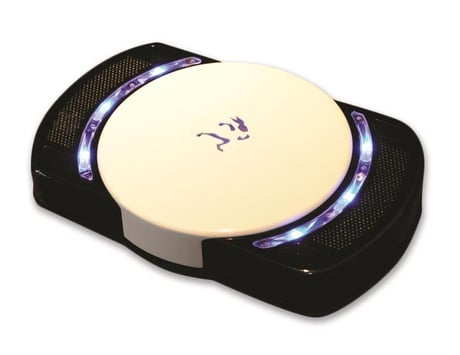
Product Picture
Click on the Z-Wave Toolbox link found on the Admin tab. Here you will see the Learn Mode button. First place the other controller into Inclusion mode and then press this Learn Mode button. This will include the Smart Hub into another network.
Click on the Z-Wave Toolbox link found on the Admin tab. Here you will see the Reset Defaults button. Pressing this button brings up the following warning. CAUTION: This will factory reset the Z-Wave controller in the hub. This will cause all of the devices to become disconnected from the hub, and they'll have to be excluded and included again to function. In addition, any pending edits that you've made in the portal will be lost. Are you sure you want to continue? Selecting Yes will result in a complete reset of the controller.
Add a new device by going to the device tab. Click the Plus button on the room you wish to add the device into and walk through the selection wizard to choose the proper device. If you do not find your specific device, you can always include any device with the generic Z-wave device found under the Other category. Once you have added a device, you will be given the option to continue directly to pairing mode which starts the inclusion process. If you have already added a device but have not included it (or have excluded it in the past) you can select the Device Details and then change to the Actions tab. There you will find a Pair Hardware link. Add or Pair is synonymous to Inclusion for Z-Wave.
To exclude a device, you select the Device Details and then change to the Actions tab. There you will find an Unpair Device link. You can also exclude any device by going to the Z-Wave Toolbox and using the Exclude/Unpair button. This is useful when a device may be currently included into another network. Unpair or Remove is synonymous to Exclusion for Z-Wave.
| Type | Value(s) |
|---|