EUROtronic Technology GmbH
Spirit Z-Wave Plus
4260012711110.0
Thermostat - HVAC
HW: 49 FW: 0.16:00.10
ZM5202
6.71.01
0x0148 (328)
0x0003 (3)
0x0001 (1)
ZC10-17095777
2017-08-15 00:21:00.826114
N/A
Enhanced 232 Slave
Listening Sleeping Slave
Yes
Smart Radiator Z-Wave Thermostat including intelligent regulation algorithm for European water radiators. FLiRS for quick response times and LED Button for user interaction signalling.
• Easy control for water radiators from any Z-Wave Controller • Fits most European water radiators (wide range of additional adaptors for different manufacturers available) • FLiRS for quick response time • LED Backlit LCD • Metal nut for reliable connection to the radiator • 2 buttons for easy temperature regulation • Battery level indicator • Child Lock • Over the Air update • UK-Mode for upside down installation • Open Window detection • Automatic frost protection
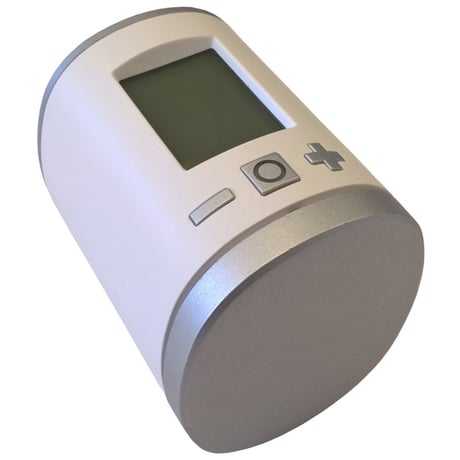
Product Picture


1 - LCD invert
Inverts the LCD orientationSize: 1 byte
Default: 0
Minimum: 0
Maximum: 0
Possible values
| From | To | Desription |
|---|---|---|
| 0 | 0 | Normal orientation |
| 1 | 1 | LCD content inverted |
2 - LCD Timeout
Configures the timeout of the LCD.Size: 1 byte
Default: 0
Minimum: 0
Maximum: 0
Possible values
| From | To | Desription |
|---|---|---|
| 0 | 0 | LCD always on |
| 5 | 30 | LCD timeout in seconds |
3 - Backlight
Enables or disables the LCD-Backlight.Size: 1 byte
Default: 1
Minimum: 0
Maximum: 0
Possible values
| From | To | Desription |
|---|---|---|
| 0 | 0 | Backlight disabled |
| 1 | 1 | Backlight enabled |
4 - Battery report
Enables or disables unsolicited battery reporting once a day.Size: 1 byte
Default: 1
Minimum: 0
Maximum: 0
Possible values
| From | To | Desription |
|---|---|---|
| 0 | 0 | Battery reporting disabled |
| 1 | 1 | Battery reporting enabled |
5 - Measured temperature report
Reports the measured roomtemperature on change.Size: 1 byte
Default: 5
Minimum: 0
Maximum: 0
Possible values
| From | To | Desription |
|---|---|---|
| 0 | 0 | Reporting disabled |
| 1 | 50 | Reporting Delta in 1/10 Celcius |
6 - Valve percentage report
Reports the valve percentage on change.Size: 1 byte
Default: 0
Minimum: 0
Maximum: 0
Possible values
| From | To | Desription |
|---|---|---|
| 0 | 0 | Reporting disabled |
| 1 | 100 | Reporting Delta in percent |
7 - Window open detection
Configures the sensitivity of the window open detection. Sensitivity level: 1 low 2 medium 3 highSize: 1 byte
Default: 2
Minimum: 0
Maximum: 0
Possible values
| From | To | Desription |
|---|---|---|
| 0 | 0 | Detection disabled |
| 1 | 3 | Sensitivity level |
8 - Measured temperature offset
Configures an offset for the measured temperature. Set the offset to -128 (0x80) if measured temperature is provided externally.Size: 1 byte
Default: 0
Minimum: 0
Maximum: 0
Possible values
| From | To | Desription |
|---|---|---|
| -50 | 50 | Offset in 1/10 Celcius |
| -128 | -128 | Temperature is supplied externaly |
Start Inclusion mode of your primary Z-Wave Controller. Press the Boost-Button.
Start Exclusion mode of your primary Z-Wave Controller. Now press and hold the boost button of the Spirit Z-Wave Plus for at least 5 seconds.
Please use this procedure only when the network primary controller is missing or otherwise inoperable. Remove batteries. Press and hold boost button. While still holding boost button insert batteries. The LCD shows RES. Release boost button. To perform the factory reset press boost button.
| Type | Value(s) |
|---|
| Group | Type |
|---|---|
| Power Management | (Refer to parameters): State idle |
| System | (Refer to parameters): State idle |
| Sensor type |
|---|
| Air Temperature |