Yale
Keyless Connected
YD-01-CON
Door Lock - Keypad
HW: 32 FW: 32.16:13.16
ZM5202
6.71.01
0x0129 (297)
0x0007 (7)
0x0001 (1)
ZC10-17115874
2017-11-21 02:30:16.141081
N/A
Enhanced 232 Slave
Listening Sleeping Slave
Yes
The Yale Keyless Connected smart lock gives you freedom to secure your home without the need for a key. Simple to use, you now have complete control on how you unlock your door.
Keyless Connected Ready smart lock Features Replaces existing rim cylinder used on a 60mm backset nightlatch Touchscreen with backlit keypad Battery operated Low battery indicator with emergency battery connection User codes and settings remain if batteries are replaced 3 minute lock out if code is entered incorrectly 5 times Tamper alarm For use on timber doors 2 year guarantee
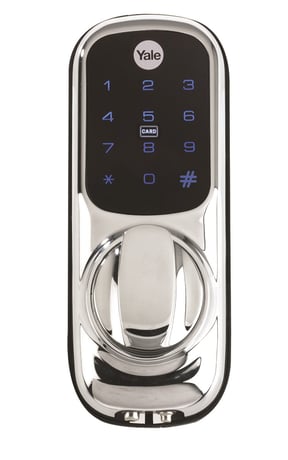
Product Picture


1 - Volume
Volume of product during operationSize: 1 byte
Default: 3
Minimum: 0
Maximum: 0
Possible values
| From | To | Desription |
|---|---|---|
| 1 | 1 | Silent |
| 2 | 2 | Low Volume |
| 3 | 3 | High Volume |
2 - Auto Relock
Auto relock On/OffSize: 1 byte
Default: 255
Minimum: 0
Maximum: 0
Possible values
| From | To | Desription |
|---|---|---|
| 0 | 0 | Auto relock Off |
| 255 | 255 | Aut Relock On |
3 - Relock Time
Amount of time lock is opened before it relocks, after it has been unlocked by PIN code, key cards or key tagsSize: 1 byte
Default: 7
Minimum: 0
Maximum: 0
Possible values
| From | To | Desription |
|---|---|---|
| 7 | 60 | Amount of time (secs) |
6 - Remote Relock Time
Amount of time lock is opened before it relocks, after it has been unlocked by Z-Wave hubSize: 1 byte
Default: 10
Minimum: 0
Maximum: 0
Possible values
| From | To | Desription |
|---|---|---|
| 10 | 90 | Amount of time (secs) |
Put the Z-Wave controller into add mode Enter the Master code on the lock, followed by # Press the 4 button, followed by # Press the 1 button followed by # Refer to the operation manual of the Z-Wave controller to complete the add/inclusion process For more information on this please visit: www.yale.co.uk/smart-living
Put the Z-Wave controller into remove mode Enter the Master code on the lock, followed by # Press the 4 button, followed by # Press the 3 button followed by # Refer to the operation manual of the Z-Wave controller to complete the remove/exclusion process For more information on this please visit: www.yale.co.uk/smart-living
Enter the Master code on the lock, followed by # Press the 4 button, followed by # Press the 0 button followed by # Please use this procedure only when the network controller is missing or inoperable
| Type | Value(s) |
|---|