Simon
S100 Rocker iO for Dimmer
10002020-13X
Light Dimmer Switch
HW: 1 FW: 4.24:78.59:70.48
ZM5202
6.51.07
0x0267 (615)
0x0007 (7)
0x0000 (0)
ZC10-18026010
2018-01-09 22:30:36.947769
N/A
Enhanced Slave
Always On Slave
Simon iO Dimmer is integrated by Electronic Dimmer and a Rocker, that provides Z-Wave communication attributes. The touch surface offers an slider area in order to adjust the light level showing the dimming intensit y with 7 LEDs .
Simon iO Dimmer is ready to operate with Z-Wave controllers and configured to be managed by Simon100 IO APP using the HUB plug IO for getting a better user experience. Sending the Blind Up/Down or setting a specific position.
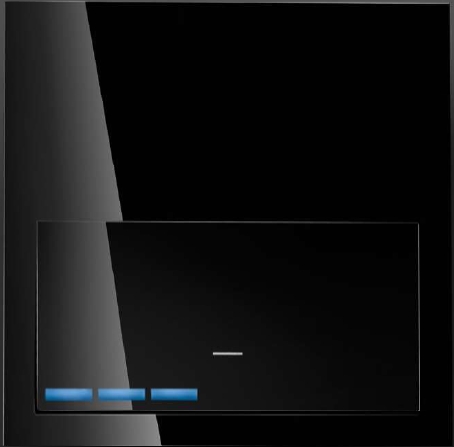
Product Picture


1 - Association LED
Activates the Central LED. Configuration Used by Masters iO in order to identify the devices associated to their Group2 during manual association process.Size: 1 byte
Default: 0
Minimum: 0
Maximum: 0
Possible values
| From | To | Desription |
|---|---|---|
| 0 | 0 | Turns the LED OFF |
| 1 | 255 | Turns the LED ON |
4 - Set Time
Sets the "Set Time" that will take the Dimmer to go from 0% to 100% This value must be set in hexadecimal format, and can accept these values: 0 --> Set Time is 0. 0x01...0x7F --> Set Time is from 1 to 127 seconds. (1 second resolution) 0x80...0xfE --> Set Time is from 1 to 127 seconds. (1 minute resolution)Size: 1 byte
Default: 0
Minimum: 0
Maximum: 0
Possible values
| From | To | Desription |
|---|---|---|
| 0 | 0 | Sets Time is 0 |
| 1 | 127 | Set Time is set in seconds from 1 to 127 minutes |
| 128 | 254 | Set Time is set in minutes from 1 to 127 minutes |
5 - Fade Time
Sets the "Fade Time" that will take the Dimmer to go from 100% to 0% This value must be set in hexadecimal format, and can accept these values: 0 --> Fade Time is 0. 0x01...0x7F --> Fade Time is from 1 to 127 seconds. (1 second resolution) 0x80...0xfE --> Fade Time is from 1 to 127 seconds. (1 minute resolution)Size: 1 byte
Default: 0
Minimum: 0
Maximum: 0
Possible values
| From | To | Desription |
|---|---|---|
| 0 | 0 | Fade Time is 0 seconds |
| 1 | 127 | Fade Time is set in seconds from 1 to 127 seconds |
| 128 | 254 | Fade Time is set in minutes from 1 to 127 minutes |
6 - Min Dimming %
Relative adjust used to set the minimum regulation value. This adjust is done in reference to internal values, accepted dimming values will always be from 1 to 0x63. Minimum Value must be < than Maximum Value.Size: 1 byte
Default: 1
Minimum: 0
Maximum: 0
Possible values
| From | To | Desription |
|---|---|---|
| 1 | 98 | minimum internal dimming value |
7 - Max Dimming %
Relative adjust used to set the maximum regulation value. This adjust is done in reference to internal values, accepted dimming values will always be from 1 to 0x63. Maximum Value must be > then Minimum Value.Size: 1 byte
Default: 100
Minimum: 0
Maximum: 0
Possible values
| From | To | Desription |
|---|---|---|
| 2 | 99 | maximum internal dimming value |
9 - Callibration
Write only configuration used to request the automatic adjust of UP and DOWN times.Size: 1 byte
Default: 0
Minimum: 0
Maximum: 0
Possible values
| From | To | Desription |
|---|---|---|
| 255 | 255 | Sunblind starts its callibration process |
10 - Delay ON
Time that Dimmer delays the activation of the load after it receives an ON request. This value must be set in hexadecimal format, and can accept these values: 0 --> ON Delay is 0. 0x01...0x7F --> Delay ON is from 1 to 127 seconds. (1 second resolution) 0x80...0xfE --> Delay ON is from 1 to 127 seconds. (1 minute resolution)Size: 1 byte
Default: 0
Minimum: 0
Maximum: 0
Possible values
| From | To | Desription |
|---|---|---|
| 0 | 0 | ON Delay is 0 seconds |
| 1 | 127 | ON Delay is set in seconds from 1 to 127 seconds |
| 128 | 254 | ON Delay is set in minutes from 1 to 127 minutes |
11 - Activation Time
Time that Dimmer activates of the load after it turns the load ON. This value must be set in hexadecimal format, and can accept these values: 0 --> Activation Time is 0. 0x01...0x7F --> Activation Time is from 1 to 127 seconds. (1 second resolution) 0x80...0xfE --> Activation Time is from 1 to 127 seconds. (1 minute resolution)Size: 1 byte
Default: 0
Minimum: 0
Maximum: 0
Possible values
| From | To | Desription |
|---|---|---|
| 0 | 0 | Activation Time is 0 seconds |
| 1 | 127 | Activation Time is set in seconds from 1 to 127 seconds |
| 128 | 154 | Activation Time is set in minutes from 1 to 127 minutes |
12 - Behavior of LED in Repose
Sets the Left and Right Leds to 20% in order to find the device and the touch areas at night.Size: 1 byte
Default: 0
Minimum: 0
Maximum: 0
Possible values
| From | To | Desription |
|---|---|---|
| 0 | 0 | Left and Right LEDs OFF |
| 1 | 255 | Left and Right LEDs ON at 20percent |
13 - Lock Input
Locks the local control of the sunblind. This configuration does not modifies the control via Z-Wave.Size: 1 byte
Default: 0
Minimum: 0
Maximum: 0
Possible values
| From | To | Desription |
|---|---|---|
| 0 | 0 | Local action enabled |
| 1 | 255 | Local action locked |
15 - Reset Default
Write only parameter used to restore configurations or perform a completely restore default.Size: 2 bytes
Default: 0
Minimum: 0
Maximum: 0
Possible values
| From | To | Desription |
|---|---|---|
| 17170 | 17170 | Configuration values are restored |
| 39015 | 39015 | Factory reset. |
16 - Delay OFF
Time that Dimmer delays the deactivation of the load after it receives an OFF request. This value must be set in hexadecimal format, and can accept these values: 0 --> Delay OFF is 0. 0x01...0x7F --> Delay OFF is from 1 to 127 seconds. (1 second resolution) 0x80...0xfE --> Delay OFF is from 1 to 127 seconds. (1 minute resolution)Size: 1 byte
Default: 0
Minimum: 0
Maximum: 0
Possible values
| From | To | Desription |
|---|---|---|
| 0 | 0 | OFF Delay is 0 seconds |
| 1 | 127 | OFF Delay |
| 128 | 254 | OFF Delay is set in minutes from 1 to 127 minutes |
19 - Press Action
Defines the action to be performed when key is pressed.Size: 1 byte
Default: 5
Minimum: 0
Maximum: 0
Possible values
| From | To | Desription |
|---|---|---|
| 0 | 0 | When short press, the device toggles the load. The Slider does not work. |
| 1 | 1 | When short press, the device turns ON the load. The Slider does not work. |
| 2 | 2 | When short press, the device turns OFF the load. The Slider does not works. |
| 4 | 4 | When short press, the device turns ON the load. When hold press from 2seconds to 10seconds device turns OFF the load. The Slider does not works with this configuration, the device will not send the Node Info neither Show the LEDs feedback with this press action. The Slider does not work. |
| 5 | 5 | When short press, the device toggles the load. The Slider dims the load when it is ON. |
20 - Identify
Write only value that performs a fast blink on Central LED during 5 seconds in order to identify the device when it is installed in a multiple frame.Size: 1 byte
Default: 0
Minimum: 0
Maximum: 0
Possible values
| From | To | Desription |
|---|---|---|
| 1 | 255 | Central LED performs a fast blink |
21 - Load State
Read only 2 Byte configuration parameter used to read the dimmer state. Byte 0 is used to know the load state ON or OFF. 0 Dimmer is OFF. 1 Dimmer is ON. Byte 1 is used to Know the last active dimming percentage.Size: 2 bytes
Default: 0
Minimum: 0
Maximum: 0
Possible values
| From | To | Desription |
|---|---|---|
| 1 | 99 | Load is OFF and las timming value is from 1% to 99% |
| 256 | 355 | Load is ON Dimmed at 1% to 99% |
23 - Calibration Required
Read only configuration used to know is device needs to be calibrated in order to work properly.Size: 1 byte
Default: 0
Minimum: 0
Maximum: 0
Possible values
| From | To | Desription |
|---|---|---|
| 0 | 0 | Device is calibrated |
| 255 | 255 | Calibration must be performed |
27 - Lock Hold Press
Locks the major part of Hold press effects in order to avoid undesired callibrations, Z-Wave changes or restores Default. 0xFF Hold Press from 2sec to 20 sec does not performs a Node info Hold Press of 10 to 15 does not performs a automatic callibration Hold press of 15 to 30 does not changes the sunblind or awing reports Hold press of 30sec restores configuration except Lock Hold Press, and sends a Node info in order to add or remove from Z-Wave NetworkSize: 1 byte
Default: 0
Minimum: 0
Maximum: 0
Possible values
| From | To | Desription |
|---|---|---|
| 0 | 0 | Hold Press is available |
| 1 | 255 | Hold Press from 2sec to 20 sec does not performs a Node info,Hold Press of 10 to 15 does not performs a automatic callibration,Hold press of 15 to 30 does not changes the sunblind or awing changes, Hold press of 30sec restores configuration except Lock Hold Press, and sends a Node info in order to add or remove from Z-Wave Network |
When the pushbutton is released after a press of (2sec<T<10sec) the device will send a NIF to include from Z-Wave network or perform an association with other Z-Wave device. Central LED will Blink with 0,3 sec period to inform that NIF can be send after release of pushbutton. This process does not perform a default reset of configurations. Main LED will Blink with 0,3 sec period to inform that NIF can be send after release of pushbutton.
When the pushbutton is released after a press of (2sec<T<10sec) the device will send a NIF to exclude from Z-Wave network or perform an association with other Z-Wave device. Main LED will Blink with 0,3 sec period to inform that NIF can be send after release of pushbutton. This process does not perform a default reset of configurations. Main LED will Blink with 0,3 sec period to inform that NIF can be send after release of pushbutton.
When the pushbutton is released after a press of (30sec<T) the device will perform a factory default values operation, excluding it from network and reset the configuration parameters. Main LED will perform 1 Blink with 5 sec. Please use this procedure only when the network primary controller is missing or otherwise inoperable.
When the pushbutton is released after a press of (10sec<T<15sec) the device will perform an automatic callibration of times of Up and Down. All LEDs will Blink with 0,3 sec period to inform that callibration is going to be performed. After release and during the callibration All LEDs will Blink with 0,3 sec period to inform that callibration process is being performed. When the pushbutton is released after a press of (15sec<T<30sec) the device will start a min adjust process, where user can adjust the minimum regulation value from 1% up to 50%) of dimmer capability.
| Type | Value(s) |
|---|
| Meter type |
|---|
| Electric Meter Consumption |