ADT SmartThings
ADT Security Hub
F-ADT-HUB-1
Central Controller
HW: 26 FW: 4.54:00.14
SD3503
6.51.10
0x014F (335)
0x4153 (16723)
0x3031 (12337)
ZC10-17105798
2017-10-11 17:07:59.078127
N/A
Static Controller
Central Static Controller
ADT and Samsung SmartThings. // The easy way to help make your home secure and smart.
The ADT Security Hub is the brain of your security system, helping protect your home with easy-to-install wireless detectors and alarms plus optional ADT professional monitoring services. It can also automate your home with a wide range of Works with SmartThings devices, including lights, cameras, doorbells, door locks, thermostats, and more.
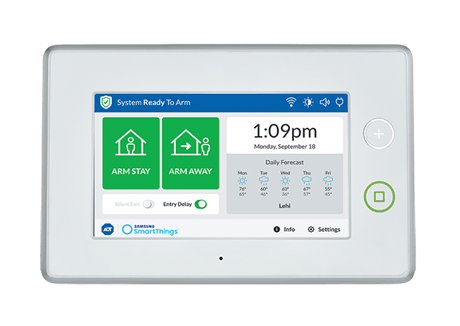
In the SmartThings mobile app, go to the ""My Home"" section, ""Things"" tab, and tap ""Add a Thing."" When the app shows ""Looking for devices..."" the panel is ready to include Z-Wave devices.
In the SmartThings mobile app, go to the ""My Home"" section, ""Things"" tab, and tap the name of the device to show the device details. Then, tap the gear icon in the upper right and tap ""Remove."" Alternatively, open the side menu (""More"" in the iOS app) and tap on ""Hub is Online."" Tap ""Z-Wave Utilities"" then ""General Device Exclusion"" and then the ""Remove"" button to confirm. The panel will enter Exclude Mode.
In the SmartThings mobile app, open the side menu (""More"" in the iOS app) and tap on ""Hub is Online."" Tap ""Z-Wave Utilities"" then ""Add hub to an existing Z-Wave network"" and confirm to activate Learn Mode on the panel.
Please use this procedure only when the network primary controller is missing or otherwise inoperable.
| Type | Value(s) |
|---|
| Meter type |
|---|
| Electric Meter Consumption |