WINKA SYSIT
Siren
WK-0004
Siren
HW: 16 FW: 1.50
ZM5202
6.51.09
0x0331 (817)
0x0003 (3)
0x1DB1 (7601)
ZC10-17105814
2017-10-24 04:32:41.321615
N/A
Enhanced 232 Slave
Always On Slave
The Siren can be triggered to sound an alarm and flash its super-bright LEDs when some event occurs.
The Siren can be triggered to sound an alarm and flash its super-bright LEDs when some event occurs. To ensure you never miss important alerts from your smart home system and keep your smart home safe. It can plugs into your wall outlet directly, and there be 5 different alert tones for a range of specific events.
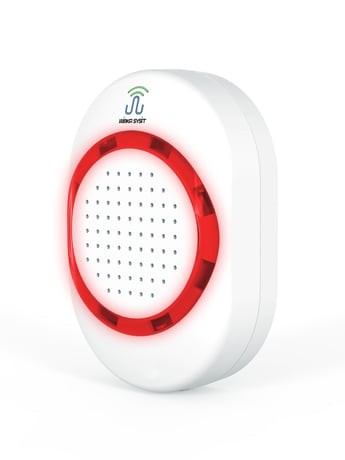
Product Picture


1 - Setting of alarm sound
This parameter is to set the sound sent by the alarm when giving an alarm and users can choose five different sound sources through this setting.Size: 1 byte
Default: 1
Minimum: 0
Maximum: 0
Possible values
| From | To | Desription |
|---|---|---|
| 1 | 5 | The sounds indicated number |
2 - Setting of alarm sound volume
Users can set through this parameter the sound volume sent when the alarm is activated, and there are 16 levels, with the adjustable scales being 0~15.0 is the minimum volume and 15 is the maximum volume.Size: 1 byte
Default: 15
Minimum: 0
Maximum: 0
Possible values
| From | To | Desription |
|---|---|---|
| 0 | 15 | Volume for Siren Buzzer Alarm |
3 - Alarm duration
This parameter can set the duration of the alarm function after activation. Unit of time is: seconds. Parameter description: 0- No alarm; 1 ~ 32766 – Alarm duration; 32767 – The alarm keeps sending alarm until the user shuts it down.Size: 2 bytes
Default: 300
Minimum: 0
Maximum: 0
Possible values
| From | To | Desription |
|---|---|---|
| 0 | 32767 | second. Alarm duration tiem. (Second) |
4 - Light alarm mode
This parameter can set whether to open different light flashing modes when the alarm is activated. 1- Turn off the light when an alarm is sent; 2- The light flashes slowly when an alarm is sent; 3- The light flashes fast when an alarm is sent; 4- The light flashes in the breathing light mode when an alarm is sent.Size: 1 byte
Default: 4
Minimum: 0
Maximum: 0
Possible values
| From | To | Desription |
|---|---|---|
| 1 | 4 | Led Pattern Number |
5 - Switch Binary Report Disable
If the gateway supports Notification Command Class Version 6 and versions above, the Switch Binary Report function can be disable so as to reduce the data volume communicating with the gateway and thus improve the communication quality of the network.0 - disable; 1 - enable.Size: 1 byte
Default: 0
Minimum: 0
Maximum: 0
Possible values
| From | To | Desription |
|---|---|---|
| 0 | 1 | 0 - Disable, 1 - Enable |
6 - Alarm Disable
This parameter can set the enabled and disabled of the alarm function. 0 – Disable the alarm function (i.e., the siren will not play sound or turn on led light when the alarm is triggered); 1 – Enable the alarm function.Size: 1 byte
Default: 1
Minimum: 0
Maximum: 0
Possible values
| From | To | Desription |
|---|---|---|
| 0 | 1 | 0 - Disable, 1 - Enable |
a) Ensure that the siren is powered up correctly. b) Set Z-Wave Gateway entered inclusion mode. c) Press the button on the siren for three times quickly within 1.5 seconds. Then the LED light will flash for 5 times with an interval of 500ms, which means that the siren has entered the inclusion mode and it is waiting for the host to complete the configuration.
a) Ensure that the siren is powered up correctly. b) Set Z-Wave Gateway entered exclusion mode. c) Press the button on the siren for three times quickly within 1.5 seconds. Then the LED light will flash for 5 times with an interval of 500ms, which means that the alarm has entered the exclusion mode and it is waiting for the host to complete the configuration.
Keep pressing the button, and then power up the siren. The alarm will enter the factory test mode, in which all the operations in this manual will be invalid to the siren and LED will keep flashing. This operation will be valid only when no backup batteries are installed or the backup batteries have no power. Exit from factory testing mode: Power off, and then power the siren on by un-pressing the button. And then it will enter the normal working mode.
a) Ensure that the siren is powered up correctly. b) Press the button and maintain this action for ten seconds, then release it after the LED light is on. Then the siren will erase all data and restore to the defaults. Note: This mode can also erase the network information of the siren and make the device exit from the Z-Wave. Please use this procedure only when the network primary controller is missing or otherwise inoperable. network that it has included.
| Type | Value(s) |
|---|
| Group | Type |
|---|---|
| Siren |
|