WINKA SYSIT
Outlet
WK-0003
On/Off Power Switch
HW: 16 FW: 1.36
ZM5202
6.51.09
0x0331 (817)
0x0003 (3)
0x1D61 (7521)
ZC10-17105819
2017-10-27 00:11:10.137484
N/A
Enhanced 232 Slave
Always On Slave
Smart power plug with electrical parameters measure
This is a smart power plug, function includes Switch, Electrical parameters measure, Over-current protection & timing. Lets you wirelessly control whatever device is plugged into it remotely, from a schedule, or from the outlet iteself. This smart switch has electrical parameters measure, you can see the electricity which your device are using in real time from APP.
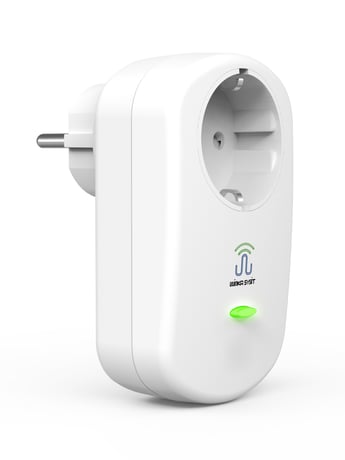
Product Picture


1 - Outlet On/Off state Saved Disable
This parameter is set as '1'. The switch will save the current switch state, and after the outlet is powered down and restarted, it will automatically recover to the switch state before power-down.Size: 1 byte
Default: 1
Minimum: 0
Maximum: 0
Possible values
| From | To | Desription |
|---|---|---|
| 0 | 1 | 0 - Disable, 1 - Enable |
2 - Button Switch Function Disable
Setting this parameter as '0' will make it invalid to operate the outlet switch with the buttonSize: 1 byte
Default: 1
Minimum: 0
Maximum: 0
Possible values
| From | To | Desription |
|---|---|---|
| 0 | 1 | 0 - Disable, 1 - Enable |
3 - Outlet LED indication Disable
Setting this parameter as '0' will forbid the LED of the outlet from being on; Parameter '0' is invalid to the LED indication in the power-up state.Size: 1 byte
Default: 1
Minimum: 0
Maximum: 0
Possible values
| From | To | Desription |
|---|---|---|
| 0 | 1 | 0 - Disable, 1 - Enable |
4 - Timer Enable
Setting this parameter as '1' will start the timing function of the outlet, and the length of time is determined by the setting of Parameter 5.This function can only provide the timed closing control function when the outlet is open.Size: 1 byte
Default: 0
Minimum: 0
Maximum: 0
Possible values
| From | To | Desription |
|---|---|---|
| 0 | 1 | 0 - Disable, 1 - Enable |
5 - Time cycle setting
This parameter sets the time length of closing the outlet at a fixed time, the unit of which is minute, which is only valid when Parameter 4 is set as '1'.Size: 2 bytes
Default: 150
Minimum: 0
Maximum: 0
Possible values
| From | To | Desription |
|---|---|---|
| 1 | 32767 | minute. the time interval for Timer |
6 - Meter reporting function Disable
Setting this parameter as '0' will close the timed report function of the outlet, with no influence on the current change reporting function. The interval of reporting electric quantity detection result is controlled by the time set by Parameter 7.Size: 1 byte
Default: 1
Minimum: 0
Maximum: 0
Possible values
| From | To | Desription |
|---|---|---|
| 0 | 1 | 0 - Disable, 1 - Enable |
7 - Interval of meter reporting setting
This parameter is to set the interval of reporting electric quantity detection result, the unit of which is: Seconds. This parameter is only valid when Parameter 6 is set as '1'.Size: 1 byte
Default: 300
Minimum: 0
Maximum: 0
Possible values
| From | To | Desription |
|---|---|---|
| 30 | 32767 | second. The timer interval for meter report |
8 - Maximum output current setting
This parameter sets the maximum output current that the outlet can provide, the unit of which is: Ampere (A).When the current consumed by the load is greater than the set value, the outlet will automatically cut off the power of the load and send out alarm information.Size: 1 byte
Default: 16
Minimum: 0
Maximum: 0
Possible values
| From | To | Desription |
|---|---|---|
| 1 | 16 | The max output current value. (Ampere) |
9 - Current changes setting
This parameter sets the change volume of the load current (volatility). When the differences between two measurements of current consumed by the load exceed the value set by this parameter, the outlet will report the last electric quantity detection result automatically to the host, the unit of which is 0.01A. For example, when this parameter is set as 10, then 10×0.01A = 0.1A, which means that all results currently measured will be reported to the outlet automatically (voltage, current, instant power and cumulative power) when the difference between the current measured currently and the current reported last time is greater than 0.1A.Size: 2 bytes
Default: 50
Minimum: 0
Maximum: 0
Possible values
| From | To | Desription |
|---|---|---|
| 1 | 1600 | The current changed value for meter report. (0.01A) |
a) Ensure that the outlet is powered up correctly. b) Set Z-Wave Gateway entered inclusion mode. c) Press the button on the outlet for three times quickly within 1.5 seconds. Then the LED light will flash for 5 times with an interval of 500ms, which means that the outlet has entered the inclusion mode and it is waiting for the gateway to complete the configuration.
a) Ensure that the outlet is powered up correctly. b) Set Z-Wave Gateway entered exclusion mode. c) Press the button on the outlet for three times quickly within 1.5 seconds. Then the LED light will flash for 5 times with an interval of 500ms, which means that the outlet has entered the mode of excluding from the network and it is waiting for the gateway to complete the configuration.
Keep pressing the button of the outlet, and then power up the outlet. The outlet will enter the factory test mode, in which all the operations of the outlet will not work and the green LED light will keep flashing. Exit from factory test mode: Power off, and then power the outlet on by un-pressing the button. And then it will enter the normal working mode.
a) Ensure that the outlet is powered up correctly. b) Press the button and maintain this action for 10 seconds, then release it after the green and red LEDs both light on. Then the outlet will restore all data to the factory defaults. Note: This mode can also delete the network information of the outlet and make the device exclude from the Z-Wave network that it has joined. Please use this procedure only when the network primary controller is missing or otherwise inoperable.
| Type | Value(s) |
|---|
| Group | Type |
|---|---|
| Power Management | (Refer to parameters): State idle |
| Meter type |
|---|
| Electric Meter Consumption |