Jintaobao
Thermostat Control Panel
JTB-3005-03
Thermostat - HVAC
HW: 33 FW: 1.01:01.01
ZM5202
6.51.09
0x015A (346)
0x3005 (12293)
0x0003 (3)
ZC10-17105800
2017-10-16 05:53:58.058848
N/A
Enhanced 232 Slave
Always On Slave
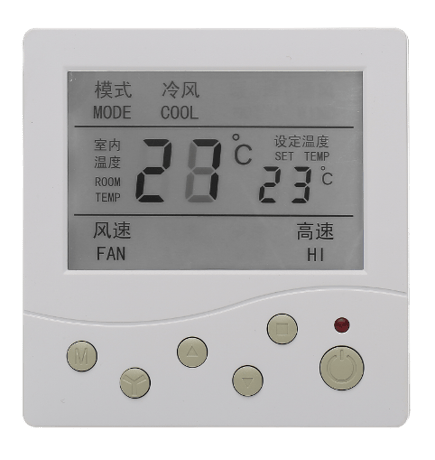
The product is a Z-Wave enabled room thermostat support control cool/heat/fan climate in Z-Wave system. The desired temperature in the room can be set locally using the button on the front of the unit.
The product is a Z-Wave enabled room thermostat support control cool/heat/fan climate in Z-Wave system. The desired temperature in the room can be set locally using the button on the front of the unit. It works in the same way as a normal room thermostat with hard wired to the heating source; meanwhile control is achieved using Z-Wave wireless signals also. This enables you to control heating times and schedule zone heating. This product can be operated in any Z-Wave network with other Z-Wave certified devices from other manufacturers. All non-battery operated nodes within the network will act as repeaters regardless of vendor to increase reliability of the network.


1 - Synchronization Cool and Heat temperature set-point
Synchronization Cool and Heat temperature set-point while one of it has been change by master controller.Size: 1 byte
Default: 1
Minimum: 0
Maximum: 0
Possible values
| From | To | Desription |
|---|---|---|
| 0 | 0 | No Synchronization |
| -128 | -128 | Synchronization |
2 - Inner master MCU communication address
Should setting same as inner master MCU configuration.Size: 1 byte
Default: 1
Minimum: 0
Maximum: 0
Possible values
| From | To | Desription |
|---|---|---|
| 1 | 127 | Should same as inner master MCU configuration. |
Start master controller add device mode as instruction, press 3 time of PB button located on the back side of thermostat panel in 1.5 second, LED flash indicator inclusion processing until included or 60 second timeout no detect any master controller.
Start master controller remove device mode as instruction, press 3 time of PB button located on the back side of thermostat panel in 1.5 second, LED flash indicator exclusion processing until excluded or 5 second timeout no detect any master controller.
Please use this procedure only when the network primary controller is missing or otherwise inoperable. Press and hold PB button located on the back side of thermostat panel for 10 seconds retrieve thermostat panel factory default.
| Type | Value(s) |
|---|
| Sensor type |
|---|
| Air Temperature |