Hank
Motion Sensor
HKZW-MS02
Notification Sensor
HW: 1 FW: 1.00
ZM5101
6.71.01
0x0208 (520)
0x0201 (513)
0x0006 (6)
ZC10-17115852
2017-11-13 22:04:16.097239
N/A
Enhanced 232 Slave
Reporting Sleeping Slave
Yes
Motion sensor is a universal Z-Wave Sensor. It can detect motion and communicate with other associated Z-Wave devices, such as Gateway, Siren, Smart Switch, etc.
Motion sensor can be included and operated in any Z-Wave network with other Z-Wave certified devices. The features list: 1) Z-Wave Plus certified for wide compatibility (500 serials product). 2) Supports security 0 and security 2 protected mode with AES-128 encryption. 3) Motion sensor. 4) Tamper alarm by shock sensor. 5) The battery life is up to 1 year. 6) Low battery alarm. 7) Support firmware OTA.
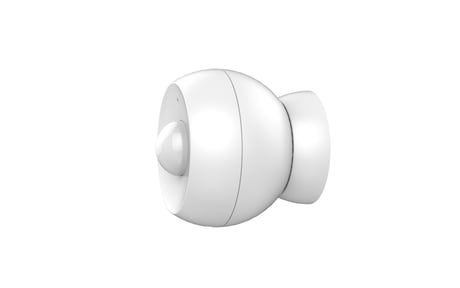
Product Picture


12 - MOTION SENSOR’S SENSITIVITY
The higher the value, the more sensitive the PIR sensor.Size: 1 byte
Default: 8
Minimum: 0
Maximum: 0
Possible values
| From | To | Desription |
|---|---|---|
| 1 | 8 | The higher the value, the more sensitive the PIR sensor. |
14 - ENABLE/DISABLE BASIC SET COMMAND
Motion sensor can send BASIC SET command to nodes associated with group 2 when motion is triggered.Size: 1 byte
Default: 0
Minimum: 0
Maximum: 0
Possible values
| From | To | Desription |
|---|---|---|
| 0 | 0 | Disable |
| 1 | 1 | Enable |
15 - VALUE OF THE BASIC SET
Motion Sensor can reverse its value of BASIC SET when motion is triggered.Size: 1 byte
Default: 0
Minimum: 0
Maximum: 0
Possible values
| From | To | Desription |
|---|---|---|
| 0 | 0 | Send BASIC SET VALUE = 255 to nodes associated with group 2 when motion alarm is triggered. Send BASIC SET VALUE = 0 to nodes associated with group 2 when motion alarm is canceled. |
| 1 | 1 | Send BASIC SET VALUE = 0 to nodes associated with group 2 when motion alarm is triggered. Send BASIC SET VALUE = 255 to nodes associated with group 2 when motion alarm is canceled. |
17 - ENABLE/DISABLE SHOCK ALARM
Size: 1 byte
Default: 0
Minimum: 0
Maximum: 0
Possible values
| From | To | Desription |
|---|---|---|
| 0 | 1 | when the value is 0, the product will not sends a vibration alarm after moving or shaking; when the value is 1, the product will sends a vibration alarm after moving or shaking |
18 - MOTION ALARM CANCELLATION DELAY
Motion alarm will be cancelled in the main controller after 3 seconds, the alarm cancellation can be delay by this parameter. Any motion detected during the cancellation delay time countdown will result in the countdown being restarted.Size: 2 bytes
Default: 0
Minimum: 0
Maximum: 0
Possible values
| From | To | Desription |
|---|---|---|
| 0 | 0 | Reports are not sent |
| 1 | 65535 | the change in luminance level resulting in luminance report being sent to the main controller. |
32 - LEVEL OF LOW BATTERY
Define a battery level as the “low battery”.Size: 1 byte
Default: 20
Minimum: 0
Maximum: 0
Possible values
| From | To | Desription |
|---|---|---|
| 10 | 50 | The low level from 10% to 50% |
1) Open the cover. 2) Place the device within the direct range of your Z-Wave controller. 3) Set the main controller in add mode (see the controller’s manual). 4) Click the Z-button once or triple click the Z-button quickly, the LED indicator should blink fast. 5) Wait for the adding process to end. 6) Successful adding will be confirmed by the Z-Wave controller’s message.
1) Open the cover. 2) Place the device within the direct range of your Z-Wave controller. 3) Set the main controller remove mode (see the controller’s manual). 4) Triple click the Z-button quickly, the LED indicator should blink fast. 5) Wait for the removing process to end. 6) Successful adding will be confirmed by the Z-Wave controller’s message.
Triple click the Z-button quickly,and then the dut will enter into the Learn Mode.
Press and hold the Z button for more than 5 seconds and release.
1)Power on the device, 2) Press and hold the Z button for more than 20 seconds, 3) If holding time more than 20seconds, the LED indicator will keep on for 2 seconds, which means resetting is complete. 4) The reset feature works only when the device has been included into a Z-Wave network. Use this procedure only in the event that the network primary controller is missing or otherwise inoperable.
| Type | Value(s) |
|---|
| Group | Type |
|---|---|
| Home Security | (Refer to parameters): State idle |
| Sensor type |
|---|
| Air Temperature |