GE
In-Wall Touch Sensing Smart Dimmer
14289/ZW3009
Light Dimmer Switch
HW: 255 FW: 5.11
ZM5101
6.51.10
0x0063 (99)
0x4944 (18756)
0x3233 (12851)
ZC10-17105823
2017-10-30 15:27:28.923426
N/A
Enhanced 232 Slave
Always On Slave
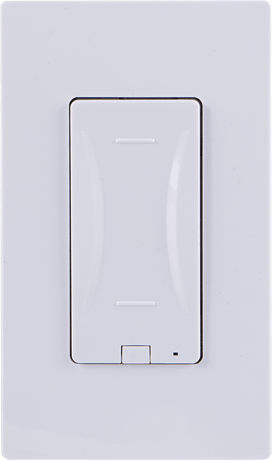
The GE Z-Wave Touch Sensing Dimmer brings together advanced touch sensing technology with an intuitive, minimalist design that sets a new standard for in-wall smart lighting controls.
The GE Touch Sensing Dimmer is the industry’s first Z-Wave Plus Smart Dimmer with fully integrated capacitive touch technology. The effortless and intuitive touch operation of GE Z-Wave Touch Dimmer reinvents the way consumers interact with lighting controls. The new Touch Dimmer offers an extremely smooth dimming performance with a simple intuitive design—simple tap on, tap off, or convenient zero to 100 percent dimming by simply gliding your finger up and down touch sensing surface. The GE Touch Sensing Dimmer is our most elegant in-wall lighting control that embeds Z-Wave Plus smart home technology to be controlled at the wall, by a mobile device, or by voice with Amazon Echo or Google Home. The GE Z-Wave Touch Sensing Dimmer brings together advanced touch sensing technology with an intuitive, minimalist design that sets a new standard for in-wall smart lighting controls. The sleek GE Z-Wave Touch Dimmer is poised to meet every interior design requirement with interchangeable paddle options available. Regardless of the home décor, users can complement any design aesthetics with paddle colors available in light almond, black, white, brown, and ivory. The GE Z-Wave Touch Dimmer also features advanced settings to remember the most recent light levels. For example, the dimmer automatically remembers the last used settings and smoothly returns to the same light level when it is turned back on. This simple one-touch feature allows users to set the perfect lighting level every time.


3 - LED Light
Used to either invert or disable the LED indicator.Size: 1 byte
Default: 0
Minimum: 0
Maximum: 0
Possible values
| From | To | Desription |
|---|---|---|
| 0 | 0 | Default - LED OFF when load is ON |
| 1 | 1 | LED ON when load is ON |
| 2 | 2 | LED always OFF |
4 - Invert Switch
Changes the switch from "ON at top, OFF on the bottom" to "OFF at the top, ON on the bottom".Size: 1 byte
Default: 0
Minimum: 0
Maximum: 0
Possible values
| From | To | Desription |
|---|---|---|
| 0 | 0 | Default |
| 1 | 1 | Invert Switch |
6 - Dim up/Dim down rate
Changes speed light dims when manually operatedSize: 1 byte
Default: 0
Minimum: 0
Maximum: 0
Possible values
| From | To | Desription |
|---|---|---|
| 0 | 0 | Dim up/down the light to the specified level quickly |
| 1 | 1 | Dim up/down the light to the specified level slowly |
7 - Dim Rate Adjustment (Between levels)
Adjusts the total amount of stepsSize: 1 byte
Default: 1
Minimum: 0
Maximum: 0
Possible values
| From | To | Desription |
|---|---|---|
| 1 | 99 | Number of steps or levels |
8 - Dim Rate Adjustment (Between levels)(Parameter 7 must be default)
Adjusts the time between stepsSize: 2 bytes
Default: 3
Minimum: 0
Maximum: 0
Possible values
| From | To | Desription |
|---|---|---|
| 1 | 255 | Time between steps |
11 - Dim Rate Adjustment (ON/OFF)
Adjusts the total amount of stepsSize: 1 byte
Default: 1
Minimum: 0
Maximum: 0
Possible values
| From | To | Desription |
|---|---|---|
| 1 | 99 | Number of steps or levels |
12 - Dim Rate Adjustment (ON/OFF)(Parameter 11 must be default)
Adjusts the time between stepsSize: 2 bytes
Default: 3
Minimum: 0
Maximum: 0
Possible values
| From | To | Desription |
|---|---|---|
| 1 | 255 | Time between steps |
Adding your device to a Z-Wave network 1. Follow the instructions for your Z-Wave certified controller to add a device to the Z-Wave network. 2. Once the controller is ready to add your device, press and release anywhere on the touch panel.
To remove and reset the device 1. Follow the instructions for your Z-Wave certified controller to remove a device from the Z-Wave network. 2. Once the controller is ready to remove your device, press and hold the side button (G) of the smart dimmer. While holding, press and release anywhere on the touch panel, then release the side button to remove it from the network.
To return your switch to factory defaults 1. Press and release side program button (G) three times quickly. The LED will flash ON/OFF five (5) times when completed successfully. All button presses must be completed within five (5) seconds. Note: This should only be used in the event your network’s primary controller is missing or otherwise inoperable.
Invert LED 1. Press and hold the side program button (G). 2. Touch and release anywhere on the capacitive touch surface 3 times quickly. 3. Release side button to invert LED.
| Type | Value(s) |
|---|