Dome
Water Main Shut-Off
DMWV1
Valve
HW: 2 FW: 0.02
ZM5202
6.51.06
0x0152 (338)
0x0003 (3)
0x0512 (1298)
ZC10-18076174
2018-06-30 19:10:49.298441
N/A
Routing Slave
Always On Slave
Dome Water Main Shut-Off
The Dome™ Home Automation DMWV1 Water Main Shut-off is designed to fit over existing ¼ turn ball-valves for pipes sized up to 1½ inch. No professional plumbing contractor is required- it can be installed by a homeowner with just a screwdriver. This device requires a Z-Wave Certified hub for operation. When configured with a Water Leak Sensor, the Water Main Shut-off can automatically cut off the supply to limit the damage. You can also remotely control the valve position using your smarthome system mobile app. Extra-long Z-Wave wireless range (up to 150 ft) allows you to place it where it’s needed without worrying if the signal is reaching your Z-Wave Hub. Also functions as Z-Wave signal extender. Dome™ DMWV1 Water Main Shut-off comes with a 1-year limited warranty. Measurements in inches: 2.5 x 3.5 x 6. Dome™ Home Automation Z-Wave devices give your family peace of mind and security you can count on. With Dome™, you’re always connected and always covered. • Installs over existing valve without need of a plumber using just a screw driver. Works with ¼ turn ball-valves on pipes sized up to 1½ inch • Open/Close valve control allowing for automatic water shut-off when leaks are detected as well as on demand control using your smarthome mobile app. • Up to 150-foot range. Functions as Z-Wave signal extender • Z-Wave Plus Certified. Requires a Z-Wave Certified Hub to operate
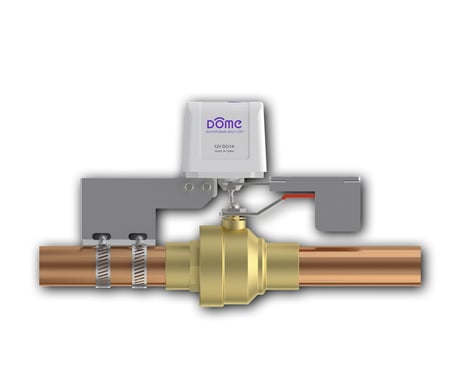
Product Picture
1. For proper inclusion, bring the Water Main Shut-Off to the final location where it will be used. * 2. Follow the instructions for your Z-Wave controller to enter inclusion mode. 3 Make sure the Water Main Shut-Off is powered on, and when prompted by your controller, press the “open/close” button quickly 3 times in a row. The LED will stop blinking and stay on continuously upon successful inclusion. *For non Z-Wave Plus networks, please consult the owner’s manual for your primary controller to determine the best method and location for adding the Water Main Shut-Off to your Z-Wave network.
1. Follow the instructions for your Z-Wave certified Controller to enter exclusion mode. 2. When prompted, press the “open/close” button on the Shut-Off quickly 3 times in a row.
Press and hold the open/close button for at least 10 seconds then release. The Shut-Off’s memory will be erased to factory settings. A flashing light indicates a successful factory reset. Beware that resetting your device will disconnect it from your system. Only do this if the controller is missing or otherwise unreachable!
| Type | Value(s) |
|---|