Saykey
Curtain Motor Control with external module
SK-3007-05
Window Covering - Pos/End Aware
HW: 33 FW: 1.01:01.01
ZM5202
6.51.09
0x032C (812)
0x3007 (12295)
0x0005 (5)
ZC10-17115871
2017-11-21 03:51:05.008211
N/A
Enhanced 232 Slave
Always On Slave
The SK-3007-05 curtain motor external module support connect specify motor to Z-Wave system reply.
The SK-3007-05 curtain motor external module support connect specify motor to Z-Wave system reply. It support control motor open/close/stop and position, meanwhile it can feedback motor position as soon as it stopped.
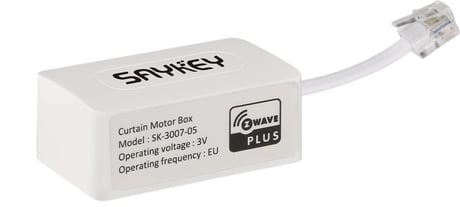
Product Picture


4 - Motor position
Support Get only, feedback motor current position(0x00-0x63, 0xFE).Size: 1 byte
Default: -127
Minimum: 0
Maximum: 0
Possible values
| From | To | Desription |
|---|---|---|
| -127 | -127 | unknown postion |
| 0 | 99 | current position |
6 - Set motor direction reverse
Support Set only. Toggle motor direction between reverse and default as send out set command with any value(0x00-0xFF).Size: 1 byte
Default: 0
Minimum: 0
Maximum: 0
Possible values
| From | To | Desription |
|---|---|---|
| -128 | 127 | Toggle motor direction. |
7 - Clear motor lead tail endpoint setting
Support Set only. Clear motor lead tail endpoint setting as send out set command with any value(0x00-0xFF).Size: 1 byte
Default: 0
Minimum: 0
Maximum: 0
Possible values
| From | To | Desription |
|---|---|---|
| -128 | 127 | Clear motor lead tail endpoint setting |
8 - Enable manual pull function
Support Set only. Enable manual pull function as send out set command with any value(0x00-0xFF).Size: 1 byte
Default: 0
Minimum: 0
Maximum: 0
Possible values
| From | To | Desription |
|---|---|---|
| -128 | 127 | Enable manual pull function |
9 - Disable manual pull function
Support Set only. Disable manual pull function as send out set command with any value(0x00-0xFF).Size: 1 byte
Default: 0
Minimum: 0
Maximum: 0
Possible values
| From | To | Desription |
|---|---|---|
| -128 | 127 | Disable manual pull function |
1. Connect power supply to motor and connect the external module to motor external connector, and Make sure the module is located within direct range of the Z-Wave controller. 2. Set the controller into the inclusion/add mode (refer to controller’s operating manual). 3. Click the PB-button triple times in 1.5 second, located left side of the motor external box. 4. Curtain motor will be detected and included in the Z-Wave network.
1. Connect power supply to motor and connect the external module to motor external connector, and Make sure the module is located within direct range of the Z-Wave controller. 2. Set the controller into the exclusion/remove mode (refer to controller’s operating manual). 3. Click the PB-button triple times in 1.5 second, located left side of the motor external box. 4. Curtain motor will be detected and excluded from the Z-Wave network.
1. Connect power supply to motor and connect the external module to motor external connector. 2. Press and hold the PB-button excess 10 second. 3. Curtain motor will be reset to factory default and clear Z-Wave included network state. Please use this procedure only when the network primary controller is missing or otherwise inoperable.
| Type | Value(s) |
|---|