Simon
S100 Rocker iO for Roller Blind
10002080-13X
Window Covering - Pos/End Aware
HW: 1 FW: 4.24:75.53:66.47
ZM5202
6.51.07
0x0267 (615)
0x0004 (4)
0x0000 (0)
ZC10-18026011
2018-01-09 22:51:02.760536
N/A
Enhanced Slave
Always On Slave
Simon Electronic Roller Blind iO is integrated by Electronic Roller Blind and a Rocker, that provides Z-Wave communication attributes. The touch area allows select which action is desired to act over the blind.
Roller Blind IO is ready to operate with Z-Wave controllers and configured to be managed by Simon100 IO APP using the HUB plug IO for getting a better user experience. Sending the Blind Up/Down or setting a specific position.
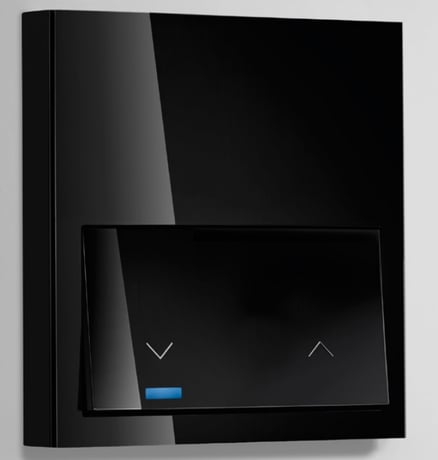
Product Picture


1 - Association LED
Activates the Central LED. Configuration Used by Masters iO in order to identify the devices associated to their Group2 during manual association process.Size: 1 byte
Default: 0
Minimum: 0
Maximum: 0
Possible values
| From | To | Desription |
|---|---|---|
| 0 | 0 | Turns the LED OFF |
| 1 | 255 | Turns the LED ON |
4 - Up Time
Sets the UP time In seconds in order to calculate the sunblind position.Size: 1 byte
Default: 60
Minimum: 0
Maximum: 0
Possible values
| From | To | Desription |
|---|---|---|
| 1 | 120 | Sets UP time of Sunblind |
5 - DOWN Time
Sets the DOWN time In seconds in order to calculate the sunblind position.Size: 1 byte
Default: 60
Minimum: 0
Maximum: 0
Possible values
| From | To | Desription |
|---|---|---|
| 1 | 120 | Sets DOWN time of Sunblind |
9 - Callibration
Write only configuration used to request the automatic adjust of UP and DOWN times.Size: 1 byte
Default: 0
Minimum: 0
Maximum: 0
Possible values
| From | To | Desription |
|---|---|---|
| 255 | 255 | Sunblind starts its callibration process |
12 - Behavior of LED in Repose
Sets the Left and Right Leds to 20% in order to find the device and the touch areas at night.Size: 1 byte
Default: 0
Minimum: 0
Maximum: 0
Possible values
| From | To | Desription |
|---|---|---|
| 0 | 0 | Left and Right LEDs OFF |
| 1 | 255 | Left and Right LEDs ON at 20percent |
13 - Lock Input
Locks the local control of the sunblind. This configuration does not modifies the control via Z-Wave.Size: 1 byte
Default: 0
Minimum: 0
Maximum: 0
Possible values
| From | To | Desription |
|---|---|---|
| 0 | 0 | Local action enabled |
| 1 | 255 | Local action locked |
15 - Reset Default
Write only parameter used to restore configurations or perform a completely restore default.Size: 2 bytes
Default: 0
Minimum: 0
Maximum: 0
Possible values
| From | To | Desription |
|---|---|---|
| 17170 | 17170 | Configuration values are restored |
| 39015 | 39015 | Factory reset. |
20 - Identify
Write only value that performs a fast blink on Central LED during 5 seconds in order to identify the device when it is installed in a multiple frame.Size: 1 byte
Default: 0
Minimum: 0
Maximum: 0
Possible values
| From | To | Desription |
|---|---|---|
| 1 | 255 | Central LED performs a fast blink |
21 - Load State
Read only value used to inform about sunblind state. Byte 0 is used to inform if Sunblind is stopped or going UP or DOWN Byte 2 is used to report the sunblind position.Size: 1 byte
Default: 0
Minimum: 0
Maximum: 0
Possible values
| From | To | Desription |
|---|---|---|
| 0 | 99 | Sunblind is stoped with position 0 to 99per cent |
| 256 | 355 | Sunblind is Moving DOWN with position 0 to 99per cent |
| 512 | 611 | Sunblind is Moving UP with position 0 to 99per cent |
23 - Calibration Required
Read only Value that informs that UP/DOWN times have not been adjusted and position percentage will not be adequate.Size: 1 byte
Default: 0
Minimum: 0
Maximum: 0
Possible values
| From | To | Desription |
|---|---|---|
| 0 | 0 | Calibration is not required. |
| 255 | 255 | It is necessary to calibrate the device to work properly. |
27 - Lock Hold Press
Locks the major part of Hold press effects in order to avoid undesired callibrations, Z-Wave changes or restores Default. 0xFF Hold Press from 2sec to 20 sec does not performs a Node info Hold Press of 10 to 15 does not performs a automatic callibration Hold press of 15 to 30 does not changes the sunblind or awing reports Hold press of 30sec restores configuration except Lock Hold Press, and sends a Node info in order to add or remove from Z-Wave NetworkSize: 1 byte
Default: 0
Minimum: 0
Maximum: 0
Possible values
| From | To | Desription |
|---|---|---|
| 0 | 0 | Hold Press is available |
| 1 | 255 | Hold Press from 2sec to 20 sec does not performs a Node info,Hold Press of 10 to 15 does not performs a automatic callibration,Hold press of 15 to 30 does not changes the sunblind or awing changes, Hold press of 30sec restores configuration except Lock Hold Press, and sends a Node info in order to add or remove from Z-Wave Network |
When the pushbutton is released after a press of (2sec<T<10sec) the device will send a NIF to include from Z-Wave network or perform an association with other Z-Wave device. Central LED will Blink with 0,3 sec period to inform that NIF can be send after release of pushbutton. This process does not perform a default reset of configurations. Main LED will Blink with 0,3 sec period to inform that NIF can be send after release of pushbutton.
When the pushbutton is released after a press of (2sec<T<10sec) the device will send a NIF to exclude from Z-Wave network or perform an association with other Z-Wave device. Main LED will Blink with 0,3 sec period to inform that NIF can be send after release of pushbutton. This process does not perform a default reset of configurations. Main LED will Blink with 0,3 sec period to inform that NIF can be send after release of pushbutton.
When the pushbutton is released after a press of (30sec<T) the device will perform a factory default values operation, excluding it from network and reset the configuration parameters. Main LED will perform 1 Blink with 5 sec. Please use this procedure only when the network primary controller is missing or otherwise inoperable.
When the pushbutton is released after a press of (10sec<T<15sec) the device will perform an automatic callibration of times of Up and Down. Left and Right LEDs will Blink with 0,3 sec period to inform that callibration is going to be performed. After release and during the callibration LED will Blink with 0,3 sec period to inform that callibration process is being performed. When the pushbutton is released after a press of (15sec<T<30sec) the device will change from blind and awning. The 3 LEDs will Blink with 0,3 sec period to inform that awing/sunblind function is being switched. If Roller blind is working as awing the system will invert the report values.
| Type | Value(s) |
|---|