Honeywell
Plug-in Outdoor Switch
39346 / ZW4201
On/Off Power Switch
HW: 255 FW: 5.21
ZM5202
6.51.10
0x0039 (57)
0x4F50 (20304)
0x3032 (12338)
ZC10-17115858
2017-11-09 18:45:57.948702
N/A
Enhanced 232 Slave
Always On Slave
Transform any home into a smart home with the Honeywell Z-Wave Outdoor Switch.
Transform any home into a smart home with the Honeywell Z-Wave Outdoor Switch. The lighting control enables wireless control of on/off functions for outdoor applications, and is compatible with incandescent, LED, Xenon, Halogen, fluorescent and compact fluorescent bulbs. The weather-resistant housing with a protective outlet cover safeguards the outlet from dirt and debris when not in use. The discreet black color blends in with any outdoor environment. Perfect for decorative or seasonal lighting, fountains and other outdoor plug-in appliances. Take control of your home lighting with Honeywell Z-Wave Smart Controls!
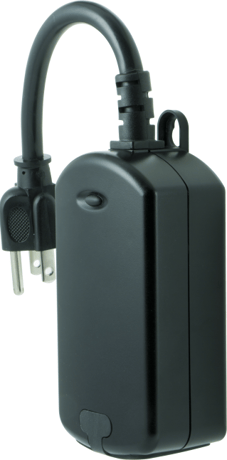
1. Follow the instructions for your Z-Wave certified controller to include the smart switch to the Z-Wave network. 2. Once the controller is ready to include your outdoor smart switch, press and release the manual/program button on the smart switch to include it in the network. 3. Once your controller has confirmed that the smart switch has been included, refresh the Z-Wave network to optimize performance.
1. Follow the instructions for your Z-Wave certified controller to exclude a device from the Z-Wave network. 2. Once the controller is ready to Exclude your device, press and release the manual/program button on the smart switch to exclude it from the network.
TO RETURN YOUR SWITCH TO FACTORY DEFAULTS 1. If plugged in, unplug the device from the receptacle. 2. Press and hold the top button, plug the device in, and continue to hold for at least 3 seconds. Note: This should only be used in the event your network’s primary controller is missing or otherwise inoperable.
| Type | Value(s) |
|---|