Aeotec
MultiSensor 6
ZW100-B
Notification Sensor
HW: 100 FW: 1.10
ZM5101
6.51.10
0x0086 (134)
0x0202 (514)
0x0064 (100)
ZC10-17115847
2017-11-10 22:48:23.19566
N/A
Enhanced 232 Slave
Reporting Sleeping Slave
Yes
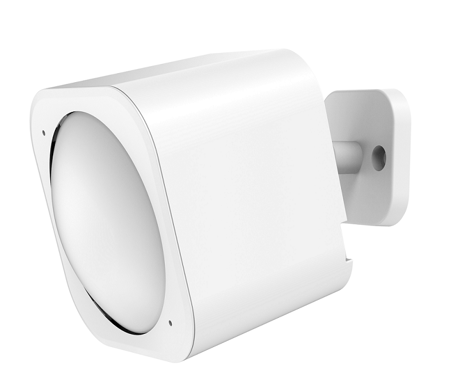
Aeotec MultiSensor 6 is a Z-Wave motion sensor, temperature sensor, humidity sensor, lighting sensor, Ultraviolet sensor and Vibration sensor, all in one package.
Aeotec MultiSensor 6 looks like a motion sensor and it acts like one too. But it’s also so much more. Installing this 1 piece of Z-Wave® technology is the same as installing 6 pieces of Z-Wave technology. Your home control network will immediately understand motion, temperature, humidity, light, Ultraviolet and Vibration readings wherever MultiSensor installed. Those intelligent readings will equate to intelligence automation. And intelligent automation will give you the perfect, smart home.


2 - Enable/Disable waking up for 10 minutes when re-power on (battery mode) the MultiSensor.
Enable/Disable waking up for 10 minutes when re-power on (battery mode) the MultiSensor.Size: 1 byte
Default: 0
Minimum: 0
Maximum: 0
Possible values
| From | To | Desription |
|---|---|---|
| 0 | 0 | Disable |
| 1 | 1 | Enable. |
3 - Set the PIR time.
The default PIR time is 4 minutes. The Multisensor will send BASIC SET CC (0x00) to the associated nodes if no motion is triggered again in 4 minutes.Size: 2 bytes
Default: 240
Minimum: 0
Maximum: 0
Possible values
| From | To | Desription |
|---|---|---|
| 10 | 3600 | The range of PIR time is 10 to 3600. |
4 - Set the sensitivity of the motion sensor.
This parameter changes the sensitivity level of the motion detector.Size: 1 byte
Default: 5
Minimum: 0
Maximum: 0
Possible values
| From | To | Desription |
|---|---|---|
| 0 | 0 | Minimum Sensitivity |
| 1 | 1 | Sensitivity Level 1 of 6 |
| 2 | 2 | Sensitivity Level 2 of 6 |
| 3 | 3 | Sensitivity Level 3 of 6 |
| 4 | 4 | Sensitivity Level 5 of 6 |
| 5 | 5 | Maximum Sensitivity |
5 - Which command would be sent when the motion sensor triggered.
To set which command would be sent when the motion sensor triggered.Size: 1 byte
Default: 1
Minimum: 0
Maximum: 0
Possible values
| From | To | Desription |
|---|---|---|
| 1 | 1 | Send Basic Set CC |
| 2 | 2 | Send Sensor Binary Report CC |
8 - Set the timeout of awake after the Wake Up CC is sent out..
Set the timeout of awake after the Wake Up CC is sent out..Size: 1 byte
Default: 30
Minimum: 0
Maximum: 0
Possible values
| From | To | Desription |
|---|---|---|
| 8 | 127 | Available rang is 8 to 127 seconds. |
9 - Report the current power mode and the product state for battery power mode
Report the current power mode and the product state for battery power mode. Note: this parameter cannot be used as Set usage.Size: 2 bytes
Default: 0
Minimum: 0
Maximum: 0
Possible values
| From | To | Desription |
|---|---|---|
| 0 | 0 | USB power mode |
| 256 | 256 | Keep sleep state for Battery power mode |
| 257 | 257 | Keep awake for 10 minutes for battery power mode. |
39 - Configure the default low battery value.
Configure the default low battery value. When the current battery level is lower than this value, it will send out the low battery alarm.Size: 1 byte
Default: 20
Minimum: 0
Maximum: 0
Possible values
| From | To | Desription |
|---|---|---|
| 10 | 50 | Available rang is 10% to 50%. |
40 - Enable/disable the selective reporting only when measurements reach a certain threshold or percentage
Enable/disable the selective reporting only when measurements reach a certain threshold or percentage. This is used to reduce network traffic. Note: If USB power, the Sensor will check the threshold every 10 seconds. If battery power, the Sensor will check the threshold when it is waken up.Size: 1 byte
Default: 0
Minimum: 0
Maximum: 0
Possible values
| From | To | Desription |
|---|---|---|
| 0 | 0 | Disable |
| 1 | 1 | Enable. |
41 - Threshold change in temperature to induce an automatic report.
Threshold change in temperature to induce an automatic report. Note: 1. The unit is Fahrenheit for US version, Celsius for EU/AU version. 2. High byte is the threshold value. Low byte is the unit (0x01=Celsius, 0x02=Fahrenheit). 3. The threshold value (high byte) contains one decimal point. E.g. if the value is set to 20 (0x001401), the threshold value =2.0 ℃ (EU/AU version) or if the value is set to 20 (0x001402), the threshold value= 2.0 ℉ (US version). When the current temperature gap is more then 2.0, which will induce a temperature report to be sent out.Size: 4 bytes
Default: 20
Minimum: 0
Maximum: 0
Possible values
| From | To | Desription |
|---|---|---|
| 10 | 2120 | Available rang of threshold is 1℉ to 212℉. |
42 - Threshold change in humidity to induce an automatic report
Threshold change in humidity to induce an automatic report. Note: 1. The unit is %. 2. The default value is 10, which means that if the current humidity gap is more than 10%, it will send out a humidity report.Size: 1 byte
Default: 10
Minimum: 0
Maximum: 0
Possible values
| From | To | Desription |
|---|---|---|
| 1 | 100 | Available rang is 1% to 100%. |
43 - Threshold change in luminance to induce an automatic report.
Threshold change in luminance to induce an automatic report.Size: 2 bytes
Default: 100
Minimum: 0
Maximum: 0
Possible values
| From | To | Desription |
|---|---|---|
| 1 | 30000 | Available rang is 1 LUX to 30000 LUX. |
44 - Threshold change in battery level to induce an automatic report.
Threshold change in battery level to induce an automatic report. Note: 1. The unit is %. 2. The default value is 10, which means that if the current battery level gap is more than 10%, it will send out a battery report.Size: 1 byte
Default: 10
Minimum: 0
Maximum: 0
Possible values
| From | To | Desription |
|---|---|---|
| 1 | 100 | Available rang is 1% to 100%. |
45 - Threshold change in ultraviolet to induce an automatic report.
Threshold change in ultraviolet to induce an automatic report.Size: 1 byte
Default: 2
Minimum: 0
Maximum: 0
Possible values
| From | To | Desription |
|---|---|---|
| 1 | 11 | Available rang is 1 to 11. |
46 - Enable/disable to send the alarm report of low temperature
Enable/disable to send the alarm report of low temperature(<-15℃). Note: If it is enabled, the MultiSensor will send a report of Multi Level Temperature CC to controller when the current temperature is less than -15℃).Size: 1 byte
Default: 0
Minimum: 0
Maximum: 0
Possible values
| From | To | Desription |
|---|---|---|
| 0 | 0 | Disable |
| 1 | 1 | Enable. |
| 1 | 30000 | Available rang is 1LUX to 30000LUX. |
48 - Enable/disable to send a report when the measurement is more than the upper limit value or less than the lower limit value.
Enable/disable to send a report when the measurement is more than the upper limit value or less than the lower limit value.Size: 1 byte
Default: 0
Minimum: 0
Maximum: 0
Possible values
| From | To | Desription |
|---|---|---|
| 0 | 0 | Disable |
| 1 | 1 | Enable. |
49 - Set the upper limit value of temperature sensor.
Set the upper limit value of temperature sensor. When the measurement is more than this upper limit, which will trigger to sent out a sensor report.Size: 4 bytes
Default: 824
Minimum: 0
Maximum: 0
Possible values
| From | To | Desription |
|---|---|---|
| -400 | 2120 | Available rang is -40.0℉ to 212.0℉. |
50 - Set the lower limit value of temperature sensor.
Set the lower limit value of temperature sensor. When the measurement is less than this lower limit, which will trigger to sent out a sensor report. High byte is the lower limit value.Size: 4 bytes
Default: 320
Minimum: 0
Maximum: 0
Possible values
| From | To | Desription |
|---|---|---|
| -400 | 2120 | Available rang is -40.0℉ to 212.0℉. |
51 - Set the upper limit value of humidity sensor.
Set the upper limit value of humidity sensor. when the measurement is more than this upper limit, which will trigger to sent out a sensor report.Size: 1 byte
Default: 60
Minimum: 0
Maximum: 0
Possible values
| From | To | Desription |
|---|---|---|
| 0 | 100 | Available rang is 0% to 100%. |
52 - Set the lower limit value of humidity sensor.
Set the lower limit value of humidity sensor. When the measurement is less than this lower limit, which will trigger to sent out a sensor report.Size: 1 byte
Default: 50
Minimum: 0
Maximum: 0
Possible values
| From | To | Desription |
|---|---|---|
| 0 | 100 | Available rang is 0% to 100%. |
53 - Set the upper limit value of Lighting sensor
Set the upper limit value of Lighting sensor. When the measurement is more than this upper limit, which will trigger to sent out a sensor report.Size: 1 byte
Default: 1000
Minimum: 0
Maximum: 0
Possible values
| From | To | Desription |
|---|---|---|
| 0 | 30000 | Available rang is 0 to 30000LUX. |
54 - Set the lower limit value of Lighting sensor.
Set the lower limit value of Lighting sensor. When the measurement is less than this lower limit, which will trigger to sent out a sensor report.Size: 1 byte
Default: 100
Minimum: 0
Maximum: 0
Possible values
| From | To | Desription |
|---|---|---|
| 0 | 30000 | Available rang is 0 to 30000LUX. |
55 - Set the upper limit value of ultraviolet sensor.
Set the upper limit value of ultraviolet sensor. When the measurement is more than this upper limit, which will trigger to sent out a sensor report.Size: 1 byte
Default: 8
Minimum: 0
Maximum: 0
Possible values
| From | To | Desription |
|---|---|---|
| 1 | 11 | Available rang is 1 to 11. |
56 - Set the lower limit value of ultraviolet sensor.
Set the lower limit value of ultraviolet sensor. When the measurement is less than this upper limit, which will trigger to sent out a sensor report.Size: 1 byte
Default: 4
Minimum: 0
Maximum: 0
Possible values
| From | To | Desription |
|---|---|---|
| 1 | 11 | Available rang is 1 to 11. |
57 - Set the recover limit value of temperature sensor.
Note: 1. When the current measurement <= (Upper limit – Recover limit), the upper limit report is enabled and then it would send out a sensor report when the next measurement is more than the upper limit. After that the upper limit report would be disabled again until the measurement <= (Upper limit – Recover limit). 2. When the current measurement >= (Lower limit + Recover limit), the lower limit report is enabled and then it would send out a sensor report when the next measurement is less than the lower limit. After that the lower limit report would be disabled again until the measurement >= (Lower limit + Recover limit). 3. High byte is the recover limit value. Low byte is the unit (0x01=Celsius, 0x02=Fahrenheit).Size: 2 bytes
Default: 20
Minimum: 0
Maximum: 0
Possible values
| From | To | Desription |
|---|---|---|
| 10 | 255 | Available rang is 1.0℉ to 25.5℉ |
58 - Set the recover limit value of humidity sensor.
Set the recover limit value of humidity sensor. Note: 1. When the current measurement <= (Upper limit – Recover limit), the upper limit report is enabled and then it would send out a sensor report when the next measurement is more than the upper limit. After that the upper limit report would be disabled again until the measurement <= (Upper limit – Recover limit). 2. When the current measurement >= (Lower limit + Recover limit), the lower limit report is enabled and then it would send out a sensor report when the next measurement is less than the lower limit. After that the lower limit report would be disabled again until the measurement >= (Lower limit + Recover limit).Size: 1 byte
Default: 5
Minimum: 0
Maximum: 0
Possible values
| From | To | Desription |
|---|---|---|
| 1 | 50 | Available rang is 1 to 50% |
59 - Set the recover limit value of Lighting sensor.
Set the recover limit value of Lighting sensor. Note: 1. When the current measurement <= (Upper limit – Recover limit), the upper limit report is enabled and then it would send out a sensor report when the next measurement is more than the upper limit. After that the upper limit report would be disabled again until the measurement <= (Upper limit – Recover limit). 2. When the current measurement >= (Lower limit + Recover limit), the lower limit report is enabled and then it would send out a sensor report when the next measurement is less than the lower limit. After that the lower limit report would be disabled again until the measurement >= (Lower limit + Recover limit). 3. Unit = 10×Recover limit (Lux)Size: 1 byte
Default: 100
Minimum: 0
Maximum: 0
Possible values
| From | To | Desription |
|---|---|---|
| 1 | 127 | Available rang is 10Lux to 1270Lux |
60 - Set the recover limit value of Ultraviolet sensor.
Set the recover limit value of Ultraviolet sensor. Note: 1. When the current measurement <= (Upper limit – Recover limit), the upper limit report is enabled and then it would send out a sensor report when the next measurement is more than the upper limit. After that the upper limit report would be disabled again until the measurement <= (Upper limit – Recover limit). 2. When the current measurement >= (Lower limit + Recover limit), the lower limit report is enabled and then it would send out a sensor report when the next measurement is less than the lower limit. After that the lower limit report would be disabled again until the measurement >= (Lower limit + Recover limit).Size: 1 byte
Default: 2
Minimum: 0
Maximum: 0
Possible values
| From | To | Desription |
|---|---|---|
| 0 | 0 | USB power mode |
| 1 | 5 | Available rang is 1 to 5. |
| 256 | 256 | Keep sleep state for Battery power mode |
| 257 | 257 | Keep awake for 10 minutes for battery power mode. |
61 - Get the out-of-limit state of the Sensors.
Get the out-of-limit state of the Sensors.Size: 2 bytes
Default: 0
Minimum: 0
Maximum: 0
Possible values
| From | To | Desription |
|---|---|---|
| 1 | 1 | Temperature sensor is out of the lower limit |
| 2 | 2 | Humidity sensor is out of the lower limit |
| 4 | 4 | Luminance sensor is out of the lower limit |
| 8 | 8 | Ultraviolet sensor is out of the lower limit |
| 16 | 16 | Temperature sensor is out of the upper limit |
| 32 | 32 | Humidity sensor is out of the upper limit |
| 64 | 64 | Luminance sensor is out of the upper limit |
| 128 | 128 | Ultraviolet sensor is out of the upper limit |
64 - Set the default unit of the automatic temperature report in parameter 101-103.
Set the default unit of the automatic temperature report in parameter 101-103.Size: 1 byte
Default: 2
Minimum: 0
Maximum: 0
Possible values
| From | To | Desription |
|---|---|---|
| 1 | 1 | The unit is Celsius. |
| 2 | 2 | The unit is Fahrenheit. |
81 - Enable/disable the LED blinking when the PIR is triggered.
Enable/disable the LED blinking when the PIR is triggered.Size: 1 byte
Default: 0
Minimum: 0
Maximum: 0
Possible values
| From | To | Desription |
|---|---|---|
| 0 | 0 | Enable. |
| 1 | 1 | Disable |
100 - Set the parameter 101-103 to default values.
Set the parameter 101-103 to default values.Size: 1 byte
Default: 0
Minimum: 0
Maximum: 0
Possible values
| From | To | Desription |
|---|---|---|
| 1 | 1 | Set the parameter 101-103 to default values. |
101 - To set which report would be sent in Report group 1
To set which report would be sent in Report group 1. Note: You can also set all sensor reports to be sent out at the same time. E.g. If you want the batter report and temperature report to be sent out at the same time, you just need to set the configuration value to 33 (1+32).Size: 4 bytes
Default: 241
Minimum: 0
Maximum: 0
Possible values
| From | To | Desription |
|---|---|---|
| 1 | 1 | Battery Report is enabled. |
| 16 | 16 | Ultraviolet Report is enabled. |
| 32 | 32 | Temperature Report is enabled. |
| 64 | 64 | Humidity Report is enabled. |
| 128 | 128 | Luminance Report is enabled. |
102 - To set which report would be sent in Report group 2
To set which report would be sent in Report group 2. Note: You can also set all sensor reports to be sent out at the same time. E.g. If you want the batter report and temperature report to be sent out at the same time, you just need to set the configuration value to 33 (1+32).Size: 4 bytes
Default: 0
Minimum: 0
Maximum: 0
Possible values
| From | To | Desription |
|---|---|---|
| 1 | 1 | Battery Report is enabled. |
| 16 | 16 | Ultraviolet Report is enabled. |
| 32 | 32 | Temperature Report is enabled. |
| 64 | 64 | Humidity Report is enabled. |
| 128 | 128 | Luminance Report is enabled. |
103 - To set which report would be sent in Report group 3
To set which report would be sent in Report group 3. Note: You can also set all sensor reports to be sent out at the same time. E.g. If you want the batter report and temperature report to be sent out at the same time, you just need to set the configuration value to 33 (1+32).Size: 4 bytes
Default: 0
Minimum: 0
Maximum: 0
Possible values
| From | To | Desription |
|---|---|---|
| 1 | 1 | Battery Report is enabled. |
| 16 | 16 | Ultraviolet Report is enabled. |
| 32 | 32 | Temperature Report is enabled. |
| 64 | 64 | Humidity Report is enabled. |
| 128 | 128 | Luminance Report is enabled. |
111 - To set the interval time of sending reports in Report group 1
To set the interval time of sending reports in Report group 1Size: 4 bytes
Default: 3600
Minimum: 0
Maximum: 0
Possible values
| From | To | Desription |
|---|---|---|
| 5 | 2678400 | Available rang is 5 to 2678400 seconds. |
112 - To set the interval time of sending reports in Report group 2
To set the interval time of sending reports in Report group 2Size: 4 bytes
Default: 3600
Minimum: 0
Maximum: 0
Possible values
| From | To | Desription |
|---|---|---|
| 5 | 2678400 | Available rang is 5 to 2678400 seconds. |
113 - To set the interval time of sending reports in Report group 3
To set the interval time of sending reports in Report group 3Size: 4 bytes
Default: 3600
Minimum: 0
Maximum: 0
Possible values
| From | To | Desription |
|---|---|---|
| 5 | 2678400 | Available rang is 5 to 2678400 seconds. |
201 - Temperature sensor calibration
Temperature sensor calibration. Note: 1. High byte is the calibration value. Low byte is the unit (0x01=Celsius, 0x02=Fahrenheit) 2. The calibration value (high byte) contains one decimal point. E.g. if the value is set to 20 (0x1401), the calibration value is 2.0 ℃ (EU/AU version) or if the value is set to 20 (0x1402), the calibration value is 2.0 ℉(US version) 3. The calibration value (high byte) = standard value - measure value. E.g. If measure value =25.3℃ and the standard value = 23.2℃, so the calibration value= 23.2℃ - 25.3℃= -2.1℃ (0xEB). If the measure value =30.1℃ and the standard value = 33.2℃, so the calibration value= 33.2℃ - 30.1℃=3.1℃ (0x1F).Size: 2 bytes
Default: 0
Minimum: 0
Maximum: 0
Possible values
| From | To | Desription |
|---|---|---|
| -128 | 127 | Available rang is -12.8℃ to 12.7℃. |
202 - Humidity sensor calibration
Humidity sensor calibration. The calibration value = standard value - measure value. E.g. If measure value =80RH and the standard value = 75RH, so the calibration value= 75RH – 80RH= -5RH (0xFB). If the measure value =85RH and the standard value = 90RH, so the calibration value= 90RH – 85RH=5RH (0x05).Size: 1 byte
Default: 0
Minimum: 0
Maximum: 0
Possible values
| From | To | Desription |
|---|---|---|
| -50 | 50 | Available rang is -50RH to 50RH. |
203 - Luminance sensor calibration
Luminance sensor calibration. The calibration value = standard value - measure value. E.g. If measure value =800Lux and the standard value = 750Lux, so the calibration value= 750 – 800= -50 (0xFFCE). If the measure value =850Lux and the standard value = 900Lux, so the calibration value= 900 – 850=50 (0x0032)Size: 2 bytes
Default: 0
Minimum: 0
Maximum: 0
Possible values
| From | To | Desription |
|---|---|---|
| -1000 | 1000 | Available rang is -1000Lux to 1000Lux. |
204 - Ultraviolet sensor calibration
Ultraviolet sensor calibration. The calibration value = standard value - measure value. E.g. If measure value =9 and the standard value = 8, so the calibration value= 8 – 9= -1 (0xFE). If the measure value =7 and the standard value = 9, so the calibration value= 9 – 7=2 (0x02).Size: 1 byte
Default: 0
Minimum: 0
Maximum: 0
Possible values
| From | To | Desription |
|---|---|---|
| -10 | 10 | Available rang is -10 to 10. |
252 - Enable/disable all configuration parameters to be locked
Enable/disable all configuration parameters to be locked.Size: 1 byte
Default: 0
Minimum: 0
Maximum: 0
Possible values
| From | To | Desription |
|---|---|---|
| 0 | 0 | Disable |
| 1 | 1 | Enable. |
255 - Reset to factory defaults.
Reset to factory defaults.Size: 4 bytes
Default: 0
Minimum: 0
Maximum: 0
Possible values
| From | To | Desription |
|---|---|---|
| 1 | 1 | Reset all configuration parameters to factory defaults. |
| 1431655765 | 1431655765 | Reset the product to factory defaults. |
Turn the primary controller of Z-Wave network into inclusion mode, short press the product’s Z-Wave button that you can find in the back of the product.
Turn the primary controller of Z-Wave network into exclusion mode, short press the product’s Z-Wave button that you can find in back of the product.
Pressing the Z-Wave button once will trigger sending the Wake up notification command. If press and hold the Z-Wave button for 3 seconds, the MultiSensor will wake up for 10 minutes.
Press and hold the Z-Wave button that you can find in back of the product for 20 seconds and then release. This procedure should only be used when the primary controller is inoperable.
Support ""Over the Air Firmware Updating"" and “Z-Wave Security”.
| Type | Value(s) |
|---|
| Group | Type |
|---|---|
| Home Security | (Refer to parameters): State idle |
| Sensor type |
|---|
| Air Temperature |
| General Purpose |
| Illuminance |
| Humidity |
| Ultraviolet |