baseCON
Simple Room Display
210001.0
Wall Controller
HW: 1 FW: 1.01:01.01
ZM5202
6.71.01
0x0348 (840)
0x0002 (2)
0x0001 (1)
ZC10-18026003
2018-02-13 04:54:39.488434
N/A
Routing Slave
Always On Slave
The room display is a four-way button with integrated RGB LED lighting and MP3 player for switching and displaying states of Z-Wave network components or system functions. In addition, the room display includes a temperature and humidity sensor. The function of the individual keys is indicated by an exchangeable symbol (foil).
The room display is a four-way button with integrated RGB LED lighting and MP3 player for switching (e.g. socket module ...) and displaying states of Z-Wave network components or system functions. When a key is pressed, a notification message frame is sent with the information - key number, number of actuations. The LED RGB illumination of the buttons can be controlled via the Z-Wave controller. Currently, in the standard version of the room display three sounds are stored in the MP3 player and can be activated via the controller. In addition, the room display includes a temperature and humidity sensor. The measured values can be queried directly or / and transmitted cyclically (configurable from 1 minute to 254 minutes). The function of the individual keys is indicated by an exchangeable symbol (foil). The product is available as wall or table version. The room display is powered by a fixed power supply. It is a wide-range power supply (primary 100V-240V AC / secondary 12V / 1A DC). For wall mounting, it can be installed via a separate flush-mounted power supply unit. When installing via the flush-mounted power supply, the installation must be carried out by a specialist. The room display can be used for various use cases. For example, an alarm function (window / door monitoring) can be realized via the room display. The buttons on the room display can be used to activate and deactivate the alarm function. In case of a triggered alarm, the room display can show the alarm with a visual and acoustic signal. It should be noted that the room display does not have its own intelligence, so the functionality must be realized via the Z-Wave controller. Other use cases are e.g. activate and deactivate scenarios, switch on and off a power module, reminder of appointments, medication,... .
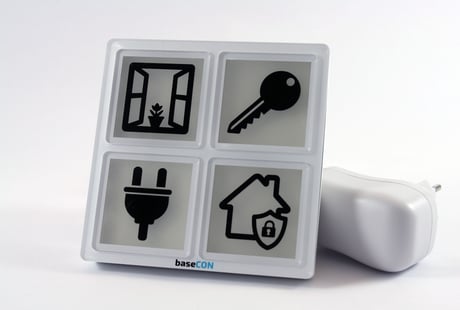
Product Picture


1 - VOLUME_STANDARD
Standard volume settingSize: 1 byte
Default: 25
Minimum: 0
Maximum: 0
Possible values
| From | To | Desription |
|---|---|---|
| 0 | 30 | volume sound |
2 - VOLUME_ALARM
Volume setting for Alarm soundSize: 1 byte
Default: 27
Minimum: 0
Maximum: 0
Possible values
| From | To | Desription |
|---|---|---|
| 0 | 30 | Alarm Volume |
3 - TEMP_ADJ_SLOPE
Correction value temperature measurement (slope) Slope = Value / 10000Size: 1 byte
Default: 1
Minimum: 0
Maximum: 0
Possible values
| From | To | Desription |
|---|---|---|
| 100 | 32767 | Slope = Value/10000 |
4 - TEMP_ADJ_OFFSET
Correction value Temperature measurement (Offset) Temperature Offset [0.1C]Size: 1 byte
Default: 0
Minimum: 0
Maximum: 0
Possible values
| From | To | Desription |
|---|---|---|
| -128 | 128 | Temperature Offset [0.1C] |
5 - COLORS_TABLE [0]
Definition of the color value (RGB) - Color table row 0 Command class color switchSize: 4 bytes
Default: 0
Minimum: 0
Maximum: 0
Possible values
| From | To | Desription |
|---|---|---|
| 0 | 16777215 | RGB Value Color table row 0 |
6 - COLORS_TABLE [1]
Definition of the color value (RGB) - Color table row 1 Command class color switchSize: 4 bytes
Default: 16711680
Minimum: 0
Maximum: 0
Possible values
| From | To | Desription |
|---|---|---|
| 0 | 16777215 | RGB Value Color table row 1 |
7 - COLORS_TABLE [2]
Definition of the color value (RGB) - Color table row 2 Command class color switchSize: 4 bytes
Default: 16730880
Minimum: 0
Maximum: 0
Possible values
| From | To | Desription |
|---|---|---|
| 0 | 16777215 | RGB Value Color table row 2 |
8 - COLORS_TABLE [3]
Definition of the color value (RGB) - Color table row 3 Command class color switchSize: 4 bytes
Default: 16762880
Minimum: 0
Maximum: 0
Possible values
| From | To | Desription |
|---|---|---|
| 0 | 16777215 | RGB Value Color table row 3 |
9 - COLORS_TABLE [4]
Definition of the color value (RGB) - Color table row 4 Command class color switchSize: 4 bytes
Default: 3302400
Minimum: 0
Maximum: 0
Possible values
| From | To | Desription |
|---|---|---|
| 0 | 16777215 | RGB Value Color table row 4 |
10 - COLORS_TABLE [5]
Definition of the color value (RGB) - Color table row 5 Command class color switchSize: 4 bytes
Default: 38400
Minimum: 0
Maximum: 0
Possible values
| From | To | Desription |
|---|---|---|
| 0 | 16777215 | RGB Value Color table row 5 |
11 - COLORS_TABLE [6]
Definition of the color value (RGB) - Color table row 6 Command class color switchSize: 4 bytes
Default: 25625
Minimum: 0
Maximum: 0
Possible values
| From | To | Desription |
|---|---|---|
| 0 | 16777215 | RGB Value Color table row 6 |
12 - COLORS_TABLE [7]
Definition of the color value (RGB) - Color table row 7 Command class color switchSize: 4 bytes
Default: 255
Minimum: 0
Maximum: 0
Possible values
| From | To | Desription |
|---|---|---|
| 0 | 16777215 | RGB Value Color table row 7 |
14 - COLORS_TABLE [9]
Definition of the color value (RGB) - Color table row 9 Command class color switchSize: 4 bytes
Default: 8192255
Minimum: 0
Maximum: 0
Possible values
| From | To | Desription |
|---|---|---|
| 0 | 16777215 | RGB Value Color table row 9 |
15 - COLORS_TABLE [10]
Definition of the color value (RGB) - Color table row 10 Command class color switchSize: 4 bytes
Default: 16711805
Minimum: 0
Maximum: 0
Possible values
| From | To | Desription |
|---|---|---|
| 0 | 16777215 | RGB Value Color table row 10 |
16 - COLORS_TABLE [11]
Definition of the color value (RGB) - Color table row 11 Command class color switchSize: 4 bytes
Default: 16743830
Minimum: 0
Maximum: 0
Possible values
| From | To | Desription |
|---|---|---|
| 0 | 16777215 | RGB Value Color table row 11 |
17 - COLORS_TABLE [12]
Definition of the color value (RGB) - Color table row 12 Command class color switchSize: 4 bytes
Default: 16777215
Minimum: 0
Maximum: 0
Possible values
| From | To | Desription |
|---|---|---|
| 0 | 16777215 | RGB Value Color table row 12 |
18 - COLORS_TABLE [13]
Definition of the color value (RGB) - Color table row 13 Command class color switchSize: 4 bytes
Default: 16777215
Minimum: 0
Maximum: 0
Possible values
| From | To | Desription |
|---|---|---|
| 0 | 16777215 | RGB Value Color table row 13 |
19 - COLORS_TABLE [14]
Definition of the color value (RGB) - Color table row 14 Command class color switchSize: 4 bytes
Default: 16777215
Minimum: 0
Maximum: 0
Possible values
| From | To | Desription |
|---|---|---|
| 0 | 16777215 | RGB Value Color table row 8 |
| 0 | 16777215 | RGB Value Color table row 14 |
20 - COLORS_TABLE [15]
Definition of the color value (RGB) - Color table row 15 Command class color switchSize: 4 bytes
Default: 16777215
Minimum: 0
Maximum: 0
Possible values
| From | To | Desription |
|---|---|---|
| 0 | 16777215 | RGB Value Color table row 15 |
21 - COLORS_TABLE [16]
Definition of the color value (RGB) - Color table row 16 Command class color switchSize: 4 bytes
Default: 16777215
Minimum: 0
Maximum: 0
Possible values
| From | To | Desription |
|---|---|---|
| 0 | 16777215 | RGB Value Color table row 16 |
22 - COLORS_TABLE [17]
Definition of the color value (RGB) - Color table row 17 Command class color switchSize: 4 bytes
Default: 16777215
Minimum: 0
Maximum: 0
Possible values
| From | To | Desription |
|---|---|---|
| 0 | 16777215 | RGB Value Color table row 17 |
23 - COLORS_TABLE [18]
Definition of the color value (RGB) - Color table row 18 Command class color switchSize: 4 bytes
Default: 16777215
Minimum: 0
Maximum: 0
Possible values
| From | To | Desription |
|---|---|---|
| 0 | 16777215 | RGB Value Color table row 18 |
24 - COLORS_TABLE [19]
Definition of the color value (RGB) - Color table row 19 Command class color switchSize: 4 bytes
Default: 16777215
Minimum: 0
Maximum: 0
Possible values
| From | To | Desription |
|---|---|---|
| 0 | 16777215 | RGB Value Color table row 19 |
25 - SEND_MV_PERIOD
Send cycle for measured value [min] for Temperature ans HumiditySize: 1 byte
Default: 0
Minimum: 0
Maximum: 0
Possible values
| From | To | Desription |
|---|---|---|
| 0 | 127 | Send cycle for measured value [min] for Temperature ans Humidity |
26 - ALARM_SOUND
Define alarm sound number. This sound is played endless with VOLUME_ALARM.Size: 1 byte
Default: 3
Minimum: 0
Maximum: 0
Possible values
| From | To | Desription |
|---|---|---|
| 1 | 3 | Define alarm sound number |
Inclusion After power up the device (not included), the ex-/inclusion button lights permanently in color red. To start the inclusion mode the ex-/inclusion button on Room Display must be pressed for at least 1.5 seconds. If the time of 1.5 seconds is reached the segment starts to blink red. During inclusion ex-/inclusion button lit white. Segment3 switched of and device sounds “dingdong” if device is completely entered the network.
Exclusion The Room Display can be removed from the network with pressing the ex-/inclusion button. The ex-/inclusion button on Room Display must be pressed for at least 5 seconds. If 5 seconds are reached the ex-/inclusion button starts to flash yellow. Release button to start exclusion. After successful removing the device reboots (flashing all 4 segments for 1 second in color white)
Factory default Reset The Room Display can be removed from the network. This can only be done within the first minute after plugging in the power plug. The function cannot be activated later. 1. For Device Reset unplug the device for 10 seconds. 2. Device plug in 3. Press button1 1x, button2 2x, button3 3x and button4 4x => segment4 is flashing in color magenta. 4. Press button4 1x The device restarts now, sets all settings (brightness, volume, …) to default and flashing all 4 segments for 1 second with color white. Please use this procedure only when the network primary controller is missing or otherwise inoperable.
| Type | Value(s) |
|---|