Yale
Keyfree Connected
YKFCON
Door Lock - Keypad
HW: 32 FW: 32.16:13.16
ZM5202
6.71.01
0x0129 (297)
0x0006 (6)
0x0001 (1)
ZC10-18015918
2017-12-21 17:01:21.187729
N/A
Enhanced 232 Slave
Listening Sleeping Slave
Yes
The Yale Keyfree Connected smart lock gives you freedom to secure your home without the need for a key. Simple to use, you now have complete control on how you unlock your door.
Keyfree Connected Ready smart lock Features Battery operated Low battery indicator with emergency battery connection User codes and settings remain if batteries are replaced 3 minute lock out if code is entered incorrectly 5 times Tamper alarm For use on UPVC & Composite Doors 2 year guarantee
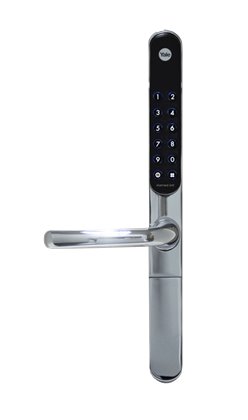
Product Picture


1 - Volume
Volume of product during operationSize: 1 byte
Default: 3
Minimum: 0
Maximum: 0
Possible values
| From | To | Desription |
|---|---|---|
| 1 | 1 | Silent |
| 2 | 2 | Low Volume |
| 3 | 3 | High Volume |
2 - Auto Relock
Auto relock On/OffSize: 1 byte
Default: 255
Minimum: 0
Maximum: 0
Possible values
| From | To | Desription |
|---|---|---|
| 0 | 0 | Auto relock Off |
| 255 | 255 | Aut Relock On |
3 - Relock Time
Amount of time lock is opened before it relocks, after it has been unlocked by PIN code, key cards or key tagsSize: 1 byte
Default: 7
Minimum: 0
Maximum: 0
Possible values
| From | To | Desription |
|---|---|---|
| 7 | 60 | Amount of time (secs) |
6 - Remote Relock Time
Amount of time lock is opened before it relocks, after it has been unlocked by Z-Wave hubSize: 1 byte
Default: 10
Minimum: 0
Maximum: 0
Possible values
| From | To | Desription |
|---|---|---|
| 10 | 90 | Amount of time (secs) |
Put the Z-Wave controller into add mode Enter the Master code on the lock, followed by # Press the 4 button, followed by # Press the 1 button followed by # Refer to the operation manual of the Z-Wave controller to complete the add/inclusion process For more information on this please visit: www.yale.co.uk/smart-living
Put the Z-Wave controller into remove mode Enter the Master code on the lock, followed by # Press the 4 button, followed by # Press the 2 button followed by # Refer to the operation manual of the Z-Wave controller to complete the remove/exclusion process For more information on this please visit: www.yale.co.uk/smart-living
Enter the Master code on the lock, followed by # Press the 4 button, followed by # Press the 0 button followed by # Please use this procedure only when the network controller is missing or inoperable
| Type | Value(s) |
|---|