Golden Security
PIR Motion Sensor
GS-ZWMS08
Notification Sensor
HW: 17 FW: 1.80
ZM5202
6.71.01
0x033A (826)
0x0003 (3)
0x0100 (256)
ZC10-18015965
2018-01-18 21:07:15.104972
N/A
Enhanced 232 Slave
Reporting Sleeping Slave
Yes
This sensor has motion detector, ambient temperature and ambient humidity sensor in one which based on Z-Wave™ Plus technology.
This product can be included and operated in any Z-Wave™ network with other Z-Wave™ certified devices from other manufacturers and/or other applications. All non-battery operated nodes within the network will act as repeaters regardless of vendor to increase reliability of the network.
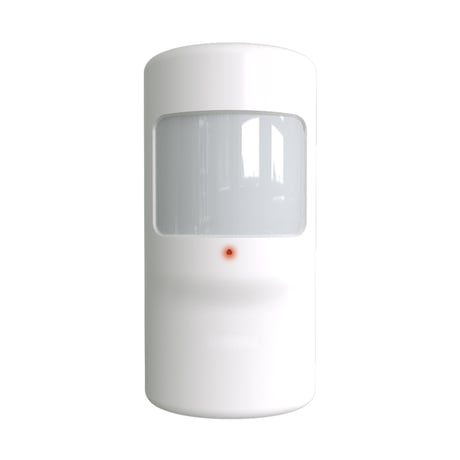
Product Picture


1 - Motion Sensitivity
This parameter is configured the sensitivity that motion detect.Size: 1 byte
Default: 1
Minimum: 0
Maximum: 0
Possible values
| From | To | Desription |
|---|---|---|
| 1 | 100 | This value is larger, the sensitivity is lower, and the distance for motion detecting is closer. |
2 - Motion Window Time
This parameter is configured the specified time window (4s..16s) in which the amount of pulses will trigger a motion event.Size: 1 byte
Default: 2
Minimum: 0
Maximum: 0
Possible values
| From | To | Desription |
|---|---|---|
| 0 | 3 | Window Time = [Value] * 4s + 4s |
3 - Pulse Count
This parameter is configured amount of pulses during the specified time window which trigger a motion event.Size: 1 byte
Default: 1
Minimum: 0
Maximum: 0
Possible values
| From | To | Desription |
|---|---|---|
| 0 | 3 | Amount of pluses = [Value] + 1. |
4 - Motion Blind Time
This parameter is configured the no motion detected time after a motion event detects. The device will wait for setting times to ready to next detect.Size: 1 byte
Default: 1
Minimum: 0
Maximum: 0
Possible values
| From | To | Desription |
|---|---|---|
| 0 | 15 | Blink Time = ([Value] + 1) * 0.5s. |
5 - Motion Enable
This parameter is configured the motion detected if enable or not. If ‘1’, Motion detected function is enable. Otherwise is disabled.Size: 1 byte
Default: 1
Minimum: 0
Maximum: 0
Possible values
| From | To | Desription |
|---|---|---|
| 0 | 0 | Motion detected function is disabled |
| 1 | 1 | Motion detected function is enable |
6 - Motion Clear Time
This parameter is configured the time to clear motion event after a motion event detected. Time to motion clear, the device will send a clear event report to controller. Unit: Second.Size: 2 bytes
Default: 30
Minimum: 0
Maximum: 0
Possible values
| From | To | Desription |
|---|---|---|
| 10 | 3600 | set the time to clear motion event after a motion event detected |
7 - Motion Event Re-trigger Enable
This configuration sets Motion Event Re-trigger is enabled or disabled.Size: 1 byte
Default: 0
Minimum: 0
Maximum: 0
Possible values
| From | To | Desription |
|---|---|---|
| 0 | 0 | Disabled. The motion event will be sent to controller only when the last motion event is cleared. |
| 1 | 1 | Enabled. The time interval for motion event detecting is defined by configuration No. 4. |
8 - Led Indicate Enable
This parameter is configured the Led light on disable or enable.Size: 1 byte
Default: 1
Minimum: 0
Maximum: 0
Possible values
| From | To | Desription |
|---|---|---|
| 0 | 0 | Disable led blink. This configuration is not affecting inclusion, exclusion and reset. |
| 1 | 1 | Enable Led blink when device detects a motion event. |
9 - Binary Sensor Report Enable
This configuration sets binary sensor report is enabled or disabled.Size: 1 byte
Default: 0
Minimum: 0
Maximum: 0
Possible values
| From | To | Desription |
|---|---|---|
| 0 | 0 | Disable sensor binary report when device detects a motion event. |
| 1 | 1 | Enable sensor binary report when device detects a motion event. |
10 - Basic Set Level
This parameter is configured the value that BASIC_SET for nodes that associated in Group 2, 3, 4. ‘100’ – BASIC_SET = 0xFF (ON). ‘0’ – BASIC_SET = 0x00 (OFF).Size: 1 byte
Default: 100
Minimum: 0
Maximum: 0
Possible values
| From | To | Desription |
|---|---|---|
| 0 | 99 | BASIC_SET = 0x00 ~ 0x63 |
| 100 | 100 | BASIC_SET = 0xFF |
11 - Sensor Measuring Interval
This parameter is configured the time interval for temperature and humidity sensor measure the ambient temperature and humidity value. This value is larger, the battery life is longer. And the value changed is not obvious.Size: 2 bytes
Default: 180
Minimum: 0
Maximum: 0
Possible values
| From | To | Desription |
|---|---|---|
| 30 | 3600 | set the time interval for temperature and humidity sensor measure the ambient temperature and humidity value. |
12 - Temperature Differential Report
This parameter is configured the value that differential between current measured and previous report value. If the differential value larger than the settings, device will report this measured temperature value to nodes associated in lifeline.Size: 1 byte
Default: 10
Minimum: 0
Maximum: 0
Possible values
| From | To | Desription |
|---|---|---|
| 1 | 127 | Differential Value =Value x 0.1℃ |
13 - Humidity Differential Report
This parameter is configured the value that differential between current measured and previous report value. If the differential value larger than the settings, device will report this measured relative humidity value to nodes associated in lifeline.Size: 1 byte
Default: 50
Minimum: 0
Maximum: 0
Possible values
| From | To | Desription |
|---|---|---|
| 1 | 127 | Differential Value = Value x 0.1% RH |
14 - Low Level Humidity Threshold
This parameter is configured the threshold value that low level for humidity. When the current ambient humidity value is lower than this configuration value, this will trigger a BASIC_SET = [Value] (The value is decided by Configuration Parameter 10) to control the devices in group 4. Otherwise, The BASIC_SET = 0x00 will be sent to devices in group 4 if these devices have been set to ‘ON’.Size: 2 bytes
Default: 300
Minimum: 0
Maximum: 0
Possible values
| From | To | Desription |
|---|---|---|
| 10 | 999 | Low Level Value = Value x 0.1% RH |
15 - High Level Humidity Threshold
This parameter is configured the threshold value that high level for humidity. When the current ambient humidity value is larger than this configuration value, this will trigger a BASIC_SET = [Value] (The value is decided by Configuration Parameter 10) to control the devices in group 4. Otherwise, The BASIC_SET = 0x00 will be sent to devices in group 4 if these devices have been set to ‘ON’.Size: 2 bytes
Default: 900
Minimum: 0
Maximum: 0
Possible values
| From | To | Desription |
|---|---|---|
| 10 | 999 | High Level Value =Value x 0.1% RH |
16 - Low Level Temperature Threshold
This parameter is configured the threshold value that low level for temperature. When the current ambient temperature value is lower than this configuration value, this will trigger a BASIC_SET = [Value] (The value is decided by Configuration Parameter 10) to control the devices in group 3. Otherwise, The BASIC_SET = 0x00 will be sent to devices in group 3 if these devices have been set to ‘ON’.Size: 2 bytes
Default: 150
Minimum: 0
Maximum: 0
Possible values
| From | To | Desription |
|---|---|---|
| 0 | 500 | Low Level Value = Value x 0.1℃ |
17 - High Level Temperature Threshold
This parameter is configured the threshold value that high level for temperature. When the current ambient temperature value is larger than this configuration value, this will trigger a BASIC_SET = [Value] (The value is decided by Configuration Parameter 10) to control the devices in group 3. Otherwise, The BASIC_SET = 0x00 will be sent to devices in group 3 if these devices have been set to ‘ON’.Size: 2 bytes
Default: 300
Minimum: 0
Maximum: 0
Possible values
| From | To | Desription |
|---|---|---|
| 0 | 500 | High Level Value =Value x 0.1℃ |
1、 Power up the device. 2、 Set Z-Wave™ Controller into inclusion mode 3、 Press the button 3 times within 1.5s to enter inclusion mode. 4、 The device will be recognized and automatically included into Z-Wave™ Network.
1、 Power up the device. 2、 Set Z-Wave™ Controller into exclusion mode 3、 Press the button 3 times within 1.5s to enter exclusion mode
Press the button briefly, Led will blink once.
Note : please use the reset procedure only when the primary controller is missing or inoperable. Operation: 1、 Power up the device. 2、 Press and hold the button for 10s until led lights is on, then release the button.
| Type | Value(s) |
|---|
| Group | Type |
|---|---|
| Home Security | (Refer to parameters): State idle |
| Sensor type |
|---|
| Air Temperature |
| General Purpose |
| Humidity |