ID Lock
ID Lock 150 Z-Wave module
ID-150
Door Lock - Keypad
HW: 1 FW: 1.05
ZM5202
6.51.06
0x0373 (883)
0x0003 (3)
0x0001 (1)
ZC10-18066154
2018-04-30 20:53:10.310611
N/A
Enhanced 232 Slave
Listening Sleeping Slave
Yes
Z-Wave Plus module compatible with ID Lock digital door locks.
A module enabling your ID Lock digital door lock to a Z-Wave Plus enabled digital door Lock. The module is compatible with ID Lock 101 and ID Lock 150. It enables your ID Lock to operate in a Z-Wave network with numerous access control funtions and notifications.
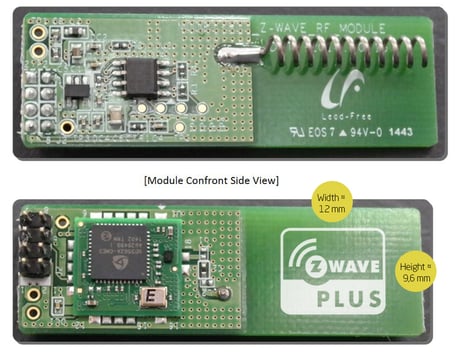
Product Picture


1 - Door lock and away mode
Away mode off or on Auto or Manual Lock mode In auto Lock mode the door Locks Three Seconds after closing the door. In manual Lock mode the door Locks when pressing O/C button or activating touchpanel. When away mode is on the inside O/C button is deactivated.Size: 1 byte
Default: 1
Minimum: 0
Maximum: 0
Possible values
| From | To | Desription |
|---|---|---|
| 0 | 0 | Away mode off - Manual lock mode |
| 1 | 1 | Away mode off - Auto lock mode |
| 2 | 2 | Away mode on - Manual lock mode |
| 3 | 3 | Away mode on - Auto lock mode |
3 - Hinge direction (Right or Left)
Direction of hinges on door. To find your correct settings look at the mounted door lock outside. If the door hinges are on the right side of the door correct setting is "Right". If the door hinges are on the left side of the door correct setting is "Left".Size: 1 byte
Default: 0
Minimum: 0
Maximum: 0
Possible values
| From | To | Desription |
|---|---|---|
| 0 | 0 | Right hinged door |
| 1 | 1 | Left hinged door |
4 - Door lock audio volume
Setting for audio volume of notifications on door lock operations. This is a set only parameter, if changed locally this config parameter does not change.Size: 1 byte
Default: 5
Minimum: 0
Maximum: 0
Possible values
| From | To | Desription |
|---|---|---|
| 0 | 6 | Sound volume level 0 to 6 |
5 - ReLock mode
ReLock mode is factory default on. ReLock is the security function relocking the door lock 7 seconds after a valid unlock if the door is not opened. When ReLock is off, the door lock will remain unlocked untill a new lock door operation (i.e. pressing O/C-button, activating touch panel or closing the door if auto lock mode).Size: 1 byte
Default: 1
Minimum: 0
Maximum: 0
Possible values
| From | To | Desription |
|---|---|---|
| 0 | 0 | ReLock mode off |
| 1 | 1 | ReLock mode on |
6 - Service PIN Mode
The service PIN on ID Lock 150 will be enabled or disabled according to this configuration setting. By default the Service PIN Mode is 0=Deactivated. It can be set to either 1, 2, 5 or 10 times, 12 hours or 24 hours. This is a set only parameter, if changed locally this config parameter does not change.Size: 1 byte
Default: 0
Minimum: 0
Maximum: 0
Possible values
| From | To | Desription |
|---|---|---|
| 0 | 0 | Service PIN deactivated |
| 1 | 1 | Service PIN valid 1 time |
| 2 | 2 | Service PIN valid 2 times |
| 3 | 3 | Service PIN valid 5 times |
| 4 | 4 | Service PIN valid 10 times |
| 8 | 8 | Service PIN valid 12 hours |
| 9 | 9 | Service PIN valid 24 hours |
7 - Door lock model
This configuration is only available through the configuration get command. If the configuration report is 65(101), door lock model type is ID Lock 101. If the configuration report is 96(150), door lock model type is ID Lock 150. ID Lock 101 cannot have user PINs or individually deleted RFID keyfobs. ID Lock 101 cannot have Service PIN Mode (Mode on ID-101 is always on). ID Lock 101 cannot be remote configured on volume, hinge direction. ID Lock 101 does not have the ReLock function (Mod on ID-101 is always on). This is a read-only parameter, it cannot be changed.Size: 1 byte
Default: 96
Minimum: 0
Maximum: 0
Possible values
| From | To | Desription |
|---|---|---|
| 65 | 65 | ID Lock 101 |
| 96 | 96 | ID Lock 150 |
Inclusion – (Puts your device in inclusion mode) • Push and hold key button until all LEDs on touch panel activates (with ID Lock in an unlocked state). • Release button. • Enter Master PIN followed by * on touch panel. • Press digit ""2"" for settings followed by * on touch panel. • Press digit “5” on touch panel. Inclusion mode starts immediately. LED indicator below logo signals this by flashing blue.
Exclusion – (Puts your device in exclusion mode) • Push and hold key button until all LEDs on touch panel activates (with ID Lock in an unlocked state). • Release button. • Enter Master PIN followed by * on touch panel. • Press digit ""2"" for settings followed by * on touch panel. • Press digit “5” on touch panel. Exclusion mode starts immediately. LED indicator below logo signals this by flashing blue.
Activate by touching the touch panel with finger(s), the palm of the hand on the outside unit or by pushing the key button on the inside unit.
Device reset – (This will reset RF interface module to factory default settings) Warning: Please do only proceed with the following reset procedure, if primary network controller is missing or otherwise inoperable. RESET Z-WAVE MODULE: • Push and hold key button until all LEDs on touch panel activates (with ID Lock in an unlocked state). • Release button. • Enter Master PIN followed by * on keypad. • Press digit ""2"" for settings followed by * on keypad. • Press digit “0” on keypad. If the Z-wave module is not included in a Z-wave network the door lock will also return to factory settings when following the above procedure. FACTORY RESET DOOR LOCK FIRMWARE: • Push and hold inside lock/unlock button while inserting the fourth battery. • Receive reset sound. • Release button. • Receive confirmation sound.
Notification parameter in COMMAND_CLASS_NOTIFICATION_V4 Events (0x06): - Manual Unlock Operation (0x02) - Manual Lock Operation (0x01) - PIN Unlock Operation (0x06) - RFID Unlock Operation (0x04) - Unlock Request by Unknown PIN or RFID (0x14) Events (0x07): - Forced Open Alarm (0x03) - High temperature Alarm (0x0A)
| Type | Value(s) |
|---|
| Group | Type |
|---|---|
| Access Control | (Refer to parameters): State idle |
| Sensor type |
|---|
| Air Temperature |
| General Purpose |
| Voltage |
| RF Signal Strength |