Axis Communications
Power On/Off Plug
T8344-JP
On/Off Power Switch
HW: 1 FW: 1.01:00.01
SD3502
6.71.01
0x0364 (868)
0x0004 (4)
0x0001 (1)
ZC10-18015972
2018-01-22 04:51:08.974823
N/A
Enhanced 232 Slave
Always On Slave
AXIS T8344 is a wireless power plug enabling remote on/off switching of lamps and other devices and acts as a repeater increasing the distance between the controller and the Z-Wave Plus® devices.
AXIS T8344 is a wireless power plug enabling remote on/off switching of lamps and other devices. With its support for wireless input/output connectivity, the power on/off plug can communicate wirelessly with AXIS M5065 PTZ Network camera or other connected Z-Wave Plus® controllers, creating a small security solution with less cabling. Thanks to its integrated wireless I/O connectivity, AXIS T8344 enables flexible installation as the relay can easily be moved and adapted to your needs. Designed to act as a repeater, AXIS T8344 increases the distance between the controller and the Z-Wave Plus® devices by up to 100m.
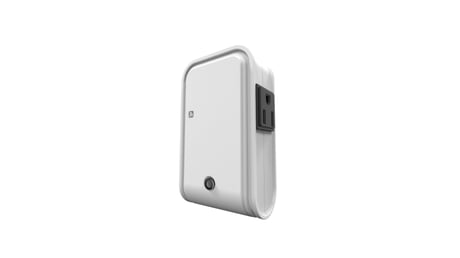
Product Picture


3 - Remember the last status
1: remember (0: do not remember)Size: 1 byte
Default: 1
Minimum: 0
Maximum: 0
Possible values
| From | To | Desription |
|---|---|---|
| 0 | 1 | 1: remember (0: do not remember) |
Auto inclusion The detector supports the auto inclusion feature where it will automatically enter Inclusion mode when first powered up. This will also apply when powered up after a factory reset. 1. On the front side of the device, there is a link-button/LED-indicator which is used to set the device in learning mode (inclusion, exclusion). 2. Put a Z-Wave controller into inclusion mode. 3. Plug the On/off Plug into a wall outlet near the device to be controlled. 4. The inclusion process should be completed when the LED stops blinking Manual inclusion If auto inclusion fails, you can choose to add the Z-Wave device to a control device. Please follow the steps described below. Note: For more details see the installation guide 1. Put the Z-Wave controller in inclusion mode 2. Press the link button 3 times within 1.5 seconds to put the unit into learning (inclusion/exclusion) mode. 3. The process should be completed when the LED stops blinking
Manual exclusion Note: For more details see the installation guide 1. Put the Z-Wave controller in exclusion mode 2. Press the link button 3 times within 1.5 seconds to put the unit into learning (inclusion/exclusion) mode. 3. The process should be completed when the LED stops blinking
Factory Reset (This procedure should only be used when the controller is inoperable.) 1. Press the link button 3 times within 1.5 seconds to put the unit into exclusion mode. 2. Within 1 second of step 1, press and hold the button for 5 seconds. 3. Node ID is deleted. The device reverts to factory default state.
| Type | Value(s) |
|---|
| Group | Type |
|---|---|
| Power Management | (Refer to parameters): State idle |
| Sensor type |
|---|
| Power |