FLEX AUTOMATION
FlexNET Dongle
Z-FlexNET Dongle
Light Dimmer Switch
HW: 1 FW: 1.01:01.00
ZM5202
6.71.01
0x002C (44)
0x0002 (2)
0x0007 (7)
ZC10-18036054
2018-01-23 21:31:43.266443
N/A
Enhanced 232 Slave
Always On Slave
FlexNET Dongle is a device that converts FlexNET Protocol (RS-485) to Z-Wave Protocol. This Device controls a total of 16+ Flex Lighting Panels via Z-Wave. FlexNET Dongle is Universal (One fits All).
FlexNET Dongle is a device that converts FlexNET Protocol (RS-485) to Z-Wave Protocol. This Device controls a total of 16+ Flex Lighting Panels via Z-Wave. FlexNET Dongle is Universal (One fits All). Using this device, you can control all functions of our Panels. It is a fully compatible with any Z-Wave enabled network. Z-Wave enabled devices displaying the Z-Wave logo can also be used with it regardless of the manufacturer. And ours can also be used in other manufacturer's Z-Wave enabled networks since FlexNET Dongle is used together with Flex Panels. This Device is designed to act as a repeater. Repeaters will re-transmit the RF signal to ensure the signal is received by its intended destination by routing the signal around obstacles and radio dead spots.
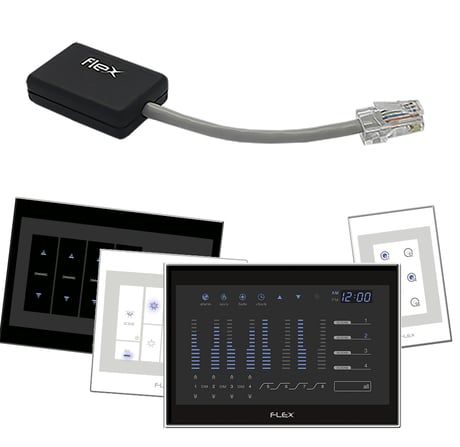
Product Picture


1 - Set Buzzer
Turn On or Off the Flex Panel BuzzerSize: 1 byte
Default: 1
Minimum: 0
Maximum: 0
Possible values
| From | To | Desription |
|---|---|---|
| 0 | 1 | 00 - Turn Off Buzzer / 01 - Turn On Buzzer |
2 - Set Clock
Configure Panel Hour and MinuteSize: 2 bytes
Default: 0
Minimum: 0
Maximum: 0
Possible values
| From | To | Desription |
|---|---|---|
| 0 | 23 | First Byte - Hour |
| 0 | 59 | Second Byte - Minute |
3 - Eco Mode Channel 01
Save energy, increase bulb life and reduce your bill by limiting the maximum brightness of each channel. (Only use for Dimmer Channels) Note: To set the Eco Mode value, firstly you should turn off the respective channel.Size: 1 byte
Default: 100
Minimum: 0
Maximum: 0
Possible values
| From | To | Desription |
|---|---|---|
| 30 | 100 | 30 - Minimum Limit / 100 - Maximum Limit |
4 - Eco Mode Channel 02
Save energy, increase bulb life and reduce your bill by limiting the maximum brightness of each channel. (Only use for Dimmer Channels) Note: To set the Eco Mode value, firstly you should turn off the respective channel.Size: 1 byte
Default: 100
Minimum: 0
Maximum: 0
Possible values
| From | To | Desription |
|---|---|---|
| 30 | 100 | 30 - Minimum Limit / 100 - Maximum Limit |
5 - Eco Mode Channel 03
Save energy, increase bulb life and reduce your bill by limiting the maximum brightness of each channel. (Only use for Dimmer Channels) Note: To set the Eco Mode value, firstly you should turn off the respective channel.Size: 1 byte
Default: 100
Minimum: 0
Maximum: 0
Possible values
| From | To | Desription |
|---|---|---|
| 30 | 100 | 30 - Minimum Limit / 100 - Maximum Limit |
6 - Eco Mode Channel 04
Save energy, increase bulb life and reduce your bill by limiting the maximum brightness of each channel. (Only use for Dimmer Channels) Note: To set the Eco Mode value, firstly you should turn off the respective channel.Size: 1 byte
Default: 100
Minimum: 0
Maximum: 0
Possible values
| From | To | Desription |
|---|---|---|
| 30 | 100 | 30 - Minimum Limit / 100 - Maximum Limit |
7 - Eco Mode Channel 05
Save energy, increase bulb life and reduce your bill by limiting the maximum brightness of each channel. (Only use for Dimmer Channels) Note: To set the Eco Mode value, firstly you should turn off the respective channel.Size: 1 byte
Default: 100
Minimum: 0
Maximum: 0
Possible values
| From | To | Desription |
|---|---|---|
| 30 | 100 | 30 - Minimum Limit / 100 - Maximum Limit |
8 - Eco Mode Channel 06
Save energy, increase bulb life and reduce your bill by limiting the maximum brightness of each channel. (Only use for Dimmer Channels) Note: To set the Eco Mode value, firstly you should turn off the respective channel.Size: 1 byte
Default: 100
Minimum: 0
Maximum: 0
Possible values
| From | To | Desription |
|---|---|---|
| 30 | 100 | 30 - Minimum Limit / 100 - Maximum Limit |
9 - Dimmer Minimum Level Channel 01
Is possible to set up a minimum value for Dimmer Channels to fix a "Lighting Range". Note: Never set the Minimum value to be higher than the Maximum Value. This command will be ignored.Size: 1 byte
Default: 29
Minimum: 0
Maximum: 0
Possible values
| From | To | Desription |
|---|---|---|
| 29 | 99 | 29 - Minimum Limit / 99 - Maximum Limit |
10 - Dimmer Minimum Level Channel 02
Is possible to set up a minimum value for Dimmer Channels to fix a "Lighting Range". Note: Never set the Minimum value to be higher than the Maximum Value. This command will be ignored.Size: 1 byte
Default: 29
Minimum: 0
Maximum: 0
Possible values
| From | To | Desription |
|---|---|---|
| 29 | 99 | 29 - Minimum Limit / 99 - Maximum Limit |
11 - Dimmer Minimum Level Channel 03
Is possible to set up a minimum value for Dimmer Channels to fix a "Lighting Range". Note: Never set the Minimum value to be higher than the Maximum Value. This command will be ignored.Size: 1 byte
Default: 29
Minimum: 0
Maximum: 0
Possible values
| From | To | Desription |
|---|---|---|
| 29 | 99 | 29 - Minimum Limit / 99 - Maximum Limit |
12 - Dimmer Minimum Level Channel 04
Is possible to set up a minimum value for Dimmer Channels to fix a "Lighting Range". Note: Never set the Minimum value to be higher than the Maximum Value. This command will be ignored.Size: 1 byte
Default: 29
Minimum: 0
Maximum: 0
Possible values
| From | To | Desription |
|---|---|---|
| 29 | 99 | 29 - Minimum Limit / 99 - Maximum Limit |
13 - Dimmer Minimum Level Channel 05
Is possible to set up a minimum value for Dimmer Channels to fix a "Lighting Range". Note: Never set the Minimum value to be higher than the Maximum Value. This command will be ignored.Size: 1 byte
Default: 29
Minimum: 0
Maximum: 0
Possible values
| From | To | Desription |
|---|---|---|
| 29 | 99 | 29 - Minimum Limit / 99 - Maximum Limit |
14 - Dimmer Minimum Level Channel 06
Is possible to set up a minimum value for Dimmer Channels to fix a "Lighting Range". Note: Never set the Minimum value to be higher than the Maximum Value. This command will be ignored.Size: 1 byte
Default: 29
Minimum: 0
Maximum: 0
Possible values
| From | To | Desription |
|---|---|---|
| 29 | 99 | 29 - Minimum Limit / 99 - Maximum Limit |
15 - Reset to Factory Default
Reset the device to the factory default. It will delete all previous device configuration.Size: 1 byte
Default: 0
Minimum: 0
Maximum: 0
Possible values
| From | To | Desription |
|---|---|---|
| 0 | -1 | -1 (0xFF) - Reset the Device |
1. Enter your Z-Wave Controller into Inclusion/Add Mode. 2. Press the Lighting Panel ""Scene1"" button more than 3 times within 1 second. OR, to use NWI: 1. Enter your Z-Wave Controller into Inclusion/Add Mode. 2. Power on the FlexNET Dongle. It will be active during 4 seconds.
1. Enter your Z-Wave Controller into Exclusion/Remove Mode. 2. Press the Lighting Panel ""Scene1"" button more than 3 times within 1 second.
To Reset to Factory Default send the following parameter: Parameter: 15 Bytes: 01 Value: 255 Note: Please use this procedure only when the network primary controller is missing or otherwise inoperable.
| Type | Value(s) |
|---|