ZLINK
Z-Wave In-Wall Dimmer
WD-100
Light Dimmer Switch
HW: 255 FW: 50.03
ZM5202
6.81.00
0x0315 (789)
0x4447 (17479)
0x3034 (12340)
ZC10-18025996
2018-02-07 22:34:33.866234
N/A
Enhanced 232 Slave
Always On Slave
ZLINK WD-100 is an in-wall dimmer designed for wireless on-off-dim control of connected dimmable lighting fixtures.
ZLINK’s WD-100 is a Z-Wave Plus certified device with S2 security and SmartStart features. You can now add this device securely and with ease using QR code on the product with compatible gateways supporting S2 and Smart Start. The elegant WD-100, with 7 LED dim level lights, communicates with other Z-Wave certified devices and updates your home into a smart home. WD-100 replaces a standard in-wall light switch turning it into a Z-Wave controlled network device with manual and remote control dimming and On/Off light control. ZLINK WD-100 supports, “Instant Feedback” of manual status to compatible gateways as well as Central Scene to allow setting multiple scene control throughout the home, with gateways supporting Central Scene. Each Z-Wave device serves as a node to repeat the signal in the network, thus, extending the overall Z-Wave mesh wireless network range. Additional Features: • Power 120 VAC, 60Hz, up to 600 watts • Region US: 908.4, 916 MHz • Works w/ most incandescent, dimmable CFL & LED lights • 7 segment LED dim level indicator • Remotely or manually turns ON or OFF, or DIM lights • Fits standard wall plates (wall plate not included) • Works with any certified gateway supporting Z-Wave
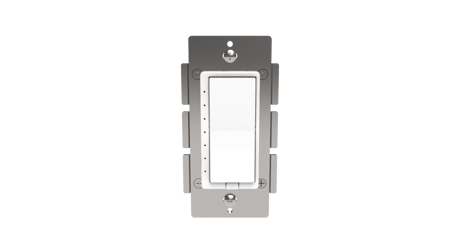
Product Picture


4 - Orientation of ON/OFF on rocker switch
The orientation of the ON/OFF on the rocker switch can be inverted using parameter 4. If value =0, the connected light will turn ON by pressing the top side of the rocker switch and turn OFF by pressing the bottom side. If value =1 the connected light will turn OFF by pressing the top side of the rocker switch and turn ON by pressing the bottom side.Size: 1 byte
Default: 0
Minimum: 0
Maximum: 0
Possible values
| From | To | Desription |
|---|---|---|
| 0 | 1 | If value =0, the connected light will turn ON by pressing the top side of the rocker switch and turn OFF by pressing the bottom side. If value =1 the connected light will turn OFF by pressing the top side of the rocker switch and turn ON by pressing the bottom side. |
| 0 | 0 |
7 - Resolution Level of Dimming
Resolution level for turning On or Off the lights via remote control. Parameter 7 indicates the number of levels when the light is controlled by remote. Lower this number, the finer the control of dimming. Higher the number the faster the dimming will jump from one state to another.Size: 1 byte
Default: 1
Minimum: 0
Maximum: 0
Possible values
| From | To | Desription |
|---|---|---|
| 1 | 99 | Parameter 7 indicates the number of levels when the light is controlled by remote. Lower this number, the finer the control of dimming. Higher the number the faster the dimming will jump from one state to another. |
| 0 | 0 |
8 - Speed of Dimming
Parameter 8 is regarding the speed for turning On or Off the lights via remote control or scheduled program. Parameter 8 indicates the time duration of each level when the light is controlled by remote. For example, if the Parameter 7 is set to 1 and Parameter 8 is set to 3, it will take approximately 3 seconds for the lights to turn On or Off when you remotely turn On or Off the switch. This provides a soft feel for the lights turning On or Off. If you prefer instant On or Off like incandescent light bulb, you can set a higher number for Parameter 7 and set parameter 8 to 1.Size: 2 bytes
Default: 3
Minimum: 0
Maximum: 0
Possible values
| From | To | Desription |
|---|---|---|
| 1 | 255 | Parameter 8 indicates the time duration of each level when the light is controlled by remote. For example, if the Parameter 7 is set to 1 and Parameter 8 is set to 3, it will take approximately 3 seconds for the lights to turn On or Off when you remotely turn On or Off the switch. This provides a soft feel for the lights turning On or Off. If you prefer instant On or Off like incandescent light bulb, you can set a higher number for Parameter 7 and set parameter 8 to 1. |
| 0 | 0 |
9 - Level for turning On or Off the lights manually
Level for turning On or Off the lights manually. Parameter 9 indicates the number of levels when the light is controlled by paddle switch.Size: 1 byte
Default: 1
Minimum: 0
Maximum: 0
Possible values
| From | To | Desription |
|---|---|---|
| 1 | 99 | Parameter 9 indicates the number of levels when the light is controlled by paddle switch. |
| 0 | 0 |
10 - Timer for turning On or Off the lights manually
Timer for turning On or Off the lights manually. Parameter 10 indicates the time duration of each level when the light is controlled by paddle switchSize: 2 bytes
Default: 3
Minimum: 0
Maximum: 0
Possible values
| From | To | Desription |
|---|---|---|
| 1 | 255 | Parameter 10 indicates the time duration of each level when the light is controlled by paddle switch |
| 0 | 0 |
Place your Z-Wave controller in ""Inclusion"" mode. Then tap either the top or bottom paddle once to initiation Inclusion.
Place your Z-Wave controller in ""Exclusion"" mode. Then tap either the top or bottom paddle once to initiation Exclusion.
1. Turn the connected light ON with the rocker 2. Quickly tap the topside of the rocker 3 times 3. Then quickly tap the bottom side of the rocker 3 times If you see the lights turn OFF then ON it means that the module has been rest successfully. Please use this procedure only when the network primary controller is missing or otherwise inoperable.
| Type | Value(s) |
|---|